Flutter 3.50 & Dart 3.14 — Highlights
This round, Flutter 3.50 + Dart 3.14 move Material/Cupertino out of the framework, declare native interop stable, and add official iOS 27 support, while A2UI 1.0, on-device AI, and desktop multi-window arrive alongside. Below are the 11 videos on the @flutterdev channel from "Client side functions for Flutter GenUI" onward, plus details from the official blogs.
At a glance#
| Video (published) | Key point | Who should watch |
|---|---|---|
| The Future of Flutter’s Dev Experience (11/11) | MCP provides tools, skills provide recipes, evals check whether AI-written Flutter is idiomatic | Anyone writing code with AI |
| The power of Dart & Wasm (11/11) | Wasm opt-in on Safari / Firefox, SIMD speedups, atomic deploys with --web-content-hash | Flutter Web |
| Build a webOS app with Flutter (11/11) | Official SDK for LG TVs, hot reload on the TV, the pluggable platforms plan | New platforms, embedded |
| What A2UI 1.0 means for Flutter devs (11/11) | Nesting guardrails, Express format (10 s → 5 s), multiple catalogs, agentFunction | AI assistants / GenUI |
| On-device AI with LiteRT-LM and Gemma (11/11) | Offline, private, zero-token-cost local LLM, with chat and tool calling | Teams that want AI features but worry about cost/privacy |
| Google AI Edge: local AI desktop app in 10 days (11/11) | Eloquent went from iOS to desktop in 10 days; new apps reuse 60% of the foundation and save 80% of the time | PMs, tech leads |
| Flutter interop with Pigeon FFI (11/11) | useJni: true: keep Pigeon’s typed contract but call directly over JNI, no serialization | Plugin / native bridge authors |
| Custom design libraries with Flutter (11/11) | Raw widgets + Mix/Remix styling layer + Widgetbook visual regression | Design system, UI team |
| Multi-window on desktop (11/11) | Experimental multi-window API, five window types, one widget tree with shared state | Desktop apps |
| What’s new in Flutter 3.50 and Dart 3.14 (11/11) | Release overview: dart migrate, material_ui, iOS 27, SwiftPM, hybrid composition | Everyone |
| Client side functions for Flutter GenUI (11/05) | Let the LLM hand work like price calculation to local Dart functions: verifiable results, no latency | AI assistants / GenUI |
Dart 3.14: no new syntax, but upgrades are now automatic#
Video: What’s new in Flutter 3.50 and Dart 3.14 (Dart 3.14 0:00)
Dart 3.14 adds no language features (this promotion and static extensions are still in progress); the focus is tooling and performance.
1. dart migrate: bump the SDK lower bound automatically + apply new idioms
Each run raises the pubspec SDK lower bound by one minor, in three steps: prepare (run the dart fixes needed before the bump) → bump → cleanup (optional). Requires the package to already be on Dart 3.0+.
dart migrate --dry-run                       # preview what will change
dart migrate --apply                         # do it all at once
dart migrate --apply --step=prepare          # or step by step, to split PRs
dart migrate --apply --step=bump,cleanup
dart migrate --apply --target-sdk=3.14.0
Official example (before → after), showing the new empty-body syntax and parameter final being removed:
// before
class WeakPasswordException implements Exception {}
void checkPassword(final String password, final int minLength) {

// after
class WeakPasswordException implements Exception;
void checkPassword(String password, int minLength) {
2. Faster Analysis Server: file discovery (Find References), startup and restart, and documentColor are all faster, and formatting stalls less. In a 16-context DevTools workspace, a cold-start rename dropped from 2.0 s to 0.9 s (about 55% faster). Both your IDE and your AI agent benefit.
3. Pub uses ETags: get / upgrade / add send If-None-Match; a project with 144 dependencies saves about 1.5 MB of downloads, which CI will notice.
4. DartPad beta runs entirely in the browser: the compiler, analyzer, and pub are compiled to Wasm and run in a Web Worker, with multi-file support, pub.dev package imports, and full LSP, with no network round trips.
5. Other changes worth knowing
- New API
rangeEquals(integer typed data andByteData), compiled straight tomemcmpon the VM:
final pngMagic = Uint8List.fromList([0x89, 0x50, 0x4E, 0x47]);
if (packet.rangeEquals(0, 4, pngMagic)) print('PNG header matched');dart:html,dart:js,dart:js_util, andpackage:jsare formally deprecated and scheduled for removal; usedart:js_interop+package:webinstead.dart:mirrorsis deprecated; new:dart run -e(run Dart in one line),dart pub upgrade pkg@latest, and the lintfuture_sync_value.- SIMD types (
Int32x4,Float32x4, …) compile tov128on Wasm, up to 4x faster in benchmarks.
In practice: in a multi-package monorepo (app + shared domain + design system), run dart migrate --step=prepare per package as its own small PR, then bump everything together; that makes review much lighter. The --dry-run output also works well as a change list to hand to an AI agent.
Further reading
- Official blog: Announcing Dart 3.14 (2026-11-11)
- Hands-on: try Dart 3.14 directly in DartPad; run
dart migrate --dry-runin a multi-package repo - Docs: Announcing Dart 3.14, Dart changelog, dart migrate
- ⚠️ Version note:
dart migrateruns the prepare and bump steps by default; review the dry run before applying
Flutter 3.50 framework: Material / Cupertino officially move out of the SDK#
Video: 3.50 overview: Framework updates 1:59
The biggest change: package:flutter/material.dart and cupertino.dart are officially deprecated in favor of the standalone packages material_ui and cupertino_ui (weekly releases, semver). flutter create already imports material_ui by default. Timeline: 3.44 froze the in-SDK versions (= package 1.0.0) → 3.47 opt-in → 3.50 deprecated.
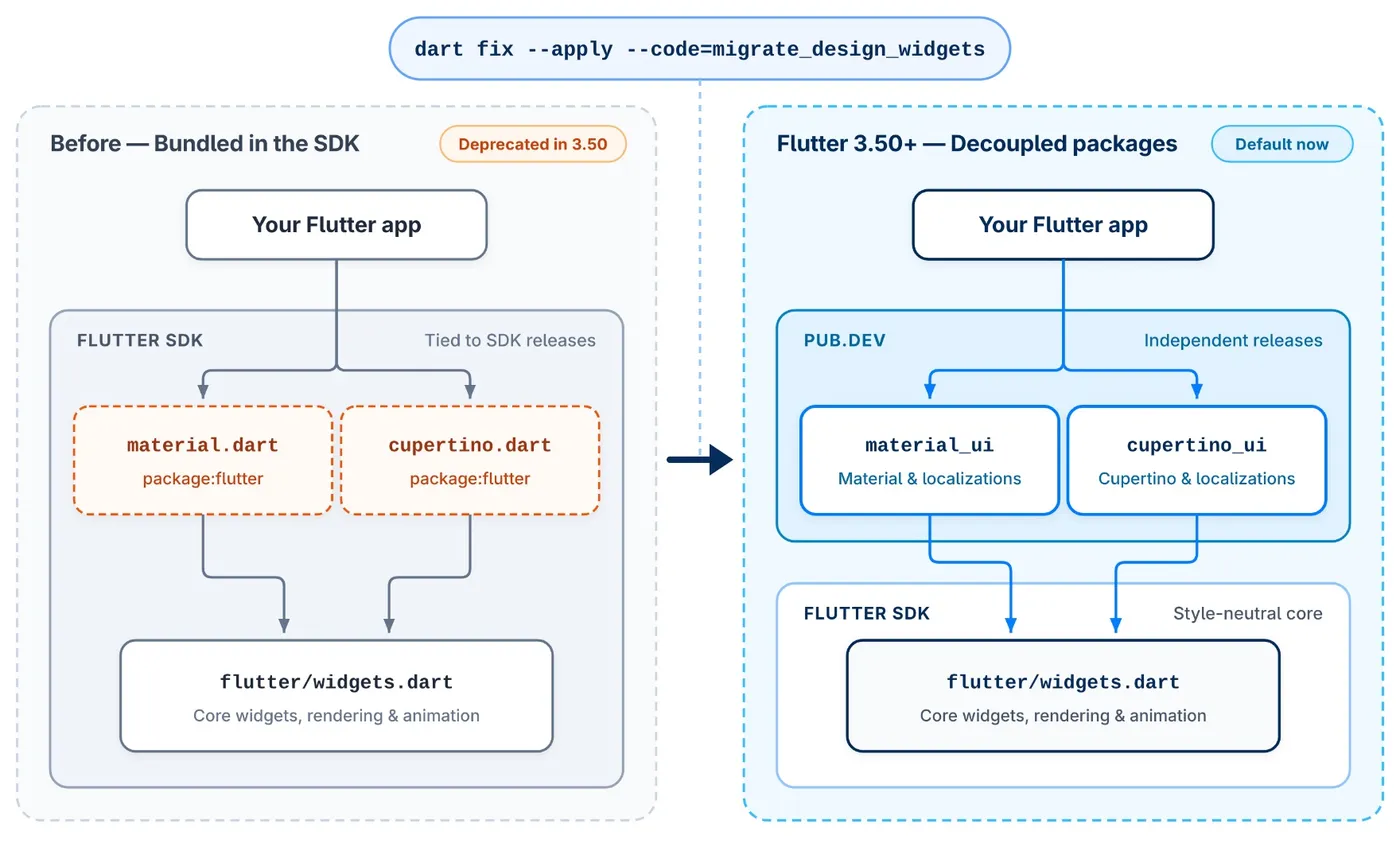
Migration steps
dart fix --apply --code=migrate_design_widgets(adds dependencies, rewrites imports)- If the pubspec was not updated:
flutter pub add material_ui cupertino_ui - Change imports to
package:material_ui/material_ui.dart/package:cupertino_ui/cupertino_ui.dart - Run
dart fixagain (import ordering, etc.)
What if third-party packages still use the old imports? Use MaterialUiCompatibilityBridge (CupertinoUiCompatibilityBridge for Cupertino) to convert the new theme into the old one and inject localizations. It is itself marked @Deprecated: it is a transition tool only, to remove once your dependencies have migrated. It cannot fix type mismatches (for example, passing the SDK’s ColorScheme to a material_ui API):
import 'package:material_ui/material_ui.dart';

MaterialApp(
  theme: ThemeData(colorScheme: ColorScheme.fromSeed(seedColor: const Color(0xFF2E7D32))),
  // Wrap the whole app once; or wrap only the subtree that uses old packages
  // ignore: deprecated_member_use
  builder: (context, child) => MaterialUiCompatibilityBridge(child: child!),
  home: const HomeScreen(),
);
Note for package authors: migrating is a breaking change for your users, so release a major version.
New widgets and APIs (the practical ones)
| Category | What’s new | Where to use it |
|---|---|---|
| Sliver | SliverClipRect, SliverClipRRect (clipOverlap) | Rounded clipping for card-style lists, stacking with a pinned header |
| Lists | itemExtentBuilder on ListView.separated | Fixed-extent optimization while keeping separators |
| Images | DecorationImage.placeholder, FadeInImageTransition.fadeInOver, ResizeImage.useLogicalSize | Placeholders before avatars / merchant logos load |
| Input | AutofillHints.emailOTPCode, numeric keyboard password (Android), Hyphens | Email OTP autofill, PIN codes |
| Accessibility | SemanticsRole.slider, MediaQueryData.reduceMotion, Esc closes Tooltip | Respect the system “reduce motion” setting |
| Navigation | Navigator.popUntilWithResult, showDialog(barrierBuilder:) | Return to the start of a multi-step flow with a result |
Breaking changes: ignoringSemantics removed from IgnorePointer / AbsorbPointer; soft hyphens show ”-” at line breaks; WidgetSpan in RTL text follows natural reading order; on the web with viewport-fit=cover, SafeArea accounts for the notch.
In practice
popUntilWithResult: when the application flow (pick a shift → accept terms → upload ID) finishes, go straight back to the job list carrying “applied”, instead of relying on a global event to tell the list to refresh.itemExtentBuilder: jumping to item N in a long list (for example “today”) no longer requires building every item before it.reduceMotion: turn off Lottie / transition animations when the system has reduce motion on.
Further reading
- Official blog: What’s new in Flutter 3.50 (11-11), Material and Cupertino decoupling are here (09-09), What’s new in Flutter 3.47 (08-12), Material and Cupertino code freeze (04-07)
- Hands-on: run
dart fix --apply --code=migrate_design_widgetson a branch and size the diff before scheduling the work - Docs: What’s new in Flutter 3.50, material_ui / cupertino_ui migration guide, Breaking changes index, Release notes, material_ui, cupertino_ui
- ⚠️ Version note: material_ui 1.11.0 / cupertino_ui 1.1.6 require Flutter ≥ 3.47; the compatibility bridge itself is already deprecated
Platform updates: iOS 27, Android secure defaults, Engine#
Video: iOS 3:05, Android 4:30, Engine 5:17
iOS / macOS
- 3.50 is the first stable after Xcode 27 / iOS 27; upgrade if you need to support iOS 27 users. Newly paired devices are set up automatically;
flutter screenshotworks on physical devices again (so an AI agent can see before/after screens itself). The new iPhone duo foldable form factor is also supported. - Touch latency: 16 ms lower on 60 Hz devices and 8 ms lower on 120 Hz ProMotion, tested back to iPhone 6s.
- CocoaPods trunk becomes read-only in December 2026. Projects with Swift Package Manager turned off now get a warning on every CLI command.
- Building on Intel Macs shows a deprecation warning and will be removed in a future release; you can use
flutter config --enable-macos-arm64-only.
Android
- Release-mode Intent hardening: the
route,dart_entrypoint, andcached_engine_idextras are ignored, and engine flags passed via Intent or--use-application-binary(such as--dart-flags) are rejected. Debug builds only warn. If you pass the initial route for deep links via an Intent extra, move to go_router / app links. - Hybrid Composition++: hands platform view compositing to the Android OS, fixing scroll tearing and text input issues. Requires Android 14 (API 34)+ with Impeller on Vulkan, and falls back automatically otherwise. On by default in beta; on stable enable it manually with
flutter config --enable-hcpp, and it is active when the log showsUsing HCPP platform view rendering strategy. Test apps heavy on maps, WebViews, and ads first. - Built-in Kotlin: plugins that apply the Kotlin Gradle Plugin themselves will soon fail to compile; switch to built-in Kotlin and declare
flutter: ">=3.44.0". - New project defaults: AGP 9.3.1, Gradle 9.5.0, KGP 2.4.20, Java 17; compile / target SDK = API 36, minSdk = API 24.
Engine
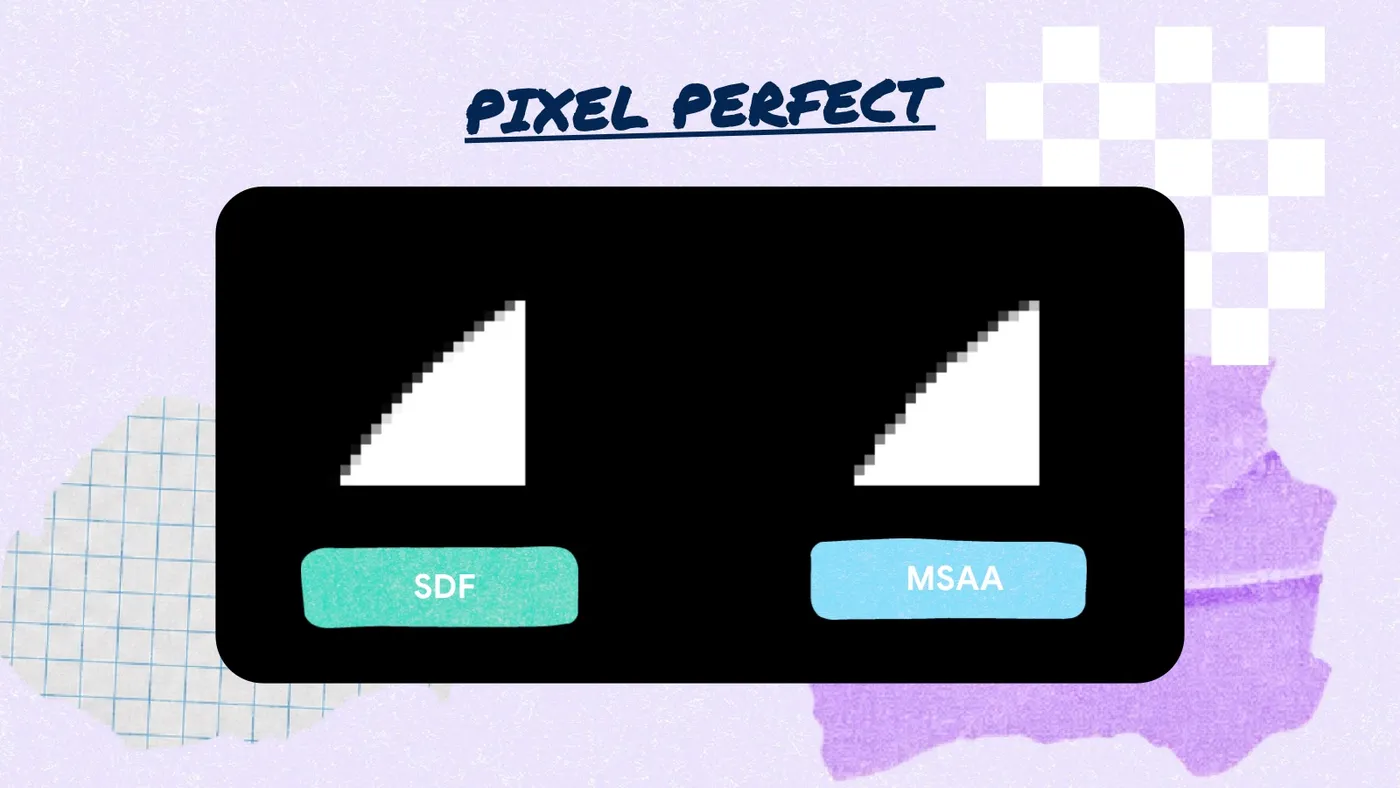
- Impeller SDF rendering (desktop) supports lines, thin borders, rounded corners, and gradients; macOS gradients and repeated text shadows are faster.
- Custom embedders: Vulkan external textures,
FlutterEngineNotifyLowMemoryWarning(clears Impeller’s offscreen caches on low memory). - Flutter GPU supports 2D texture arrays, with clearer shader pipeline error messages.
- Windows now requires OpenGL ES 3 by default and supports non-ASCII paths (Chinese folder names no longer break things).
Further reading
- Official blog: How Flutter stays ahead of iOS releases (08-25), Saying goodbye to CocoaPods (04-30), What’s new in Flutter 3.50
- Hands-on: on a physical Android 14+ device, run
flutter config --enable-hcppand check the log for HCPP - Docs: Release notes, Breaking changes index, Swift Package Manager (for app developers)
- ⚠️ Version note: HCPP must be enabled manually on stable; CocoaPods trunk is read-only from December 2026
Native interop: FFIgen / JNIgen stable, Pigeon direct calls (preview)#
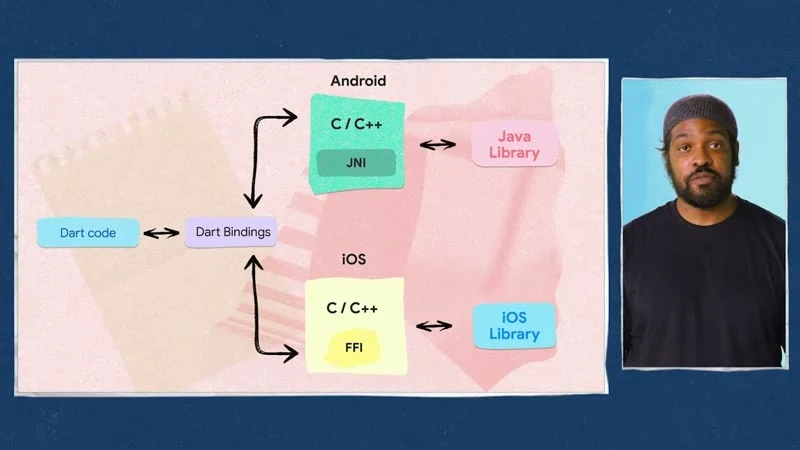
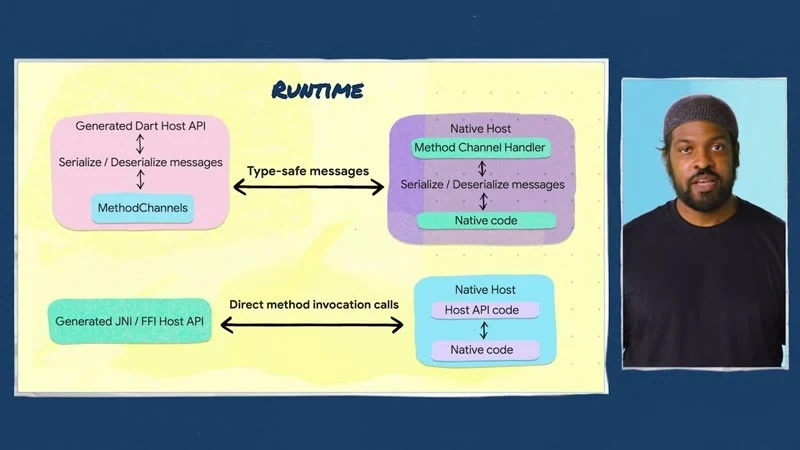
Video: Flutter interop with Pigeon FFI (comparing the three approaches 1:05, defining @HostApi 2:00, permission flow on a device 4:05), 3.50 overview: Native interop 1:13
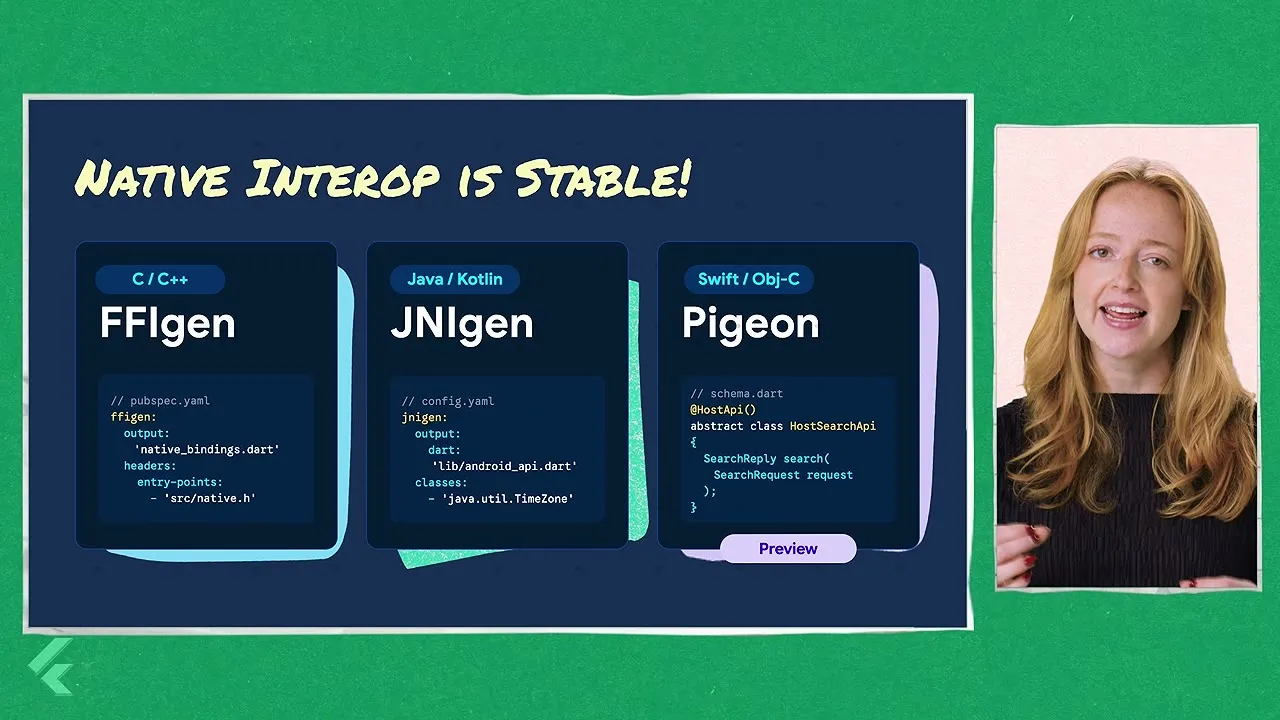
- FFIgen / JNIgen are officially stable: generate Dart bindings directly from C / Objective-C / Swift headers and Java / Kotlin classes, with synchronous calls and no platform channel.
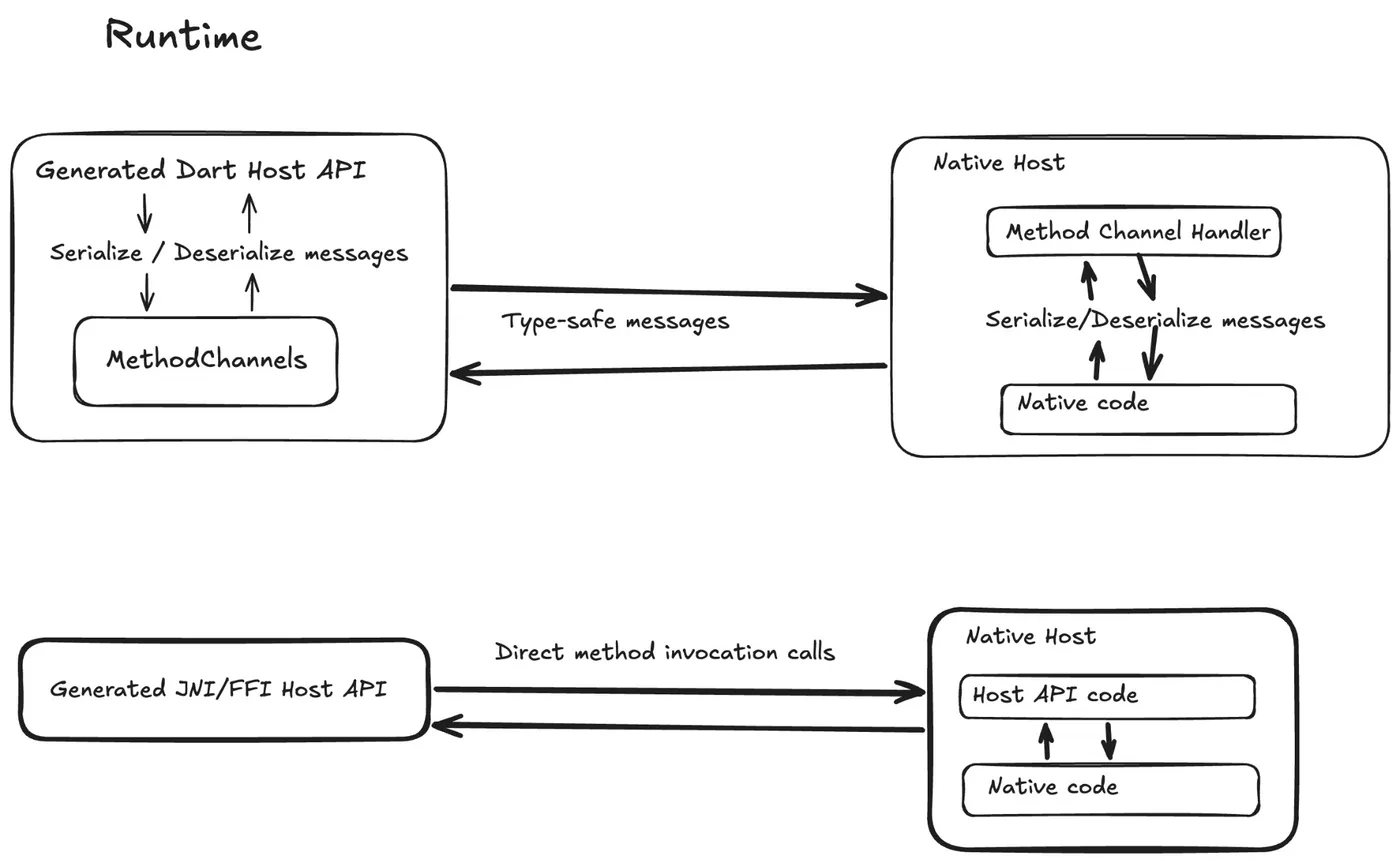
- Pigeon 30’s native interop mode (preview): one Pigeon definition, with Android going through JNI (
useJni: true) and iOS / macOS through FFI (useFfi: true), no more serializing to a MethodChannel. It does not support Windows / Linux yet, and the team explicitly says not to use it in production.
Pigeon definition (pigeon 30.0.2, checked against the official native_interop_guide)
// pigeons/messages.dart
import 'package:pigeon/pigeon.dart';

@ConfigurePigeon(PigeonOptions(
  appDirectory: './',
  dartOut: 'lib/src/messages.g.dart',
  kotlinOut: 'android/src/main/kotlin/com/example/permissions/Messages.g.kt',
  kotlinOptions: KotlinOptions(package: 'com.example.permissions', useJni: true),
  swiftOut: 'ios/Classes/Messages.g.swift',
  swiftOptions: SwiftOptions(useFfi: true, ffiModuleName: 'permissions'),
))
@HostApi()
abstract class PermissionsApi {
  bool checkPermission(String permission);
  bool checkAndRequestPermission(String permission);
}
flutter pub add dev:pigeon
# Android (JNI)
flutter pub add jni && flutter pub add dev:jnigen dev:logging dev:path
# iOS / macOS (FFI)
flutter pub add ffi objective_c meta && flutter pub add dev:ffigen dev:swift2objc dev:swiftgen dev:path dev:pub_semver
# Set ANDROID_HOME first, and run ./gradlew compileReleaseKotlin once in example/android
dart run pigeon --input pigeons/messages.dartOutput: messages.g.dart, messages.native_interop.g.dart, plus messages.g.jni.dart / messages.g.ffi.dart.
// Dart side: use the native interop constructor
late final PermissionsApi _api = PermissionsApi.createWithNativeInteropApi();
final granted = await _api.checkPermission('camera');
// Android plugin
override fun onAttachedToEngine(binding: FlutterPlugin.FlutterPluginBinding) {
PermissionsApiRegistrar().register(this, binding)
}
override fun onDetachedFromEngine(binding: FlutterPlugin.FlutterPluginBinding) {
PermissionsApiRegistrar().unregister(this, binding)
}// iOS plugin
public static func register(with registrar: FlutterPluginRegistrar) {
let instance = PermissionsPlugin()
PermissionsApiSetup.register(api: instance, registrar: registrar)
registrar.publish(instance)
}
The sample app from the video: the button calls Kotlin directly over JNI, and the status updates immediately after the system permission dialog.
In practice
- Frequent small calls (permission checks, device info, battery / network status) benefit most: no serialization and no thread hop.
- Keep large SDKs (push, payments, maps) on their existing plugins for now; reassess once interop mode leaves preview.
- For plugins the team writes itself, try
useJni/useFfiin the example app first, measure cold start and call latency, then decide whether to migrate.
Further reading
- Official blog: Flutter’s path towards seamless interop (2025-05-20, background: why move away from MethodChannel), What’s new in Flutter 3.50
- Hands-on: Pigeon example (native_interop_app), flutter/demos native_interop_demos
- Docs: Interop overview, Pigeon, pigeon (pub.dev)
- ⚠️ Version note: the native interop mode in pigeon 30.0.2 is a preview, does not support Windows / Linux, and should not go to production
Desktop multi-window API (experimental, main channel only)#
Video: Multi-window on desktop with Flutter (five window types 2:23, Linux example 4:45, Window API 5:13)
One Flutter app can open multiple native windows, and all windows share one widget tree, so Riverpod / Bloc share state across windows unchanged. This is a multi-year collaboration led by Canonical (Ubuntu) and reviewed by Google. It is not available in stable 3.50.0; it only works on the main channel with flutter config --enable-windowing. The API is marked @internal and lives in package:flutter/src/widgets/_window.dart; the team says not to use it in production or in pub packages, and even patch releases may contain breaking changes.
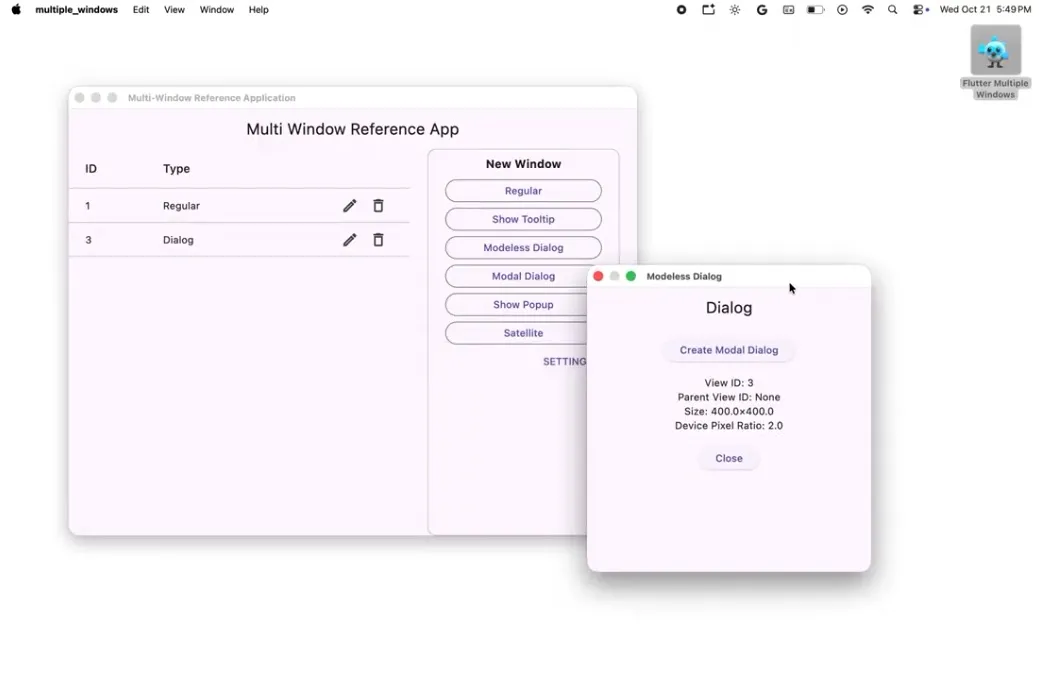
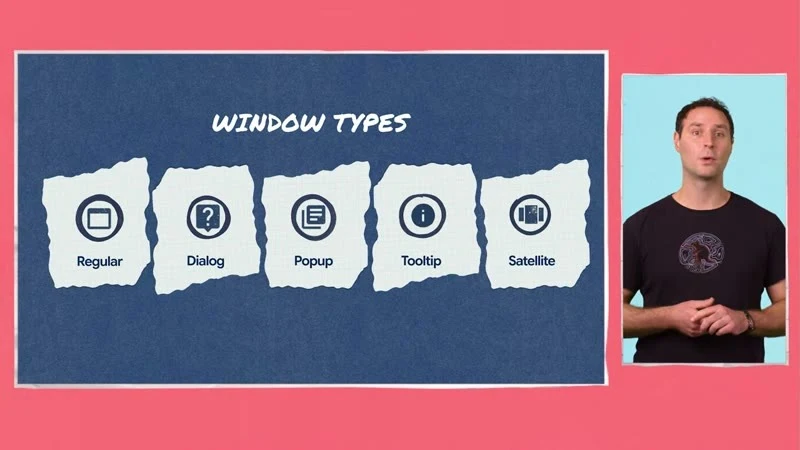
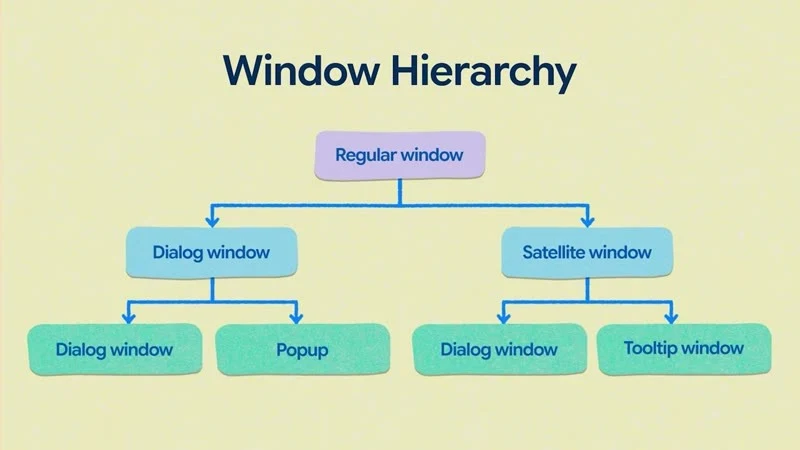
Top: the five window types. Bottom: windows can form a tree, with dialog, popup, satellite, and tooltip windows under a regular window. (Video screenshot: Multi-window on desktop with Flutter)
| Type | Controller | Behavior | Typical use |
|---|---|---|---|
| Regular | WindowController | Title bar, resizable/maximizable/full screen | Main window, a tab split into a new window |
| Dialog | DialogWindowController | Modal when parent is non-null; must be answered before it can close | Confirmations, forms |
| Popup | PopupWindowController | Attached to an anchor, closes when you click elsewhere | Context menus, autocomplete |
| Tooltip | TooltipWindowController | Like popup but never takes focus | Button hints |
| Satellite | SatelliteWindowController | Moves / resizes with its parent | Toolboxes, color palettes |
Other roles: Window(controller:, child:) handles rendering (main has unified this into a single widget; at the 3.50.0 tag there were still separate widgets such as DialogWindow and PopupWindow), WindowManager + WindowRegistry manage multiple windows, mixins such as WindowControllerDelegate hook onWindowCloseRequested / onWindowDestroyed, and WindowScope queries contentSizeOf, isActivatedOf, isMaximizedOf, and so on. The controller parameter is size:; use .shrinkWrap() to size to content. Creating a controller on a mobile device throws.
The code is adapted from the official example examples/multiple_windows and _window.dart on main:
// flutter channel main && flutter config --enable-windowing
// ignore_for_file: invalid_use_of_internal_member, implementation_imports
import 'package:flutter/material.dart';
import 'package:flutter/services.dart';
import 'package:flutter/src/widgets/_window.dart';

class MainWindowDelegate with WindowControllerDelegate {
  @override
  void onWindowDestroyed() {
    super.onWindowDestroyed();
    // Quit the app when the main window closes (do not use exit(0) from dart:io)
    ServicesBinding.instance.exitApplication(AppExitType.required);
  }
}

void main() {
  WidgetsFlutterBinding.ensureInitialized();
  final mainWindow = WindowController(
    size: const Size(1000, 700),
    title: 'Admin',
    delegate: MainWindowDelegate(),
  );
  runWidget(WindowManager(initialWindows: [
    WindowEntry(
      controller: mainWindow,
      builder: (_) => const MaterialApp(home: HomePage()),
    ),
  ]));
}

// Open a "real" dialog window from HomePage
void openConfirm(BuildContext context) {
  final registry = WindowRegistry.of(context);
  late final WindowEntry entry;
  final dialog = DialogWindowController(
    size: const Size(420, 300),
    parent: WindowScope.of(context), // has a parent = modal
    title: 'Confirm schedule',
    delegate: _OnDestroyed(() => registry.unregister(entry)),
  );
  entry = WindowEntry(controller: dialog, builder: (_) => const ConfirmPage());
  registry.register(entry);
}

class _OnDestroyed with DialogWindowControllerDelegate {
  _OnDestroyed(this.onDone);
  final VoidCallback onDone;
  @override
  void onWindowDestroyed() {
    onDone();
    super.onWindowDestroyed();
  }
}
// Get the size inside any window: WindowScope.contentSizeOf(context)
How it evolved (tracking issue #30701): #188866 moved WindowManager above WidgetsApp so secondary windows can have their own Navigator; #189363 renamed RegularWindow* to Window* and sizedToContent to shrinkWrap; #196002 (2026-11-10) merged the per-type widgets into a single Window. In the future, Material dialogs, menus, and tooltips will automatically become separate windows on desktop, so most people will not need to touch this layer directly.
In practice
- Admin / scheduling system: the main window is a calendar; clicking a shift opens a satellite window with staff details that follows the main window when it is dragged.
- Support tool: each ticket is its own window, sharing one Riverpod provider, so an edit in one updates the other immediately.
- For now this only suits a PoC on a main-channel branch; wait for stable before shipping.
Further reading
- Official blog: Introducing the Desktop Windowing API for Flutter (08-24)
- Hands-on: examples/multiple_windows (requires the main channel +
flutter config --enable-windowing) - Docs: tracking issue #30701
- ⚠️ Version note: not available in stable 3.50; the API is marked
@internaland even patch releases may break it
Design systems: Mix, Remix, Widgetbook#
Video: The new way to build custom design libraries (Mix 2:07, Remix 4:13, Widgetbook 5:06, AI visual testing loop 6:25)
With material_ui / cupertino_ui split out, building your own design system in Flutter becomes more practical. The video covers three community tools (none are official Google packages):
| Tool | Version (2026-11-12) | Role |
|---|---|---|
| mix | 2.4.0 | Describe styles, variants (dark / hover / press), and animation with Stylers |
| remix | 0.2.0 | Unstyled component library built on Mix (Fortal theme) |
| widgetbook | 3.25.0 | Component catalog, visual regression, accessibility checks |
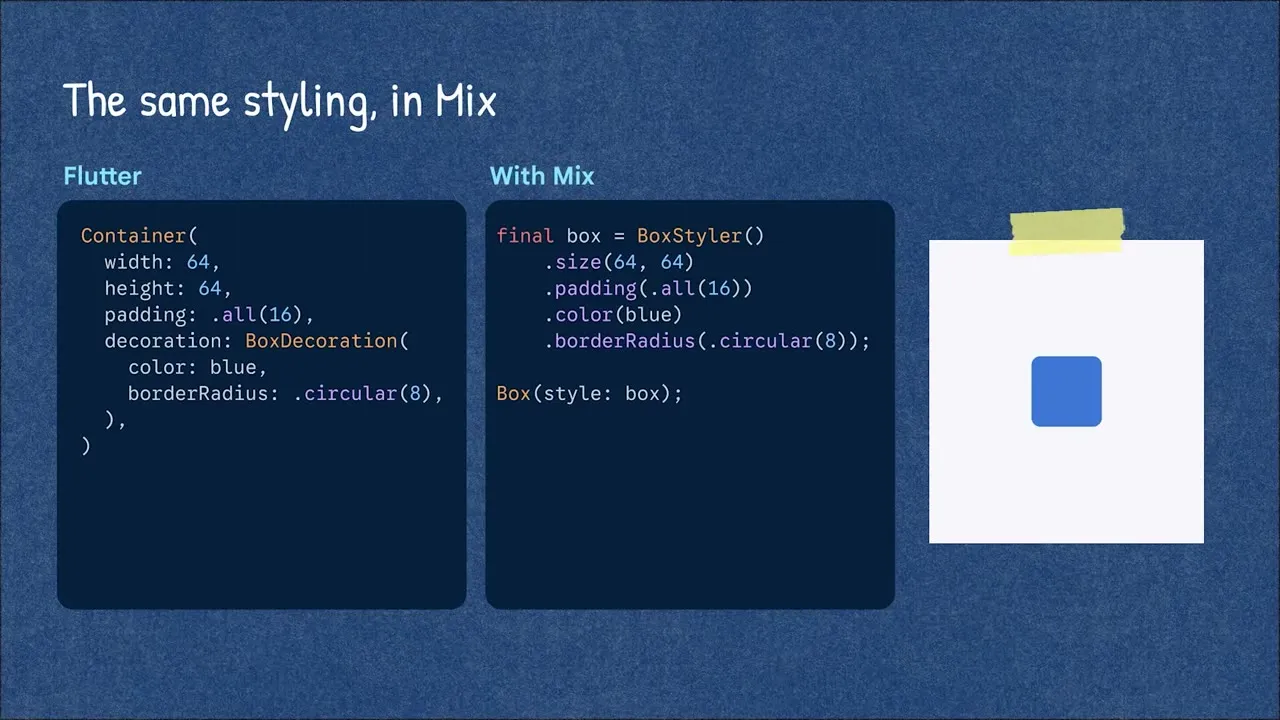
Mix 2.4.0
import 'package:mix/mix.dart';

final accentCard = BoxStyler()
    .padding(EdgeInsetsMix.all(16))
    .color(Colors.white)
    .borderRadius(BorderRadiusMix.circular(12))
    .onDark(BoxStyler().color(Colors.grey.shade900))
    .onHovered(BoxStyler().color(Colors.green.shade50))
    .animate(AnimationConfig.easeOut(200.ms));

// Container with interaction states
accentCard.pressable(onPress: onTap, child: const Text('Checked in'));
Each variant you add (.onDark, .onHovered, .animate) gives the box on the right one more behavior (from 3:21 in the video, at 2.5x speed).
Remix 0.2.0
final primaryButton = RemixButtonStyle()
    .padding(EdgeInsetsMix.symmetric(horizontal: 16, vertical: 10))
    .backgroundColor(Colors.green)
    .foregroundColor(Colors.white)
    .borderRadius(BorderRadiusMix.circular(8))
    .onHovered(RemixButtonStyle().backgroundColor(Colors.green.shade700))
    .animate(AnimationConfig.spring(300.ms));

RemixButton(label: 'Check in', onPressed: () {}, style: primaryButton);
// App-wide theme: wrap the app in FortalScope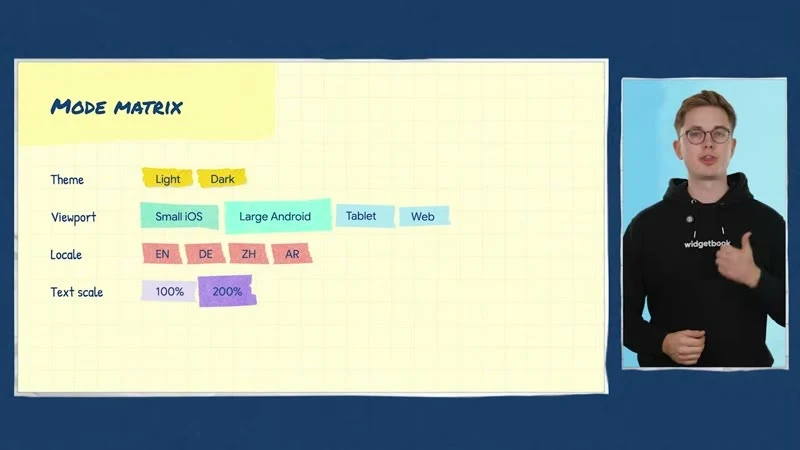
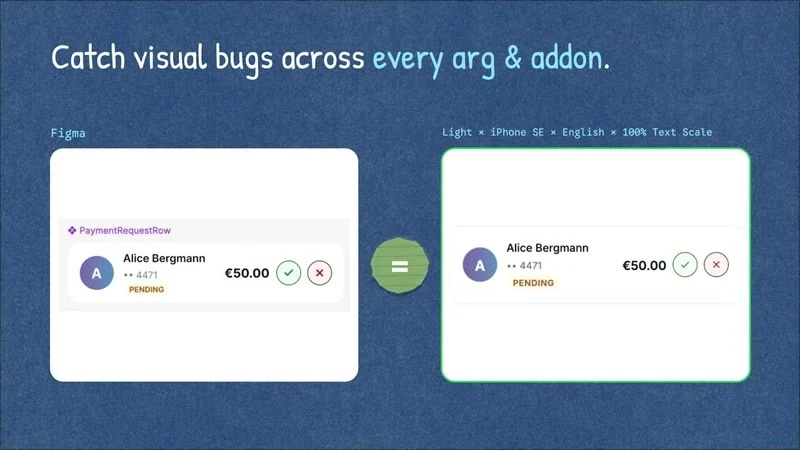
Widgetbook 3.25.0 (the “modes” in the video are a v4 beta feature; stable 3.x builds the same matrix with addons)
// widgetbook/lib/main.dart
@widgetbook.App()
class WidgetbookApp extends StatelessWidget {
  const WidgetbookApp({super.key});
  @override
  Widget build(BuildContext context) => Widgetbook.material(
        directories: directories, // generated by build_runner
        addons: [
          MaterialThemeAddon(themes: [
            WidgetbookTheme(name: 'Light', data: ThemeData.light()),
            WidgetbookTheme(name: 'Dark', data: ThemeData.dark()),
          ]),
          ViewportAddon([IosViewports.iPhone13, AndroidViewports.samsungGalaxyS20]),
          TextScaleAddon(min: 1.0, max: 2.0),
        ],
      );
}

@widgetbook.UseCase(name: 'Default', type: CheckInCard)
Widget checkInCardDefault(BuildContext context) => const CheckInCard();
dart run build_runner build -d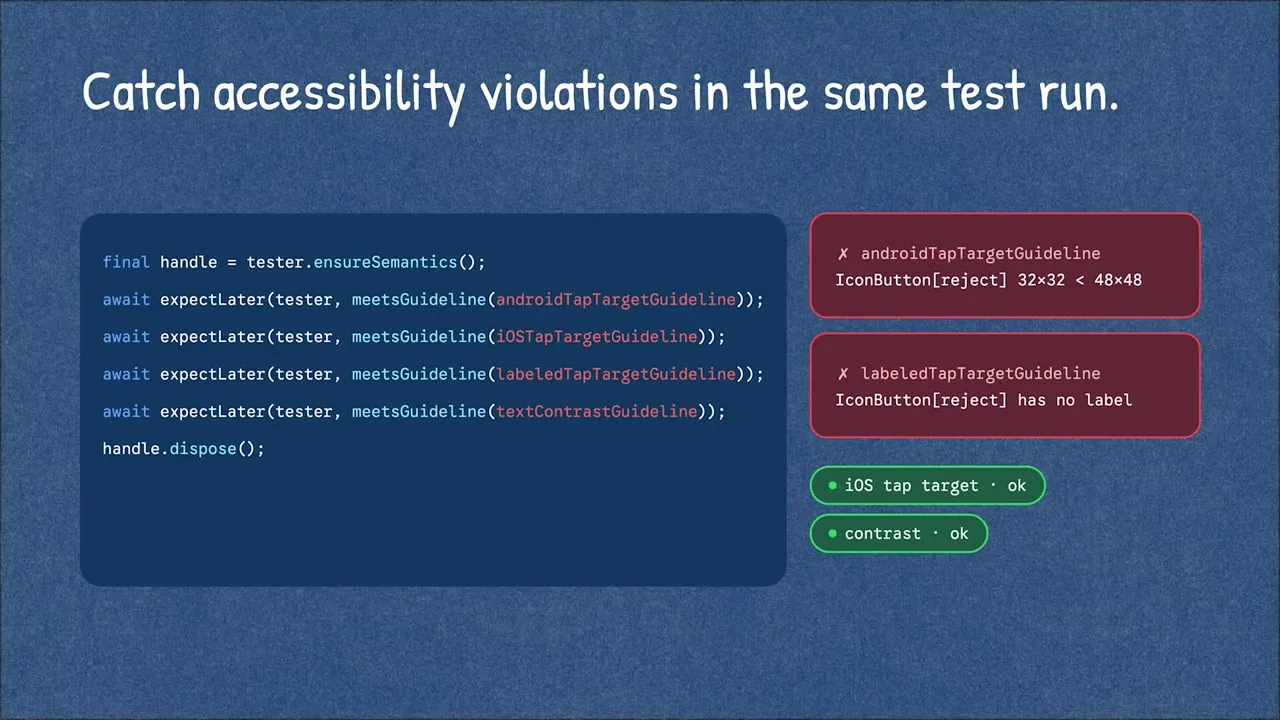
Accessibility checks and visual regression comparison are part of Widgetbook Cloud (a paid service).
In practice
- Once material_ui is split out, take stock first: which screens really need Material components, and which already use custom styling.
- Widgetbook’s Light / Dark × two sizes × large text matrix catches problems QA often misses, such as layouts breaking at large font sizes.
- Mix / Remix are still iterating fast at 0.x–2.x; use them on new standalone components first rather than rewriting the whole app at once.
Further reading
- Official blog: Material and Cupertino decoupling are here (09-09, why building your own design system got easier); there is no official blog post on Mix / Remix / Widgetbook yet
- Hands-on: Widgetbook quick start, Remix repo (with examples)
- Docs: mix (pub.dev), Widgetbook Cloud
- ⚠️ Version note: the modes in the video are Widgetbook v4 beta; Mix 2.4.0 / Remix 0.2.0 are still iterating fast
Web: Wasm on all three major browsers, atomic deploys#
Video: The power of Dart & Wasm (three browsers + SIMD 2:46, Wasm beyond the browser 4:55, atomic deploys 9:15)
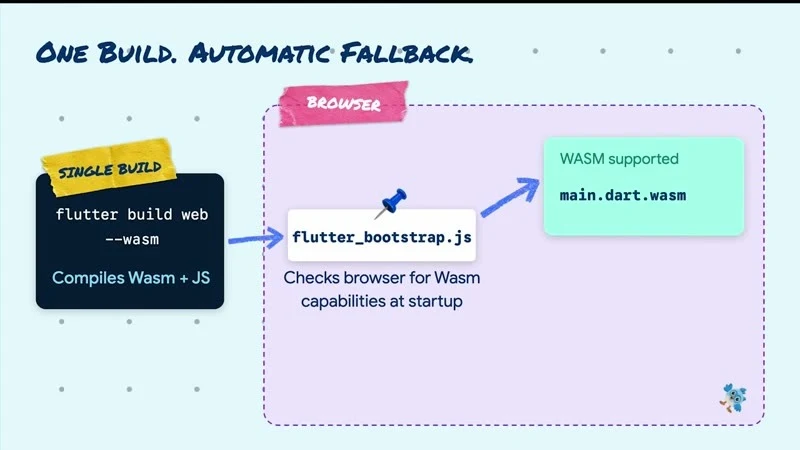
| Update | Key point | How to use it |
|---|---|---|
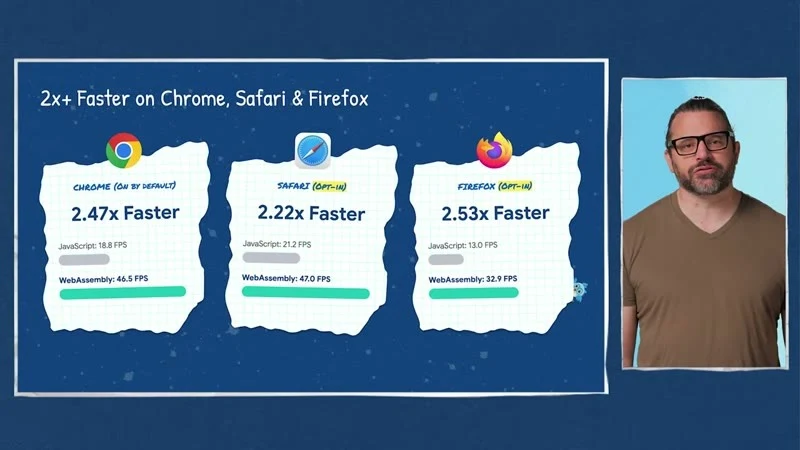
| Wasm on the three major browsers | Chromium 137+, Safari 26.2+, Firefox 147+ | Only Chromium uses Wasm by default; enable the others with wasmAllowList |
| Wasm SIMD | Hardware vector acceleration | Applied automatically |
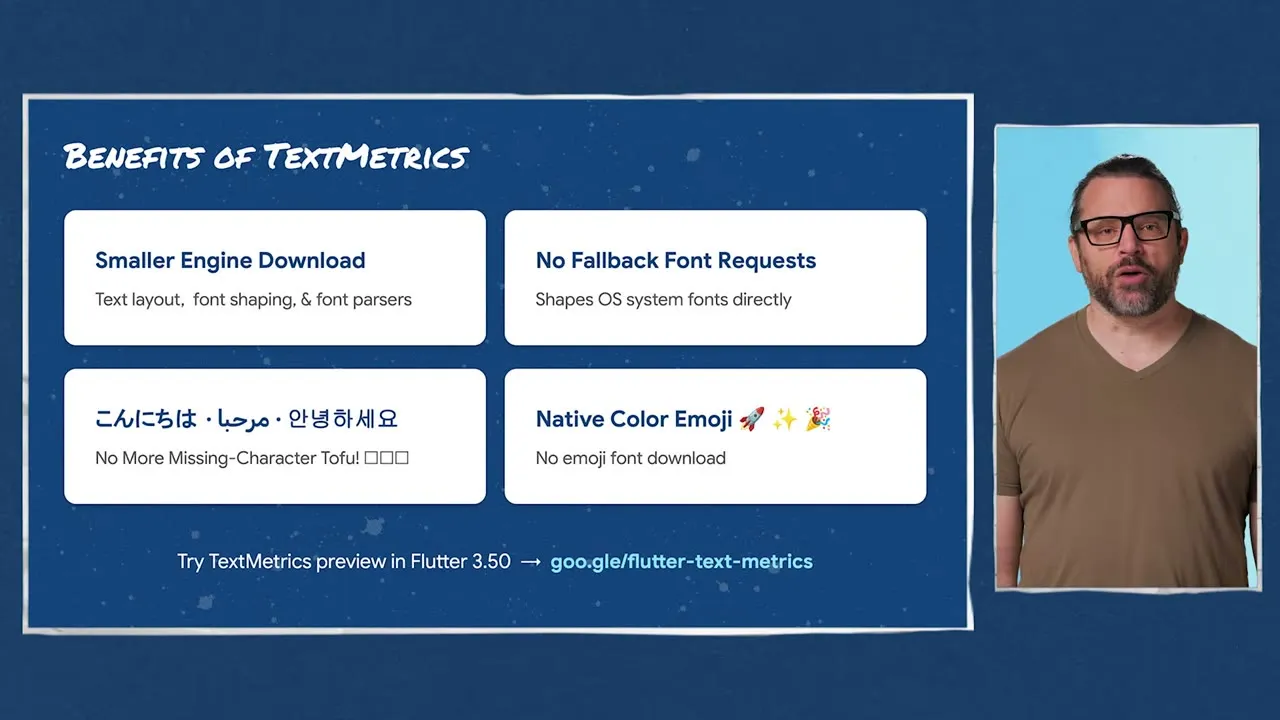
| WebParagraph (experimental) | Lays out text with the browser’s native TextMetrics, no font or ICU download | preferWebParagraph: true, CanvasKit JS builds only |
--web-content-hash | File names carry an 8-character SHA-256, so deploys no longer mix old and new files | canvaskit is not hashed; incompatible with deferred wasm loading |
dart compile wasm --standalone | Compiles pure Dart programs to WASI executables | Use with wasmtime |
// web/flutter_bootstrap.js
{{flutter_js}}
{{flutter_build_config}}
_flutter.loader.load({
  config: {
    wasmAllowList: { blink: true, webkit: true, gecko: true }, // there is also unknown
    // preferWebParagraph: true, // experimental: Chrome needs --enable-blink-features=ExtendedTextMetrics
  },
});
flutter build web --wasm --web-content-hashOfficial firebase.json caching example (index.html is not cached; hashed files are cached forever)
{
  "hosting": {
    "public": "build/web",
    "headers": [
      { "source": "**", "headers": [{ "key": "Cache-Control", "value": "max-age=0, must-revalidate" }] },
      { "source": "assets/**", "headers": [{ "key": "Cache-Control", "value": "public, max-age=31536000, immutable" }] },
      { "source": "main.dart.*.+(js|wasm|mjs)", "headers": [{ "key": "Cache-Control", "value": "public, max-age=31536000, immutable" }] }
    ],
    "rewrites": [{ "source": "**", "destination": "/index.html" }]
  }
}
Wasm beyond the browser
dart compile wasm --standalone bin/main.dart -o main.wasm
wasmtime run main.wasm

# Simon Binder's wasm_tools (0.1.1-preview.1, proof of concept): WASI component model
dart pub add dev:wasm_tools
dart run wasm_tools compile bin/app.dart
wasmtime run bin/app.wasm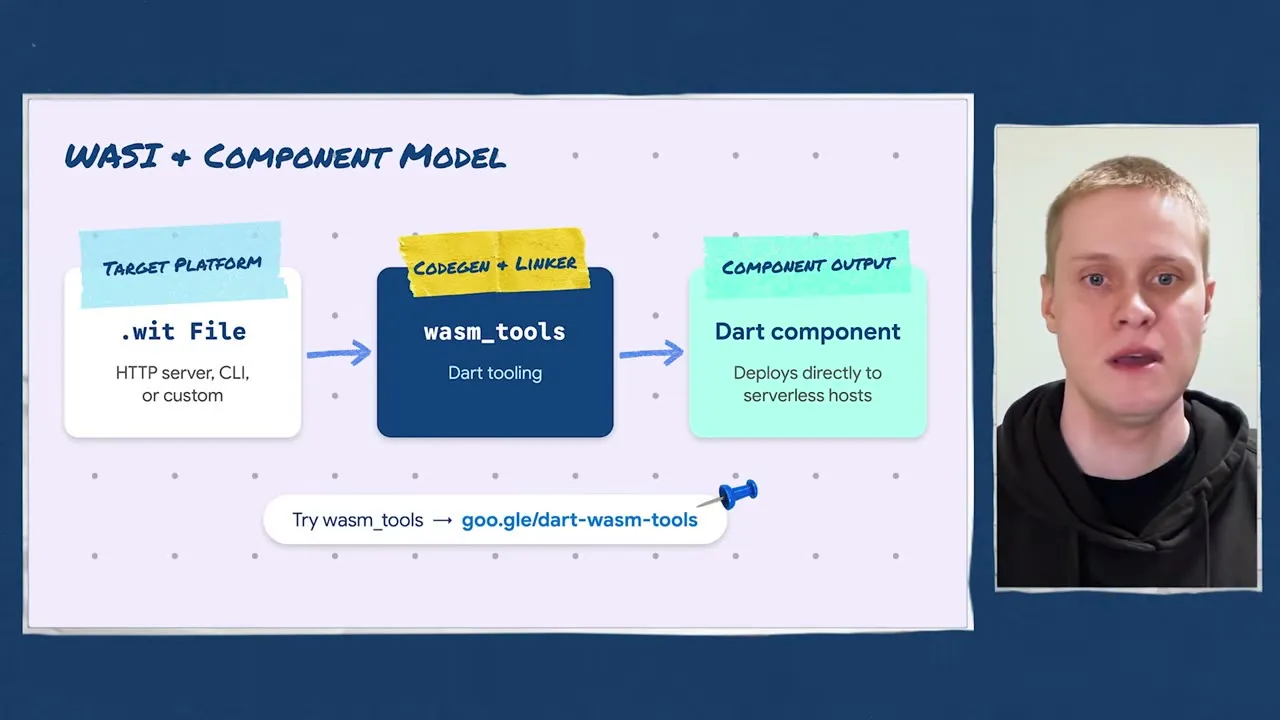
In practice
- Admin / internal-tool Flutter Web apps: enable Wasm on all three browsers and measure your own screens with flutter-wasm-compare.
- Occasional “white screen / stale JS” after a deploy: adding
--web-content-hashand the caching config above usually fixes it. - Shared pure-Dart logic (pay calculation, validation rules) can be compiled to standalone Wasm and reused at the edge or in services written in other languages.
Further reading
- Official blog: What’s new in Flutter 3.50 (Web section), Announcing Dart 3.14 (
dart compile wasm --standalone), Best practices for optimizing Flutter web loading speed (2024, background on load speed) - Hands-on: DartPad preview (100% client-side), flutter-wasm-compare three-browser performance comparison
- Docs: Wasm, Web initialization (flutter_bootstrap.js), Web deployment, TextMetrics experiment #172561, wasm_tools, wasm.dart
- ⚠️ Version note: WebParagraph is still experimental; wasm_tools 0.1.1-preview.1 is only a proof of concept
GenUI / A2UI 1.0: let AI reply with an interface instead of a wall of text#
Video: What A2UI 1.0 means for Flutter devs (allowedParents/Children 3:02, Express 4:21, multiple catalogs 6:59, agentFunction 8:10), Client side functions for Flutter GenUI
A2UI (Agent-to-UI) is a protocol in which an agent assembles UI from components in a catalog and the Flutter side renders it. a2ui.org currently marks v1.0 as the “Current” spec; the Flutter packages have been replaced: genui is formally deprecated, succeeded by three modular packages with a different API (package versions are still 0.x). The video’s demo app Commis and the official codelab still use the old genui API, so be careful before copying them.
| Package | Version (2026-11-12) | Purpose |
|---|---|---|
| a2ui_core | 0.7.0 | MessageProcessor, Catalog, FunctionImplementation, AgentFunction |
| a2ui_flutter | 0.3.0 | Renders surfaces as Flutter widgets |
| a2ui_agent | 0.3.0 | For when the app itself acts as the agent (A2uiGenerator, Express) |
| json_schema_builder | 0.1.7 | Defines schemas (a2ui_core does not re-export it) |
| genui | 0.10.4 | Old package, deprecated |
Video demo: the agent learns that the guest is allergic to shellfish, filters out recipes containing shrimp on its own, and offers only 7 selectable options. Nobody wrote that filter screen.
The video’s demo app Commis: the bottom tabs are regular UI, and the rightmost is the agent screen (source).
| New in 1.0 | Problem it solves | Key details |
|---|---|---|
| Client-side functions | LLMs get money math wrong and you wait on the network | Extend FunctionImplementation; runs on the device, results are deterministic and immediate |
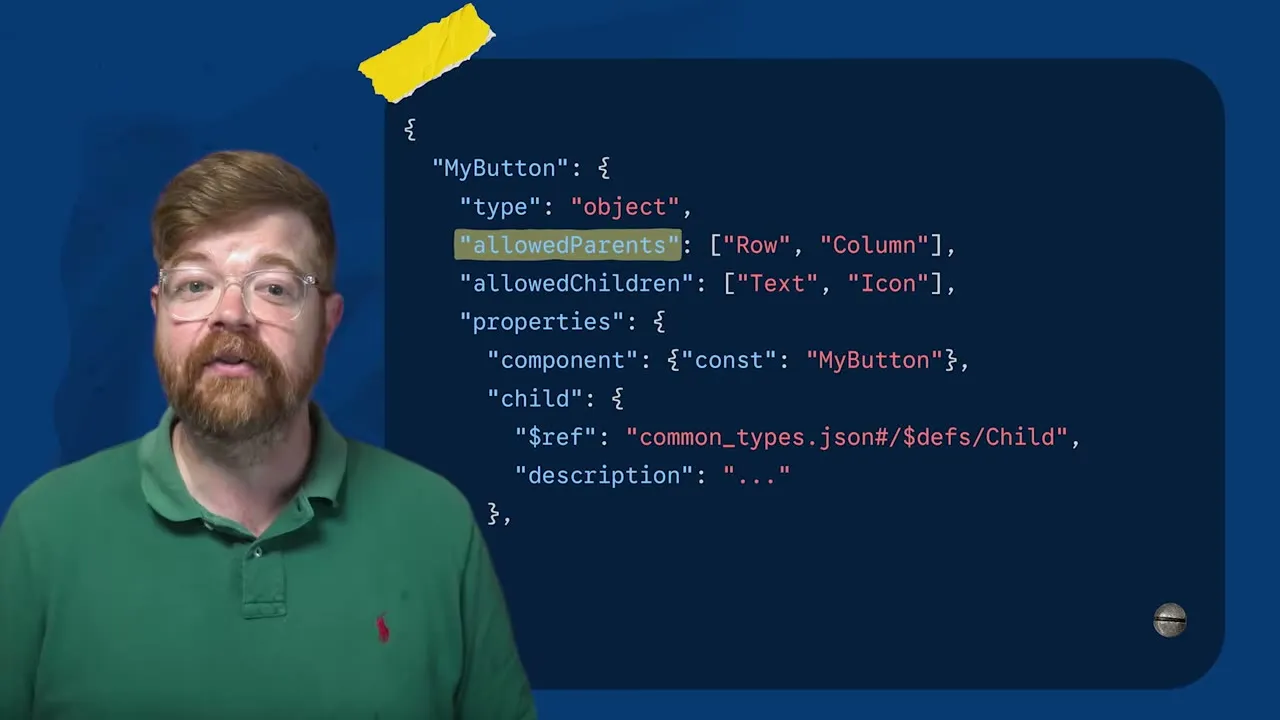
allowedParents / allowedChildren | The agent stuffs a whole order table into a button | Compiled into the prompt, and the processor rejects with UNALLOWED_PARENT / UNALLOWED_CHILD, reporting back so the agent corrects itself |
| Express format | Generation too slow, payload too large | Default format in a2ui_agent (ExpressFormatFactory); Solid Software’s medical records dashboard went from about 10 s → 5 s |
| Multiple catalogs | A catalog is tied to one surface | Register several at once with MessageProcessor(catalogs: [...]) |
AgentFunction | Changing one number needs a new LLM turn | A component calls an agent-side function and the result is written back to the data, bypassing the model |
| Metadata | Want to pass a trace id or style flags | SurfaceModel.metadata / .extensions, node.metadata |
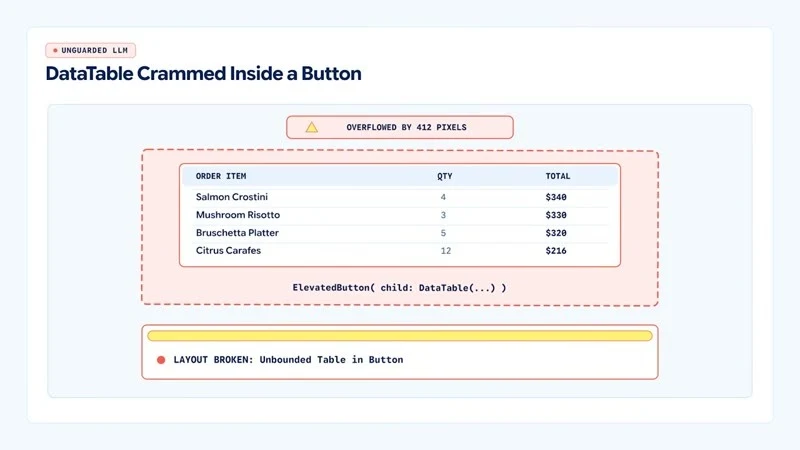
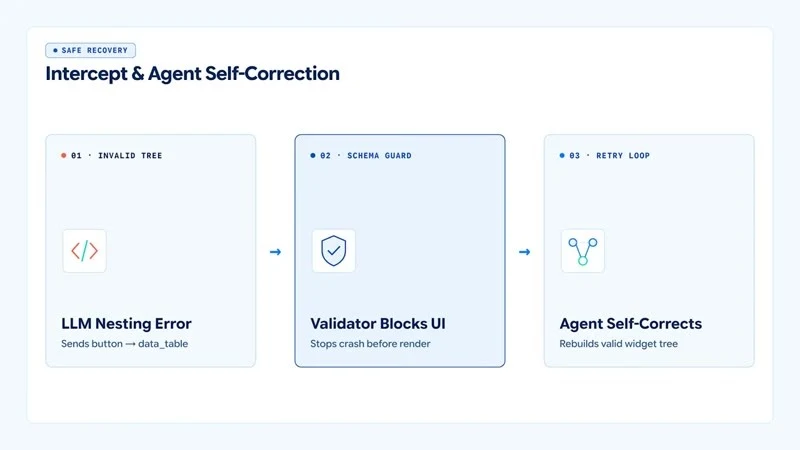
Top: 0.9 has no nesting limits, so a whole table ends up inside a button. Bottom: 1.0 blocks it before rendering and lets the agent correct itself.
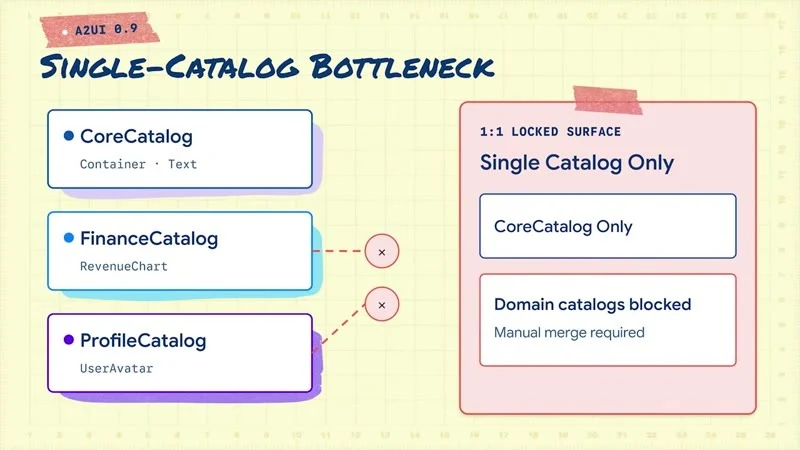
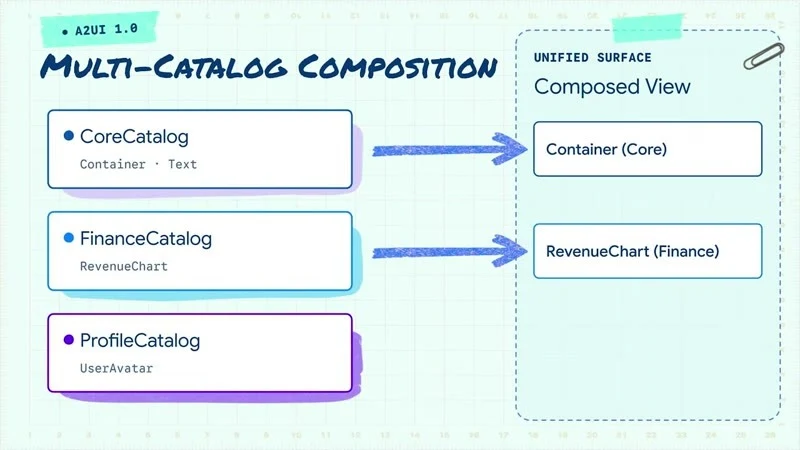
Top: in 0.9 a surface can use only one catalog. Bottom: 1.0 can combine Core, Finance, and Profile catalogs at once. (Video screenshot: What A2UI 1.0 means for Flutter devs)
Client-side function (a2ui_core 0.7.0)
dependencies:
  a2ui_flutter: ^0.3.0
  a2ui_core: ^0.7.0
  a2ui_agent: ^0.3.0          # only needed if the app builds the prompt itself
  json_schema_builder: ^0.1.7
import 'package:a2ui_core/a2ui_core.dart';
import 'package:a2ui_flutter/a2ui_flutter.dart';
import 'package:json_schema_builder/json_schema_builder.dart' hide ValidationResult;
class CalculatePayFunction extends FunctionImplementation {
CalculatePayFunction(this.rates)
: super(
name: 'calculatePay',
description: 'Returns the pay for a shift as a TWD string, e.g. NT\$1,830.',
returnType: A2uiReturnType.string,
argumentSchema: S.object(
properties: {
'shift_id': S.string(description: 'The shift ID.'),
'hours': S.number(description: 'Worked hours.'),
},
required: ['shift_id', 'hours'],
),
);
final PayRateService rates;
@override
Object? execute(Map<String, dynamic> args, DataContext context,
[CancellationSignal? cancellationSignal]) {
final hours = num.tryParse(args['hours'].toString())?.toDouble() ?? 0;
final pay = rates.payFor(args['shift_id'].toString(), hours); // pure Dart, unit-testable
return 'NT\$${pay.toStringAsFixed(0)}';
}
}
final payLabel = ComponentImplementation(
name: 'PayLabel',
schema: S.object(
properties: {'text': CommonSchemasV1.dynamicString}, required: ['text']),
allowedParents: ['ShiftCard'], // may only be placed inside ShiftCard
allowedChildren: const [], // may not wrap other components
builder: (context, node, props, buildChild) => Text(props.string('text') ?? ''),
);
final shiftCatalog = CatalogImplementation(
id: 'https://example.com/catalogs/shift.json', // catalog ids in 1.0 are URIs
protocolVersion: A2uiProtocolVersion.v1_0,
components: [payLabel],
functions: [CalculatePayFunction(PayRateService())],
);
// One processor can register several catalogs at once
final processor = MessageProcessor<ComponentImplementation>(
catalogs: [basicCatalog(), shiftCatalog],
outboundListener: sendToAgent, // actions, errors, and callAgentFunction all go out here
unifiedOutbound: true,
);
// Read metadata sent by the agent (for example a trace id)
processor.model.onSurfaceCreated.subscribe((surface) {
final ext = surface.extensions;
});
Agent side (a Dart server, or the app acting as its own agent): A2uiGenerator(catalogs: [...]) uses the Express format by default; AgentFunctions go in the agent’s CatalogApi(...).copyWith(agentFunctions: [...]) and are answered by RendererToAgentMessageProcessor. Note that CatalogImplementation cannot hold AgentFunctions.
Old API mapping: SynchronousClientFunction, executeSync, and Catalog([...], functions:, catalogId:) in the video and the Commis example are genui APIs and do not exist in the a2ui_* packages.
Deciding which actions call the model (Somnio’s approach in their finance demo): a “question” starts a new turn; operations whose answer is already known (recalculating after changing an amount) go through an AgentFunction or a client function. The model does no arithmetic. They tested 8 finance scenarios: 5 were fine with a regular form, and only 3 were really worth GenUI. (That repo’s v1 frontend uses a custom renderer, not a2ui_flutter.)
In practice
- Pay / hourly-rate estimates: “How much do I get for 6 hours on this shift?” → the agent decides the screen, the
calculatePayabove does the math, and the LLM never writes the number. - Job search assistant: use allowedChildren to restrict a job card to title, location, hourly rate, and button, keeping the brand consistent.
- Multi-team ownership: the core UI team maintains the base catalog, while each business team publishes their own domain catalog.
- Observability: pass a trace id in metadata to connect backend agent logs with the app’s Datadog / Sentry events.
- Ask first: “Can a regular form solve this?” Most of the time it can.
Further reading
- Official blog: Quick, reliable calculations with A2UI’s Client-Side Functions (08-28), Speeding up generative UI with async A2UI (08-13), New updates to A2UI and Flutter’s GenUI package (05-14)
- Hands-on: Codelab: Getting started with GenUI, A2UI quickstart, Commis example app, Somnio finance demo
- Docs: a2ui.org, A2UI Dart source, Client-Side Functions blog post, a2ui_core, a2ui_flutter
- ⚠️ Version note: the codelab and Commis still use the deprecated genui 0.10; use a2ui_* (0.x) for new projects
On-device AI: LiteRT-LM + Gemma 4, MediaPipe, Genkit Dart 1.0#
Video: On-device AI with LiteRT-LM and Gemma (choosing a Gemma model 4:19, Flutter implementation 5:31, Tool calling 7:18), Google AI Edge: a desktop AI app in 10 days
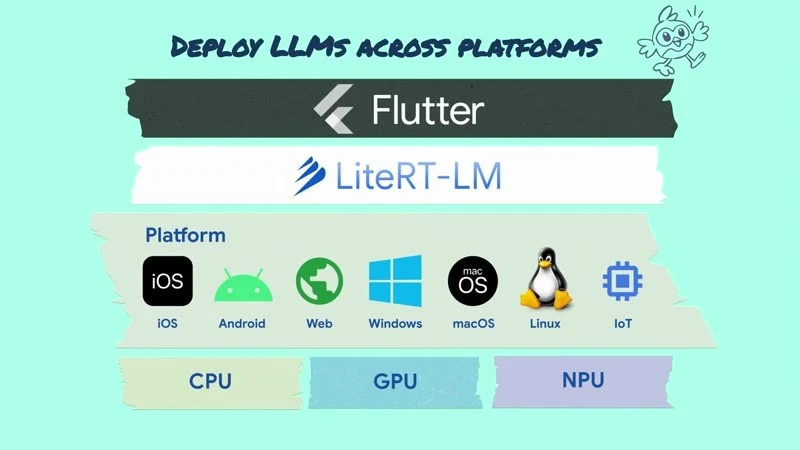
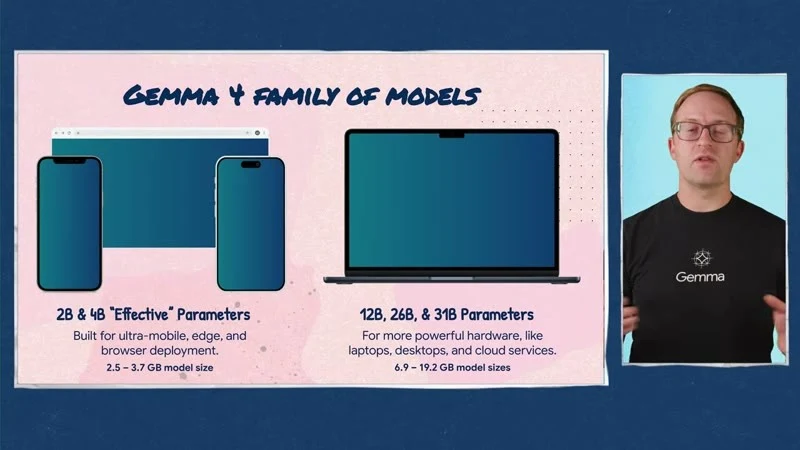
First, be clear about what is official:
| Item | Source | Version (2026-11-12) |
|---|---|---|
| LiteRT-LM runtime, Gemma 4 models | Official Google | — |
| flutter_edge_ai + flutter_edge_ai_litertlm | Community packages (sashadenisov.dev, formerly flutter_gemma); the video demo uses them | 2.6.0 / 1.20.0 |
| MediaPipe for Flutter | Official Google: 5 task packages + mediapipe_core, 22 task classes | 0.2.1 (the video shows 0.1.3) |
| Genkit Dart | Official Google, 1.0 announcement | 1.0.2 |
LiteRT-LM + Gemma 4 (with flutter_edge_ai)
dependencies:
  flutter_edge_ai: ^2.6.0
  flutter_edge_ai_litertlm: ^1.20.0
await FlutterEdgeAi.initialize(inferenceEngines: const [LiteRtLmEngine()]);
// Gemma 4 E2B is about 2.59 GB and E4B about 3.66 GB; downloaded on first use
await FlutterEdgeAi.installModelFromCatalog(LiteRtLmModels.gemma4E2bIt.generic)
.withProgress((p) => debugPrint('downloading $p%'))
.install();
final model = await FlutterEdgeAi.getActiveModel(
maxTokens: 2048,
preferredBackend: PreferredBackend.gpu,
);
const weather = Tool(
name: 'get_weather',
description: 'Current weather for a city',
parameters: {
'type': 'object',
'properties': {'city': {'type': 'string'}},
'required': ['city'],
},
);
final chat = await model.openChat(tools: const [weather]);
await chat.addQueryChunk(Message.text(text: "What's the weather in Taipei right now?", isUser: true));
await for (final r in chat.generateChatResponseAsync()) {
if (r is TextResponse) debugPrint(r.token);
if (r is FunctionCallResponse) {
final result = await weatherService.lookup(r.args['city']);
await chat.addQuery(Message.toolResponse(
toolName: r.name, response: result, toolCallId: r.id));
}
}Platform requirements: iOS 15+ (static frameworks), Android minSdk 30 and arm64 only, macOS 14+. Hugging Face litert-community also hosts larger models such as 12B, 26B-A4B, and 31B.
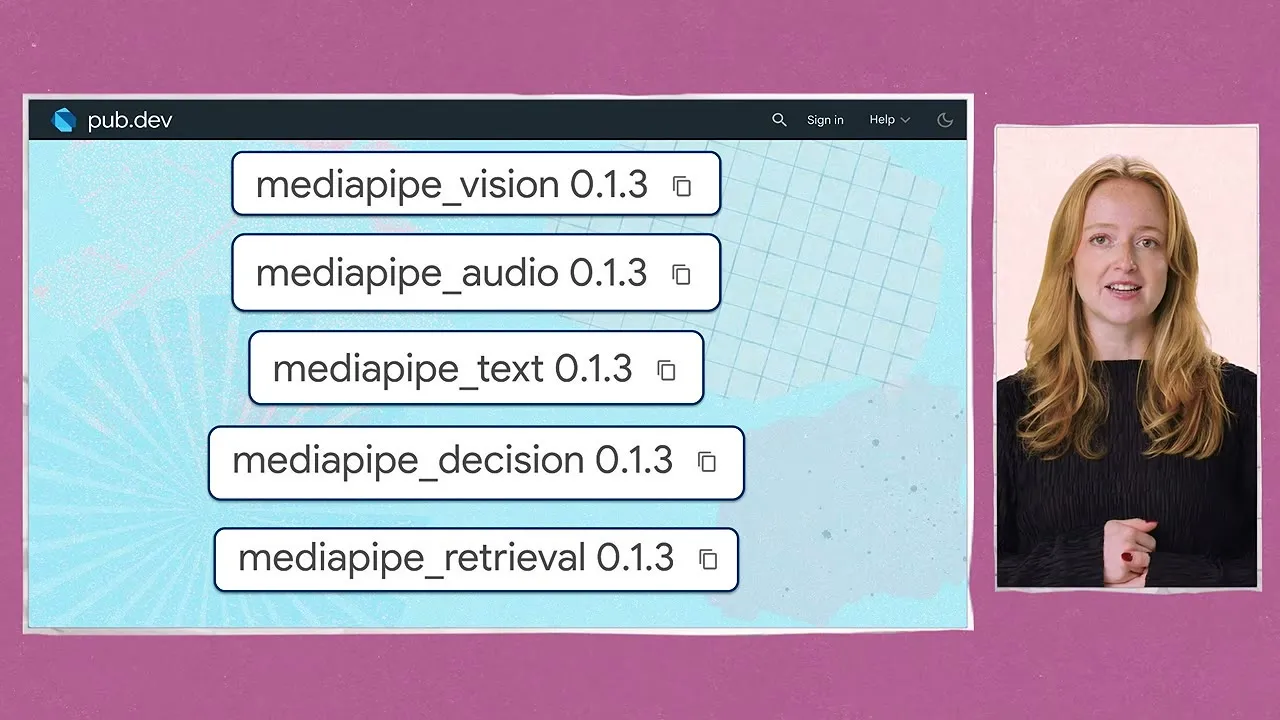
MediaPipe (0.2.1, requires Flutter ≥ 3.47): five task packages: vision / text / audio / decision / retrieval.
final classifier = await TextClassifier.create(
  TextClassifierOptions(model: TextModels.bertClassifier, maxResults: 2),
);
Genkit Dart 1.0 (AI flows in the cloud / on the server)
final ai = Genkit(plugins: []);
final hello = ai.defineFlow(
  name: 'hello',
  inputSchema: .string(defaultValue: 'World'),
  outputSchema: .string(),
  fn: (String subject, _) async => 'hello $subject',
);
In practice
- Offline / privacy scenarios: schedule summaries, job description translation, and form content checks can run on the phone, so personal data never leaves the device.
- The 2.59 GB download is the main cost: download only on Wi-Fi when the user opts in, and keep a cloud fallback.
- Low-end Android (minSdk < 30) and 32-bit devices are not supported; check the user device distribution before launch.
- Start with small models (MediaPipe text classification, embeddings): much smaller than an LLM, with stable results.
Further reading
- Official blog: Announcing Genkit Dart 1.0 (10-08); LiteRT-LM / Gemma on Flutter has only the video so far, no blog post
- Hands-on: flutter-mediapipe (with examples), LiteRT-LM, Gemma models (Hugging Face), Getting started with Genkit Dart
- Docs: Gemma, MediaPipe for Flutter, Genkit Dart 1.0 announcement; community: flutteredge.ai
- ⚠️ Version note: flutter_edge_ai is a community package; the Gemma 4 E2B download is about 2.59 GB; Android needs minSdk 30 and arm64
AI developer tools: Dart / Flutter MCP, skills, agent plugins#
Video: The Future of Flutter’s Dev Experience (what MCP tools and skills do 15:18, how the team runs evals 21:35)
Key point: models will keep getting better, but deterministic tools such as the analyzer, DevTools, and the VM service matter more. MCP hands them to the agent, and skills tell the agent how to write idiomatic code.
// Any MCP-capable agent (requires Dart 3.9+)
{ "mcpServers": { "dart": { "command": "dart", "args": ["mcp-server"] } } }
# Claude Code: official agent plugin (MCP + skills)
claude plugin marketplace add flutter/agent-plugins
claude plugin install dart-flutter@dart-flutter
# Other agents: skills only
npx skills add flutter/agent-plugins --skill '*' --agent universal --yes
# Package authors: fetch / lint the skills bundled with packages
dart run skills@ get
dart pub add dev:skills_lintIn practice
- Install the
dart-flutterplugin in the team’s Claude Code so the agent can run the analyzer, inspect the widget tree, and hot reload instead of guessing. - Internal shared packages can ship their own skills and check them in CI with
skills_lint.
Further reading
- Official blog: Introducing Skills for Dart and Flutter (05-06), Skills CLI 1.0 (09-08), Building multi-agent development teams (08-20), Dart MCP server (2025-07)
- Hands-on: flutter/agent-plugins, Antigravity
- Docs: Getting started with AI, AI tools, Package skills
- ⚠️ Version note: the Dart MCP server requires Dart 3.9+
LG webOS: Flutter on the TV#
Video: Build a webOS app with Flutter (installing the SDK 4:47, create, run, hot reload 5:52)
- The SDK is maintained by LG and is the first external platform under Flutter’s “pluggable platforms”.
- The development machine must be Linux (use WSL2 or a DevContainer on macOS / Windows); it targets webOS TV 26+, outputs .ipk, and already has 25 common plugins.
flutter-webos doctor -v
flutter-webos precache
flutter-webos config --enable-custom-devices
flutter-webos custom-devices add          # add a TV in developer mode
flutter-webos devices
flutter-webos create --platforms webos my_tv_app
flutter-webos run -d <device-id>
flutter-webos build webos --release
In practice: large screens in stores or at events (queue calling, check-in boards) can reuse existing Flutter components directly; remote-control focus navigation needs to be designed separately.
Further reading
- Official blog: no webOS post yet; for an overview see What’s new in Flutter 3.50
- Hands-on: lg-flutter-webos/flutter-webos
- Docs: LG: Flutter for webOS guide
Sources#
- What’s new in Flutter 3.50 (2026-11-11)
- Announcing Dart 3.14 (2026-11-11)
- Breaking changes index, material_ui / cupertino_ui migration guide, Docs What’s new
- Quick, reliable calculations with A2UI’s Client-Side Functions (2026-08-28)
- AI makes it easy to migrate. Flutter makes it easy to scale. (2026-10-20)
- Videos: @flutterdev channel (links to each video appear in the sections above; all screenshots and GIFs in this article are taken from these official videos)