Flutter 3.50 & Dart 3.14 重點整理
這一波 Flutter 3.50 + Dart 3.14 把 Material/Cupertino 從框架拆出去、Native interop 宣告穩定、iOS 27 正式支援,同時 A2UI 1.0、on-device AI、桌面多視窗一起登場。
一頁看懂#
| 影片(上架日) | 一句話重點 | 誰該看 |
|---|---|---|
| The Future of Flutter’s Dev Experience(11/11) | MCP 給工具、skills 給食譜、evals 驗證 AI 寫的 Flutter 是否道地 | 所有用 AI 寫 code 的人 |
| The power of Dart & Wasm(11/11) | Safari / Firefox 可選用 Wasm、SIMD 加速、--web-content-hash 原子部署 | Flutter Web |
| Build a webOS app with Flutter(11/11) | LG 電視官方 SDK、hot reload 上電視、pluggable platforms 計畫 | 新平台、嵌入式 |
| What A2UI 1.0 means for Flutter devs(11/11) | 巢狀護欄、Express 格式(10 秒→5 秒)、多 catalog、agentFunction | 做 AI 助理 / GenUI |
| On-device AI with LiteRT-LM and Gemma(11/11) | 離線、隱私、零 token 成本的本機 LLM,含聊天與 tool calling | 想加 AI 功能但怕成本/隱私 |
| Google AI Edge: local AI desktop app in 10 days(11/11) | Eloquent 10 天從 iOS 到桌面;新 app 重用 60% 基礎、省 80% 時間 | PM、技術主管 |
| Flutter interop with Pigeon FFI(11/11) | useJni: true:保留 Pigeon 型別合約,改走 JNI 直呼,免序列化 | 寫 plugin / 原生橋接 |
| Custom design libraries with Flutter(11/11) | Raw widgets + Mix/Remix 樣式層 + Widgetbook 視覺回歸 | 設計系統、UI 團隊 |
| Multi-window on desktop(11/11) | 實驗性多視窗 API,五種視窗類型,單一 widget tree 共享狀態 | 桌面 app |
| What’s new in Flutter 3.50 and Dart 3.14(11/11) | 版本總覽:dart migrate、material_ui、iOS 27、SwiftPM、hybrid composition | 所有人 |
| Client side functions for Flutter GenUI(11/05) | 讓 LLM 把算錢這類工作交給本機 Dart 函式,結果可驗證、無延遲 | 做 AI 助理 / GenUI |
Dart 3.14:沒有新語法,但升級變自動了#
影片:What’s new in Flutter 3.50 and Dart 3.14(Dart 3.14 0:00)
Dart 3.14 不加語言功能(this promotion 與 static extensions 還在做),重點是工具與效能。
1. dart migrate:自動升 SDK 下限 + 套用新寫法
每次把 pubspec 的 SDK 下限往上推一個 minor,分三步:prepare(先跑 bump 前需要的 dart fix)→ bump → cleanup(可選)。需要原本已是 Dart 3.0+。
dart migrate --dry-run                       # 先看會改什麼
dart migrate --apply                         # 一次做完
dart migrate --apply --step=prepare          # 或分步,方便拆 PR
dart migrate --apply --step=bump,cleanup
dart migrate --apply --target-sdk=3.14.0
官方範例(前 → 後),可以看到空 body 的新寫法與參數 final 被拿掉:
// before
class WeakPasswordException implements Exception {}
void checkPassword(final String password, final int minLength) {

// after
class WeakPasswordException implements Exception;
void checkPassword(String password, int minLength) {
2. Analysis Server 變快:檔案探索(Find References)、啟動與重啟、documentColor 都更快,格式化時較少卡住。在 16 個 context 的 DevTools workspace 裡,冷啟動 rename 從 2.0 秒降到 0.9 秒(約快 55%)——你的 IDE 與 AI agent 都受惠。
3. Pub 用 ETag:get / upgrade / add 帶 If-None-Match,144 個依賴的專案約省 1.5 MB 下載,CI 會感受得到。
4. DartPad beta 全在瀏覽器內:編譯器、analyzer、pub 都編成 Wasm 跑在 Web Worker,支援多檔案、import pub.dev 套件、完整 LSP,沒有網路來回。
5. 其他值得知道的改動
- 新 API
rangeEquals(整數 typed data 與ByteData),VM 上直接變memcmp:
final pngMagic = Uint8List.fromList([0x89, 0x50, 0x4E, 0x47]);
if (packet.rangeEquals(0, 4, pngMagic)) print('PNG header matched');dart:html、dart:js、dart:js_util、package:js正式棄用並排定移除,改用dart:js_interop+package:web。dart:mirrors棄用;新增dart run -e(一行跑 Dart)、dart pub upgrade pkg@latest、lintfuture_sync_value。- SIMD 型別(
Int32x4、Float32x4…)在 Wasm 編成v128,benchmark 最高快 4 倍。
情境延伸:多 package 的 monorepo(app + 共用 domain + design system)可以每個 package 各跑 dart migrate --step=prepare 開一支小 PR,再統一 bump,review 壓力小很多;--dry-run 的輸出也很適合丟給 AI agent 當改動清單。
延伸閱讀
- 官方 blog:Announcing Dart 3.14(2026-11-11)
- 動手做:DartPad 直接試 Dart 3.14;在多 package repo 跑
dart migrate --dry-run - 官方文件:Announcing Dart 3.14、Dart changelog、dart migrate
- ⚠️ 版本提醒:
dart migrate預設步驟為 prepare、bump;先看 dry-run 再套用
Flutter 3.50 框架:Material / Cupertino 正式搬出 SDK#
影片:3.50 總覽:Framework updates 1:59
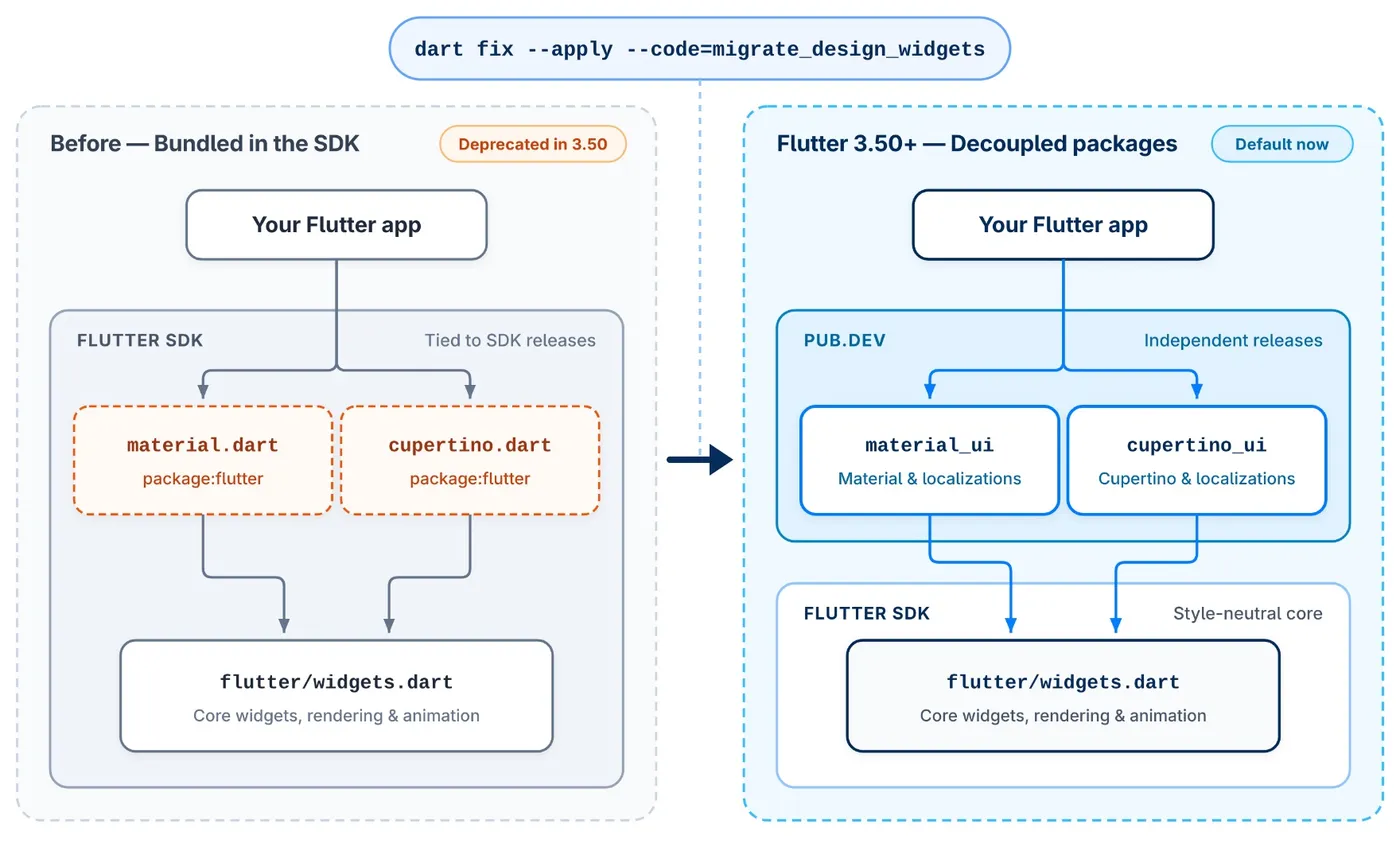
最大的變化是 package:flutter/material.dart 與 cupertino.dart 正式 deprecated,改用獨立套件 material_ui、cupertino_ui(每週發版、semver)。flutter create 預設已 import material_ui。時間線:3.44 凍結 SDK 內版本(= 套件 1.0.0)→3.47 可選用 → 3.50 棄用。
遷移步驟
dart fix --apply --code=migrate_design_widgets(加依賴、改 import)- 若 pubspec 沒被更新:
flutter pub add material_ui cupertino_ui - import 改為
package:material_ui/material_ui.dart/package:cupertino_ui/cupertino_ui.dart - 再跑一次
dart fix(import 排序等)
第三方套件還在用舊 import 怎麼辦?用 MaterialUiCompatibilityBridge(Cupertino 對應 CupertinoUiCompatibilityBridge)把新 theme 轉成舊版 theme、並注入在地化。它本身已標 @Deprecated——只是過渡工具,依賴套件遷移完就要拿掉。型別不合的情況(例如把 SDK 的 ColorScheme 傳給 material_ui API)它救不了:
import 'package:material_ui/material_ui.dart';

MaterialApp(
  theme: ThemeData(colorScheme: ColorScheme.fromSeed(seedColor: const Color(0xFF2E7D32))),
  // 整個 app 包一次;也可以只包住使用舊套件的那個子樹
  // ignore: deprecated_member_use
  builder: (context, child) => MaterialUiCompatibilityBridge(child: child!),
  home: const HomeScreen(),
);
套件作者注意:遷移對使用者是 breaking change,要發 major 版。
新 widget 與 API(挑實用的)
| 類別 | 新東西 | 用在哪 |
|---|---|---|
| Sliver | SliverClipRect、SliverClipRRect(clipOverlap) | 卡片式列表圓角裁切、跟 pinned header 疊加 |
| 列表 | ListView.separated 的 itemExtentBuilder | 獲得固定高度優化,又能有分隔線 |
| 圖片 | DecorationImage.placeholder、FadeInImageTransition.fadeInOver、ResizeImage.useLogicalSize | 頭像 / 商家 logo 載入前的佔位圖 |
| 輸入 | AutofillHints.emailOTPCode、數字鍵盤 password(Android)、Hyphens | Email OTP 自動填入、PIN 碼 |
| 無障礙 | SemanticsRole.slider、MediaQueryData.reduceMotion、Esc 關 Tooltip | 尊重系統「減少動態」 |
| 導覽 | Navigator.popUntilWithResult、showDialog(barrierBuilder:) | 多步驟流程結束時帶結果回到起點 |
Breaking changes:IgnorePointer / AbsorbPointer 的 ignoringSemantics 移除;軟連字號在換行處會顯示「-」;RTL 文字中 WidgetSpan 依自然閱讀順序;Web viewport-fit=cover 時 SafeArea 會算進瀏海。
情境延伸
popUntilWithResult:報名流程(選班 → 確認條款 → 上傳證件)結束後直接回到工作列表並帶回「已報名」,不用再靠全域事件通知列表重整。itemExtentBuilder:長列表跳到第 N 筆(例如「今天」)不用先建立前面所有 item。reduceMotion:系統開了減少動態就關掉 Lottie / 轉場動畫。
延伸閱讀
- 官方 blog:What’s new in Flutter 3.50(11-11)、Material and Cupertino decoupling are here(09-09)、What’s new in Flutter 3.47(08-12)、Material and Cupertino code freeze(04-07)
- 動手做:在分支上跑
dart fix --apply --code=migrate_design_widgets,看 diff 大小再排工 - 官方文件:What’s new in Flutter 3.50、material_ui / cupertino_ui 遷移指南、Breaking changes 索引、Release notes、material_ui、cupertino_ui
- ⚠️ 版本提醒:material_ui 1.11.0 / cupertino_ui 1.1.6 需 Flutter ≥ 3.47;相容橋本身已 deprecated
平台更新:iOS 27、Android 安全預設、Engine#
影片:iOS 3:05、Android 4:30、Engine 5:17
iOS / macOS
- 3.50 是 Xcode 27 / iOS 27 之後第一個 stable,要支援 iOS 27 使用者就升級。新配對的裝置會自動準備好;
flutter screenshot在實機上又能用了(讓 AI agent 自己看改動前後畫面)。也支援新的 iPhone duo 摺疊形態。 - 觸控延遲:60 Hz 裝置少 16 ms、120 Hz ProMotion 少 8 ms,測試覆蓋到 iPhone 6s。
- CocoaPods trunk 2026 年 12 月變唯讀。關掉 Swift Package Manager 的專案,現在每個 CLI 指令都會跳警告。
- Intel Mac 建置會跳棄用警告,未來版本移除;可用
flutter config --enable-macos-arm64-only。
Android
- Release 版 Intent 加固:忽略
route、dart_entrypoint、cached_engine_idextras,拒絕經 Intent 或--use-application-binary傳入的 engine flags(如--dart-flags)。debug 版只警告。如果你們用 Intent extra 帶 initial route 做 deep link,要改走 go_router / app links。 - Hybrid Composition++:把 platform view 合成交給 Android OS,解決捲動撕裂與文字輸入問題。需 Android 14(API 34)+ 且 Impeller 走 Vulkan,不符合自動回退。beta 已預設開啟,stable 要手動
flutter config --enable-hcpp,看 log 出現Using HCPP platform view rendering strategy即生效。地圖、WebView、廣告多的 app 優先測。 - Built-in Kotlin:plugin 自己 apply Kotlin Gradle Plugin 很快會編譯失敗,要改用內建 Kotlin 並宣告
flutter: ">=3.44.0"。 - 新專案預設:AGP 9.3.1、Gradle 9.5.0、KGP 2.4.20、Java 17;compile / target SDK = API 36,minSdk = API 24。
Engine
- Impeller SDF 渲染(桌面)支援線條、細邊框、圓角、漸層,macOS 漸層與重複文字陰影變快。
- 自訂 embedder:Vulkan external textures、
FlutterEngineNotifyLowMemoryWarning(低記憶體時清 Impeller 離屏快取)。 - Flutter GPU 支援 2D texture arrays、shader pipeline 錯誤訊息更清楚。
- Windows 預設要 OpenGL ES 3、支援非 ASCII 路徑(中文資料夾名稱不再出事)。

延伸閱讀
- 官方 blog:How Flutter stays ahead of iOS releases(08-25)、Saying goodbye to CocoaPods(04-30)、What’s new in Flutter 3.50
- 動手做:Android 14+ 實機開
flutter config --enable-hcpp,看 log 是否出現 HCPP 字樣 - 官方文件:Release notes、Breaking changes 索引、Swift Package Manager(app 開發者)
- ⚠️ 版本提醒:HCPP 在 stable 需手動開啟;CocoaPods trunk 2026 年 12 月起唯讀
Native interop:FFIgen / JNIgen 穩定,Pigeon 直連(preview)#
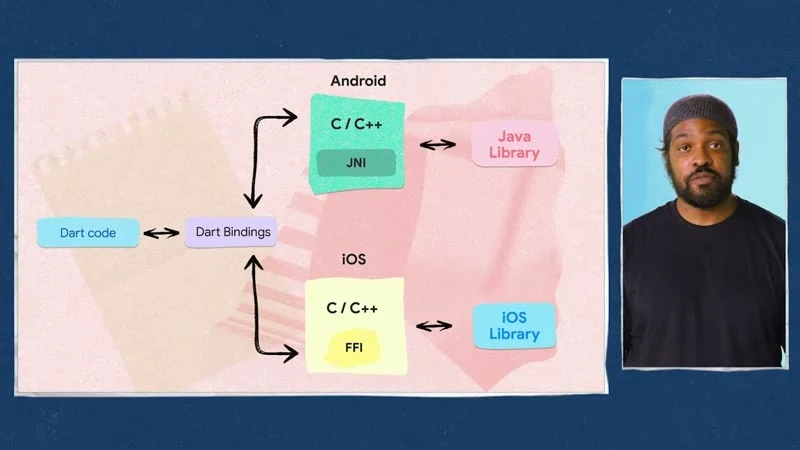
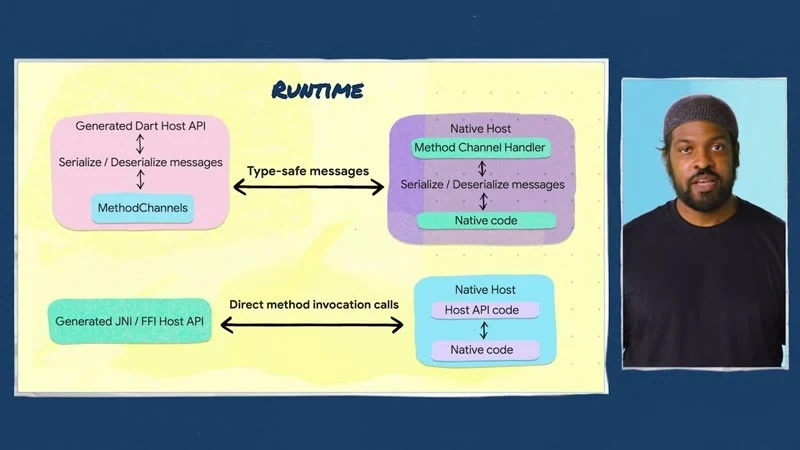
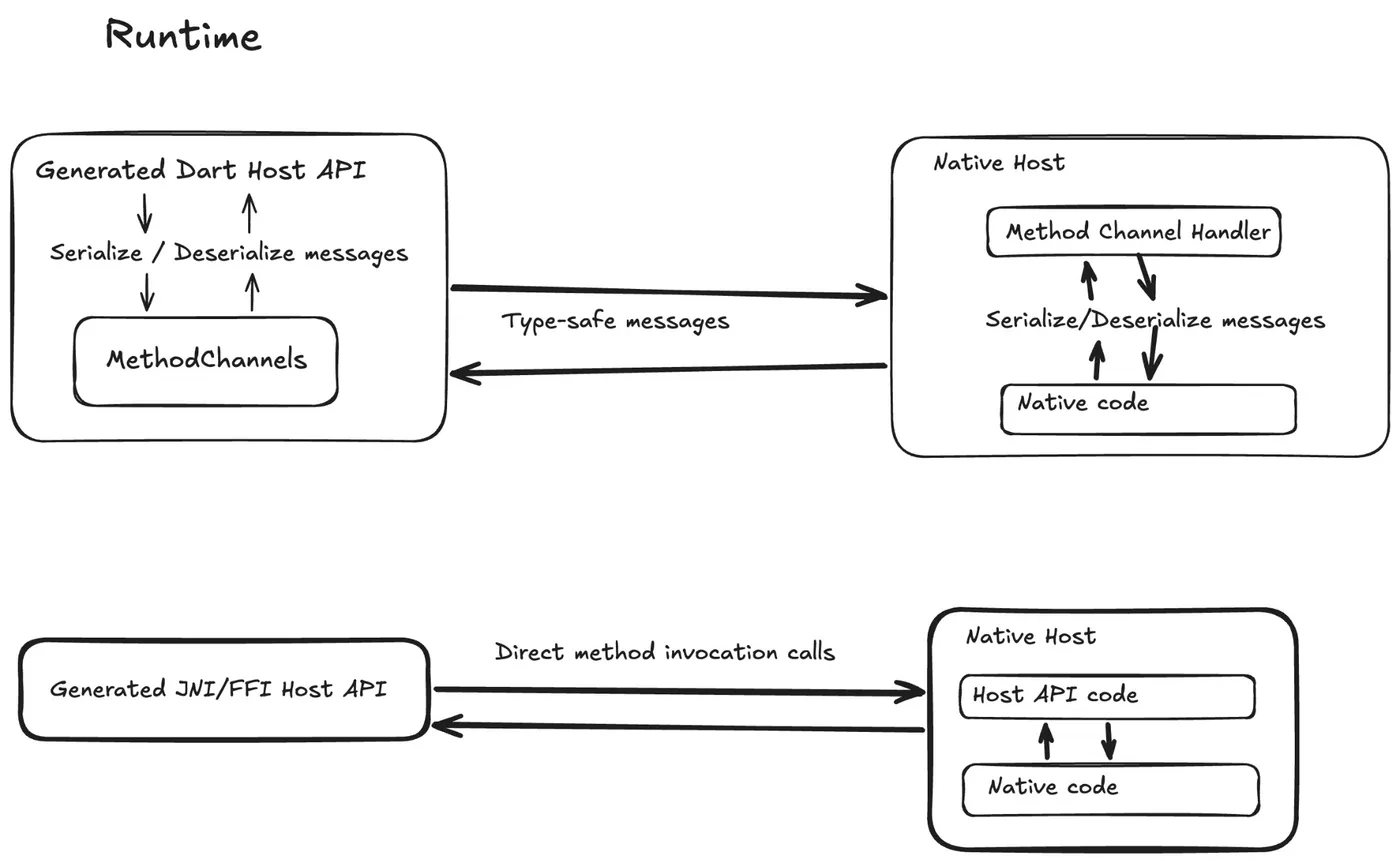
影片:Flutter interop with Pigeon FFI(三種方式比較 1:05、定義 @HostApi 2:00、實機權限流程 4:05)、3.50 總覽:Native interop 1:13
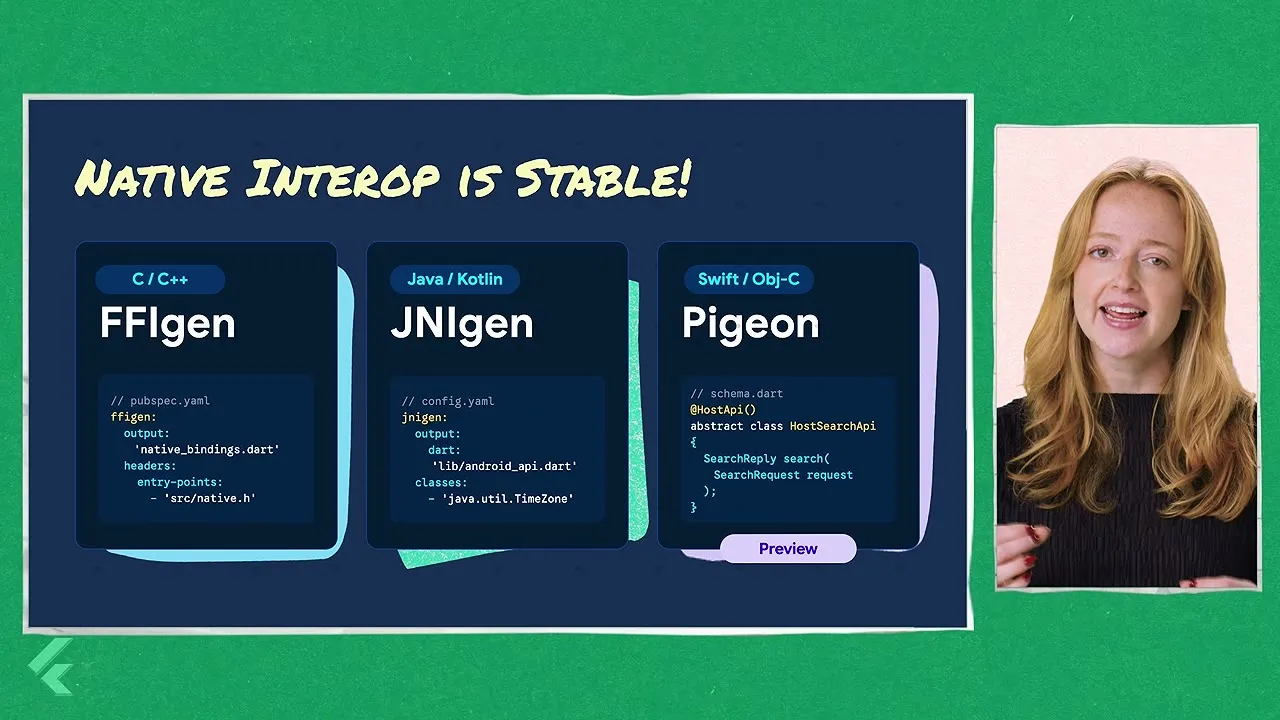
- FFIgen / JNIgen 正式穩定:從 C / Objective-C / Swift 標頭與 Java / Kotlin 類別直接產生 Dart 綁定,同步呼叫、不經 platform channel。
- Pigeon 30 的 native interop 模式(preview):同一份 Pigeon 定義,Android 走 JNI(
useJni: true)、iOS / macOS 走 FFI(useFfi: true),不再序列化到 MethodChannel。目前不支援 Windows / Linux,官方明說不要用在 production。
Pigeon 定義(pigeon 30.0.2,對照官方 native_interop_guide)
// pigeons/messages.dart
import 'package:pigeon/pigeon.dart';

@ConfigurePigeon(PigeonOptions(
  appDirectory: './',
  dartOut: 'lib/src/messages.g.dart',
  kotlinOut: 'android/src/main/kotlin/com/example/permissions/Messages.g.kt',
  kotlinOptions: KotlinOptions(package: 'com.example.permissions', useJni: true),
  swiftOut: 'ios/Classes/Messages.g.swift',
  swiftOptions: SwiftOptions(useFfi: true, ffiModuleName: 'permissions'),
))
@HostApi()
abstract class PermissionsApi {
  bool checkPermission(String permission);
  bool checkAndRequestPermission(String permission);
}
flutter pub add dev:pigeon
# Android(JNI)
flutter pub add jni && flutter pub add dev:jnigen dev:logging dev:path
# iOS / macOS(FFI)
flutter pub add ffi objective_c meta && flutter pub add dev:ffigen dev:swift2objc dev:swiftgen dev:path dev:pub_semver
# 需先設好 ANDROID_HOME,並在 example/android 跑過一次 ./gradlew compileReleaseKotlin
dart run pigeon --input pigeons/messages.dart產出:messages.g.dart、messages.native_interop.g.dart,以及 messages.g.jni.dart / messages.g.ffi.dart。
// Dart 端:改用 native interop 建構子
late final PermissionsApi _api = PermissionsApi.createWithNativeInteropApi();
final granted = await _api.checkPermission('camera');
// Android plugin
override fun onAttachedToEngine(binding: FlutterPlugin.FlutterPluginBinding) {
PermissionsApiRegistrar().register(this, binding)
}
override fun onDetachedFromEngine(binding: FlutterPlugin.FlutterPluginBinding) {
PermissionsApiRegistrar().unregister(this, binding)
}// iOS plugin
public static func register(with registrar: FlutterPluginRegistrar) {
let instance = PermissionsPlugin()
PermissionsApiSetup.register(api: instance, registrar: registrar)
registrar.publish(instance)
}
影片中的範例 app:按鈕直接經 JNI 呼叫 Kotlin,跳出系統權限視窗後立刻更新狀態。
情境延伸
- 頻繁的小呼叫(權限檢查、裝置資訊、電量 / 網路狀態)最受益:少了序列化與 thread hop。
- 大型 SDK(推播、金流、地圖)先維持現有 plugin;等 interop 模式脫離 preview 再評估。
- 團隊自寫 plugin 可以先在 example app 試
useJni/useFfi,量測冷啟動與呼叫延遲,再決定是否遷移。
延伸閱讀
- 官方 blog:Flutter’s path towards seamless interop(2025-05-20,背景:為什麼要捨 MethodChannel)、What’s new in Flutter 3.50
- 動手做:Pigeon example(native_interop_app)、flutter/demos native_interop_demos
- 官方文件:Interop 總覽、Pigeon、pigeon(pub.dev)
- ⚠️ 版本提醒:pigeon 30.0.2 的 native interop 模式是 preview,不支援 Windows / Linux,不要上 production
桌面多視窗 API(實驗性,僅 main channel)#
影片:Multi-window on desktop with Flutter(五種視窗 2:23、Linux 範例 4:45、Window API 5:13)

Flutter 可以一個 app 開多個原生視窗,所有視窗共用同一棵 widget tree,Riverpod / Bloc 不用改就能跨視窗共享狀態。這是 Canonical(Ubuntu)主導、Google review 的多年合作。stable 3.50.0 並未開放,只有 main channel 加 flutter config --enable-windowing 才能用;API 標為 @internal,放在 package:flutter/src/widgets/_window.dart,官方說明不要用於正式環境或 pub 套件,連 patch 版都可能有 breaking change。
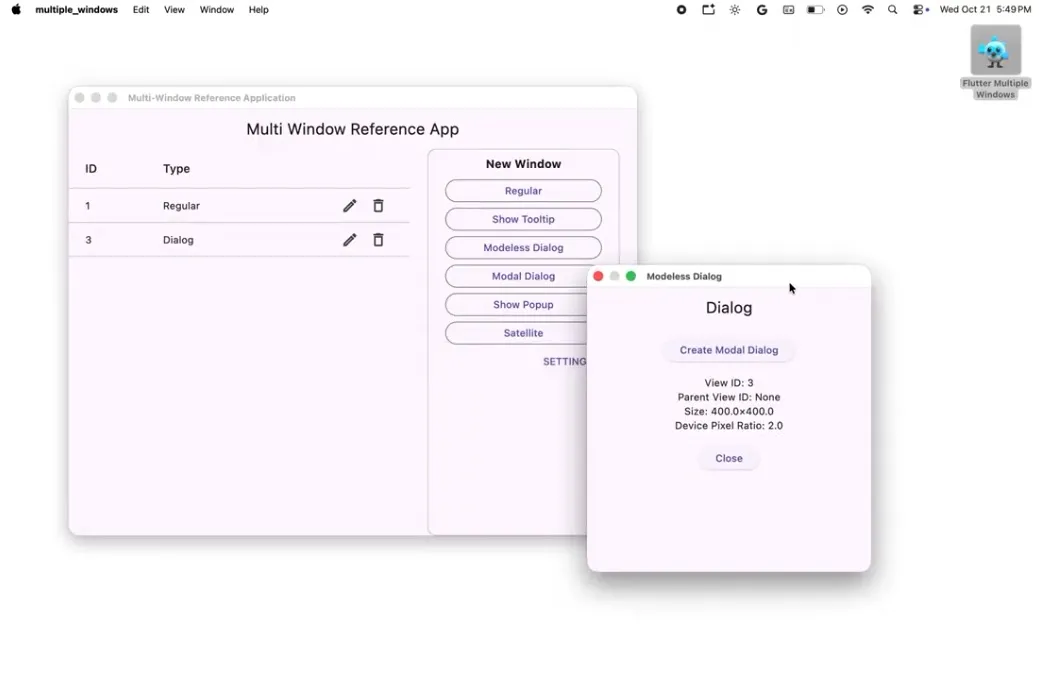
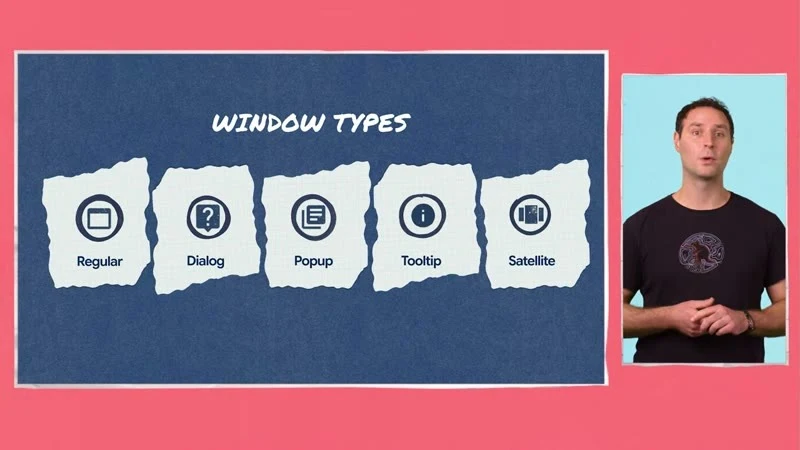
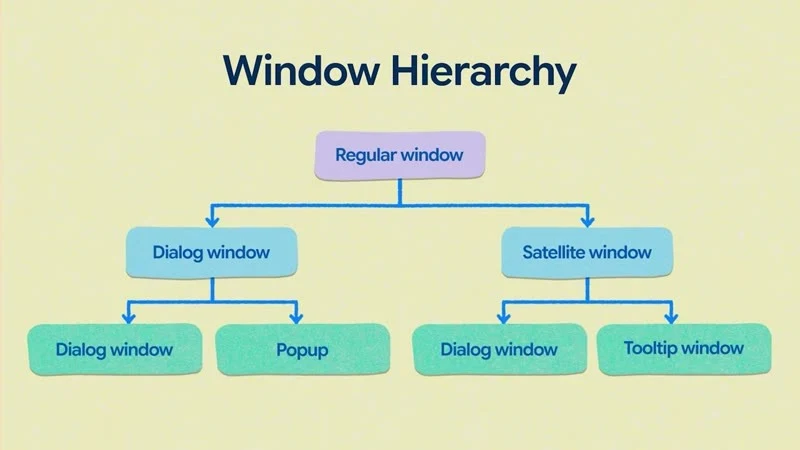
上:五種視窗類型。下:視窗可以組成樹,regular 底下掛 dialog、popup、satellite、tooltip。(影片截圖:Multi-window on desktop with Flutter)
| 類型 | Controller | 行為 | 典型用途 |
|---|---|---|---|
| Regular | WindowController | 標題列、可縮放/最大化/全螢幕 | 主視窗、分頁拆成新視窗 |
| Dialog | DialogWindowController | parent 不為 null 就是 modal;必須回答才關得掉 | 確認、表單 |
| Popup | PopupWindowController | 貼著 anchor,點別處就關 | 右鍵選單、autocomplete |
| Tooltip | TooltipWindowController | 同 popup 但永不取得焦點 | 按鈕說明 |
| Satellite | SatelliteWindowController | 跟著 parent 移動 / 縮放 | 工具箱、調色盤 |
其他角色:Window(controller:, child:) 負責渲染(main 已統一成這一個 widget;3.50.0 tag 時還是 DialogWindow、PopupWindow 等各自的 widget)、WindowManager + WindowRegistry 管理多個視窗、WindowControllerDelegate 等 mixin 接 onWindowCloseRequested / onWindowDestroyed、WindowScope 查 contentSizeOf、isActivatedOf、isMaximizedOf 等。控制器參數是 size:,依內容定尺寸用 .shrinkWrap()。在行動裝置建立 controller 會丟例外。
程式依官方範例 examples/multiple_windows 與 main 的 _window.dart 改寫:
// flutter channel main && flutter config --enable-windowing
// ignore_for_file: invalid_use_of_internal_member, implementation_imports
import 'package:flutter/material.dart';
import 'package:flutter/services.dart';
import 'package:flutter/src/widgets/_window.dart';

class MainWindowDelegate with WindowControllerDelegate {
  @override
  void onWindowDestroyed() {
    super.onWindowDestroyed();
    // 主視窗關掉就結束 app(不要用 dart:io 的 exit(0))
    ServicesBinding.instance.exitApplication(AppExitType.required);
  }
}

void main() {
  WidgetsFlutterBinding.ensureInitialized();
  final mainWindow = WindowController(
    size: const Size(1000, 700),
    title: 'Admin',
    delegate: MainWindowDelegate(),
  );
  runWidget(WindowManager(initialWindows: [
    WindowEntry(
      controller: mainWindow,
      builder: (_) => const MaterialApp(home: HomePage()),
    ),
  ]));
}

// 在 HomePage 裡彈出「真正的」對話框視窗
void openConfirm(BuildContext context) {
  final registry = WindowRegistry.of(context);
  late final WindowEntry entry;
  final dialog = DialogWindowController(
    size: const Size(420, 300),
    parent: WindowScope.of(context), // 有 parent = modal
    title: '確認排班',
    delegate: _OnDestroyed(() => registry.unregister(entry)),
  );
  entry = WindowEntry(controller: dialog, builder: (_) => const ConfirmPage());
  registry.register(entry);
}

class _OnDestroyed with DialogWindowControllerDelegate {
  _OnDestroyed(this.onDone);
  final VoidCallback onDone;
  @override
  void onWindowDestroyed() {
    onDone();
    super.onWindowDestroyed();
  }
}
// 任何視窗內取尺寸:WindowScope.contentSizeOf(context)
版本演進(追蹤 issue #30701):#188866 把 WindowManager 移到 WidgetsApp 之上,次視窗可有自己的 Navigator;#189363 把 RegularWindow* 更名為 Window*、sizedToContent 改為 shrinkWrap;#196002(2026-11-10)把各類型 widget 合併成單一 Window。未來 Material 的 dialog、menu、tooltip 會在桌面上自動變成獨立視窗,多數人不必直接碰這層。
情境延伸
- 後台 / 排班系統:主視窗是行事曆,點班別開 satellite 視窗顯示人員細節,拖主視窗時跟著走。
- 客服工具:每個工單是獨立視窗,共用同一個 Riverpod provider,一邊改另一邊即時更新。
- 現在只適合在 main channel 的分支做 PoC;等 stable 開放再進正式版。
延伸閱讀
- 官方 blog:Introducing the Desktop Windowing API for Flutter(08-24)
- 動手做:examples/multiple_windows(需 main channel +
flutter config --enable-windowing) - 官方文件:追蹤 issue #30701
- ⚠️ 版本提醒:stable 3.50 未開放,API 標為
@internal,patch 版都可能 breaking
設計系統:Mix、Remix、Widgetbook#
影片:The new way to build custom design libraries(Mix 2:07、Remix 4:13、Widgetbook 5:06、AI 視覺測試迴圈 6:25)
material_ui / cupertino_ui 拆出後,「自建設計系統」在 Flutter 更可行。影片介紹了三個社群工具(皆非 Google 官方套件):
| 工具 | 版本(2026-11-12) | 定位 |
|---|---|---|
| mix | 2.4.0 | 用 Styler 描述樣式、變體(dark / hover / press)與動畫 |
| remix | 0.2.0 | 建在 Mix 上、無預設外觀的元件庫(Fortal 主題) |
| widgetbook | 3.25.0 | 元件目錄、視覺回歸、無障礙檢查 |
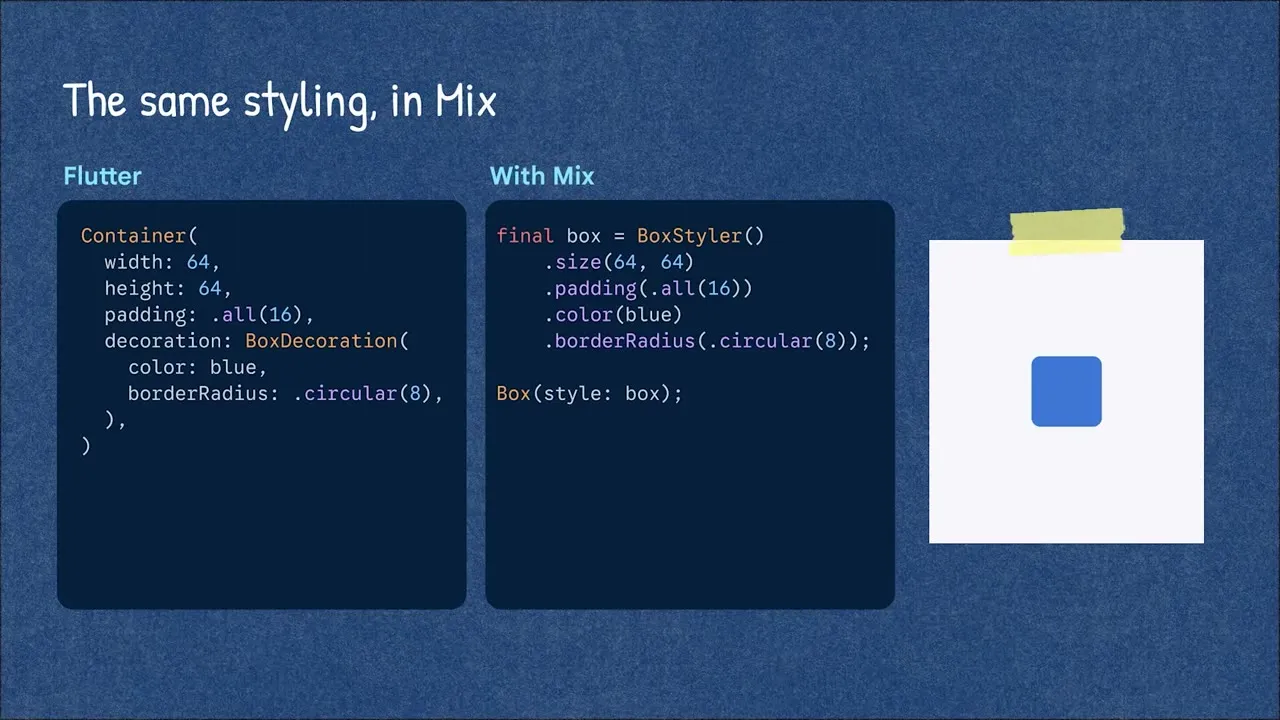
Mix 2.4.0
import 'package:mix/mix.dart';

final accentCard = BoxStyler()
    .padding(EdgeInsetsMix.all(16))
    .color(Colors.white)
    .borderRadius(BorderRadiusMix.circular(12))
    .onDark(BoxStyler().color(Colors.grey.shade900))
    .onHovered(BoxStyler().color(Colors.green.shade50))
    .animate(AnimationConfig.easeOut(200.ms));

// 帶互動狀態的容器
accentCard.pressable(onPress: onTap, child: const Text('已報到'));
每加一個變體(.onDark、.onHovered、.animate),右邊的方塊就多一種行為(影片 3:21 起,2.5 倍速)。
Remix 0.2.0
final primaryButton = RemixButtonStyle()
    .padding(EdgeInsetsMix.symmetric(horizontal: 16, vertical: 10))
    .backgroundColor(Colors.green)
    .foregroundColor(Colors.white)
    .borderRadius(BorderRadiusMix.circular(8))
    .onHovered(RemixButtonStyle().backgroundColor(Colors.green.shade700))
    .animate(AnimationConfig.spring(300.ms));

RemixButton(label: '報到', onPressed: () {}, style: primaryButton);
// 整體主題:用 FortalScope 包住 app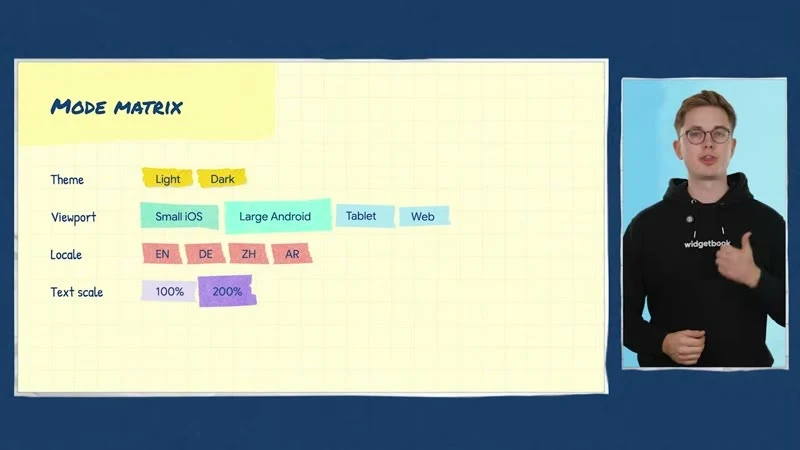
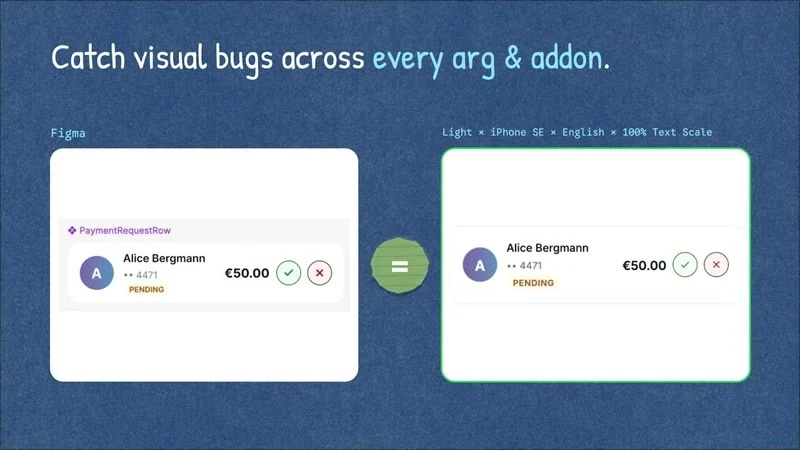
Widgetbook 3.25.0(影片中的「modes」是 v4 beta 功能;穩定的 3.x 用 addons 達成同樣的矩陣)
// widgetbook/lib/main.dart
@widgetbook.App()
class WidgetbookApp extends StatelessWidget {
  const WidgetbookApp({super.key});
  @override
  Widget build(BuildContext context) => Widgetbook.material(
        directories: directories, // build_runner 產生
        addons: [
          MaterialThemeAddon(themes: [
            WidgetbookTheme(name: 'Light', data: ThemeData.light()),
            WidgetbookTheme(name: 'Dark', data: ThemeData.dark()),
          ]),
          ViewportAddon([IosViewports.iPhone13, AndroidViewports.samsungGalaxyS20]),
          TextScaleAddon(min: 1.0, max: 2.0),
        ],
      );
}

@widgetbook.UseCase(name: 'Default', type: CheckInCard)
Widget checkInCardDefault(BuildContext context) => const CheckInCard();
dart run build_runner build -d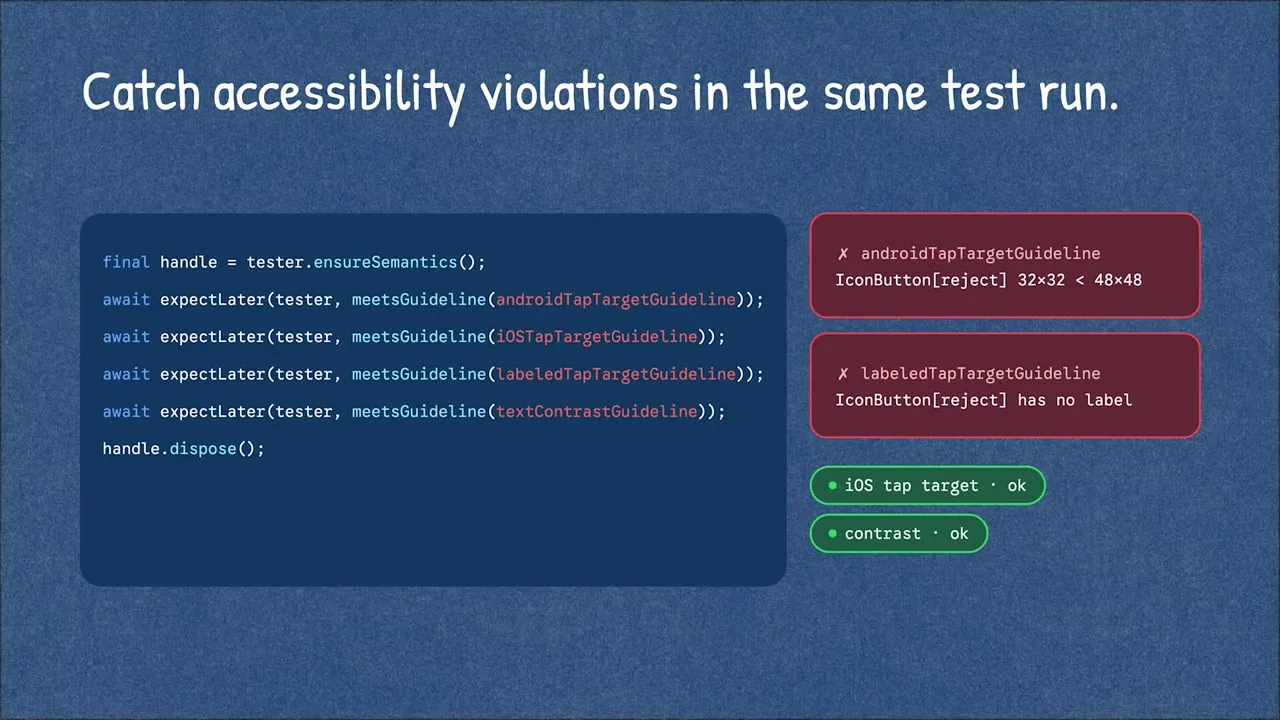
無障礙檢查與視覺回歸比對屬於 Widgetbook Cloud(付費服務)。
情境延伸
- 拆出 material_ui 後先盤點:哪些畫面真的需要 Material 元件,哪些已經是自訂樣式。
- Widgetbook 的 Light / Dark × 兩種尺寸 × 大字體矩陣,可以抓到「大字體破版」這類 QA 常漏的問題。
- Mix / Remix 仍在 0.x–2.x 快速迭代,先用在新的獨立元件,不要一次改寫整個 app。
延伸閱讀
- 官方 blog:Material and Cupertino decoupling are here(09-09,為什麼自建設計系統變容易);Mix / Remix / Widgetbook 目前沒有官方 blog 專文
- 動手做:Widgetbook quick start、Remix repo(含範例)
- 官方文件:mix(pub.dev)、Widgetbook Cloud
- ⚠️ 版本提醒:影片中的 modes 是 Widgetbook v4 beta;Mix 2.4.0 / Remix 0.2.0 仍在快速迭代
Web:Wasm 三大瀏覽器全通、原子化部署#
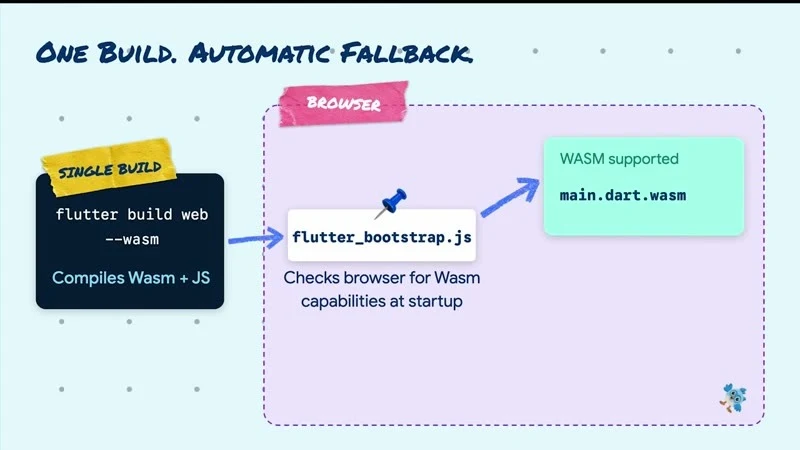
影片:The power of Dart & Wasm(三瀏覽器 + SIMD 2:46、Wasm 走出瀏覽器 4:55、原子化部署 9:15)

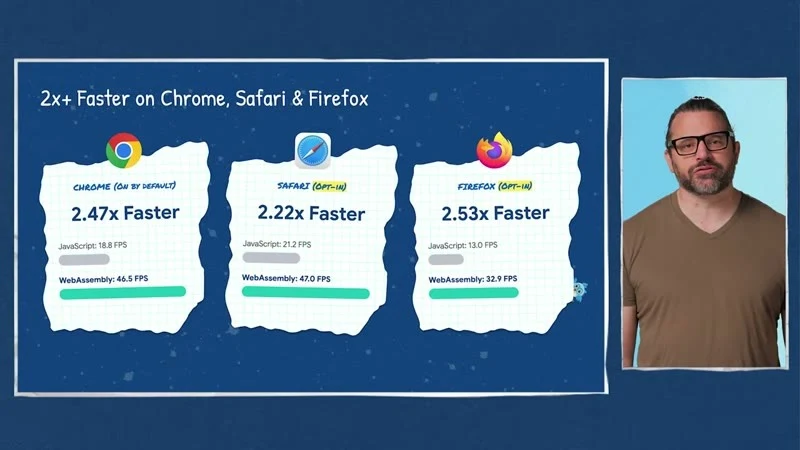
| 更新 | 重點 | 怎麼用 |
|---|---|---|
| 三大瀏覽器 Wasm | Chromium 137+、Safari 26.2+、Firefox 147+ | 預設只有 Chromium 走 Wasm;其他用 wasmAllowList 開啟 |
| Wasm SIMD | 硬體向量運算加速 | 自動套用 |
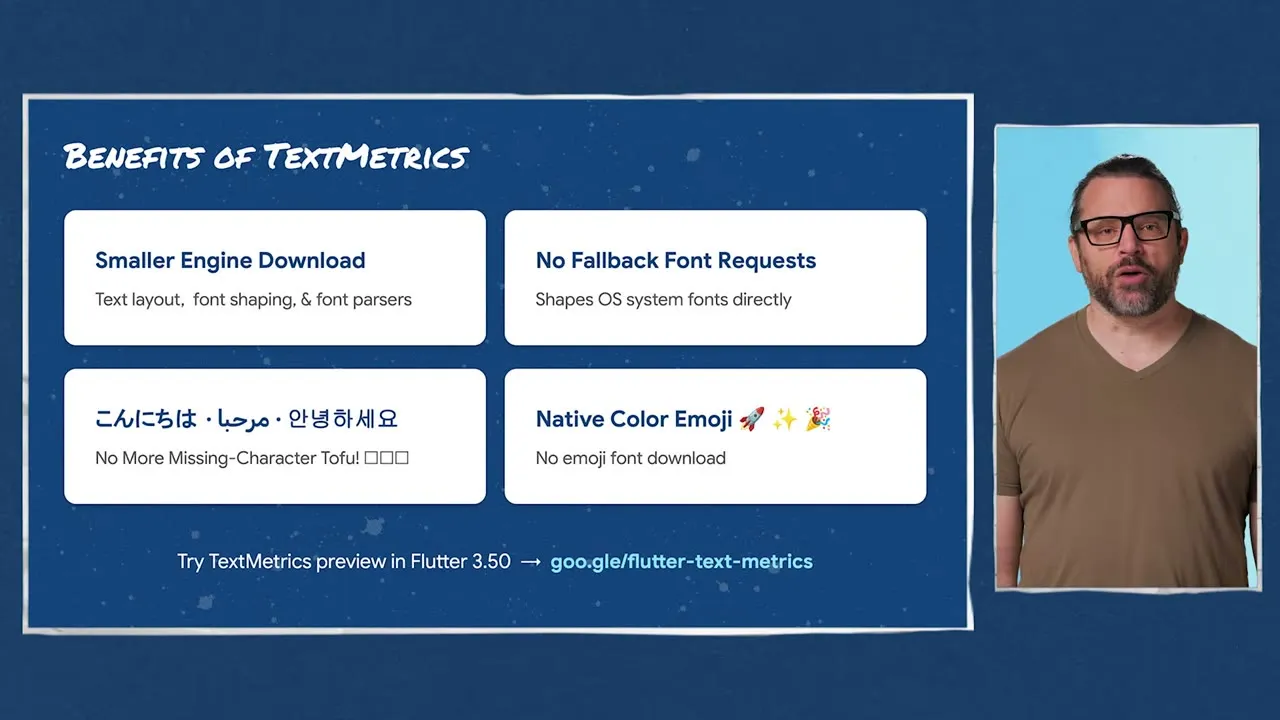
| WebParagraph(實驗) | 用瀏覽器原生 TextMetrics 排字,不必下載字型與 ICU | preferWebParagraph: true,只限 CanvasKit JS 建置 |
--web-content-hash | 檔名帶 8 字元 SHA-256,部署不再新舊混用 | canvaskit 不加 hash;與 deferred wasm loading 不相容 |
dart compile wasm --standalone | 純 Dart 程式編成 WASI 可執行檔 | 配合 wasmtime |
// web/flutter_bootstrap.js
{{flutter_js}}
{{flutter_build_config}}
_flutter.loader.load({
  config: {
    wasmAllowList: { blink: true, webkit: true, gecko: true }, // 另有 unknown
    // preferWebParagraph: true, // 實驗:Chrome 需 --enable-blink-features=ExtendedTextMetrics
  },
});
flutter build web --wasm --web-content-hash官方 firebase.json 快取範例(index.html 不快取、帶 hash 的檔案永久快取)
{
  "hosting": {
    "public": "build/web",
    "headers": [
      { "source": "**", "headers": [{ "key": "Cache-Control", "value": "max-age=0, must-revalidate" }] },
      { "source": "assets/**", "headers": [{ "key": "Cache-Control", "value": "public, max-age=31536000, immutable" }] },
      { "source": "main.dart.*.+(js|wasm|mjs)", "headers": [{ "key": "Cache-Control", "value": "public, max-age=31536000, immutable" }] }
    ],
    "rewrites": [{ "source": "**", "destination": "/index.html" }]
  }
}
Wasm 走出瀏覽器
dart compile wasm --standalone bin/main.dart -o main.wasm
wasmtime run main.wasm

# Simon Binder 的 wasm_tools(0.1.1-preview.1,概念驗證):WASI component model
dart pub add dev:wasm_tools
dart run wasm_tools compile bin/app.dart
wasmtime run bin/app.wasm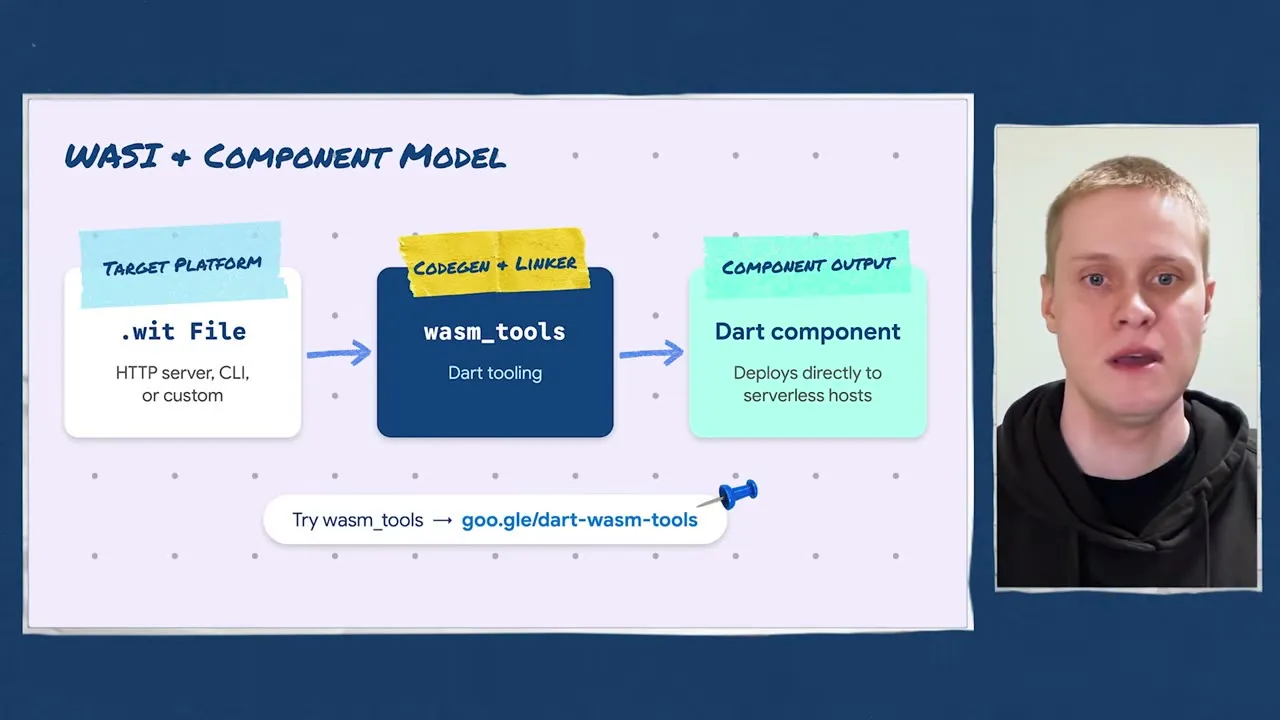
情境延伸
- 後台 / 內部工具類 Flutter Web:開啟三瀏覽器 Wasm,用 flutter-wasm-compare 量測自己的畫面。
- 部署後偶發「白畫面 / 舊版 JS」:加上
--web-content-hash與上面的快取設定通常就能解決。 - 共用的純 Dart 邏輯(計薪、驗證規則)可編成 standalone Wasm,放在 edge 或其他語言的服務裡重用。
延伸閱讀
- 官方 blog:What’s new in Flutter 3.50(Web 段落)、Announcing Dart 3.14(
dart compile wasm --standalone)、Best practices for optimizing Flutter web loading speed(2024,載入速度背景) - 動手做:DartPad preview(100% client-side)、flutter-wasm-compare 三瀏覽器效能比較
- 官方文件:Wasm、Web 初始化(flutter_bootstrap.js)、Web 部署、TextMetrics 實驗 #172561、wasm_tools、wasm.dart
- ⚠️ 版本提醒:WebParagraph 仍是實驗;wasm_tools 0.1.1-preview.1 只是概念驗證
GenUI / A2UI 1.0:讓 AI 回覆「介面」而不是一大段文字#
影片:What A2UI 1.0 means for Flutter devs(allowedParents/Children 3:02、Express 4:21、多 catalog 6:59、agentFunction 8:10)、Client side functions for Flutter GenUI
A2UI(Agent-to-UI)是 agent 用 catalog 裡的元件拼出 UI、由 Flutter 端渲染的協定。a2ui.org 目前把 v1.0 標為「Current」規格;Flutter 端套件已換代:genui 正式 deprecated,改由三個模組化套件接手,API 也不同(套件版號仍是 0.x)。影片的示範 app Commis 與官方 codelab 目前仍是舊的 genui 寫法,照抄前要注意。
| 套件 | 版本(2026-11-12) | 用途 |
|---|---|---|
| a2ui_core | 0.7.0 | MessageProcessor、Catalog、FunctionImplementation、AgentFunction |
| a2ui_flutter | 0.3.0 | 把 surface 渲染成 Flutter widget |
| a2ui_agent | 0.3.0 | app 自己當 agent 時用(A2uiGenerator、Express) |
| json_schema_builder | 0.1.7 | 定義 schema(a2ui_core 不會 re-export) |
| genui | 0.10.4 | 舊版,已 deprecated |
影片示範:agent 發現客人對甲殼類過敏,自己過濾掉含蝦的食譜,只給 7 個可勾選選項——沒有人寫過這個篩選畫面。
影片示範 app Commis:下方分頁是一般 UI,最右邊是 agent 畫面(原始碼)。
| 1.0 新東西 | 解決什麼 | 關鍵細節 |
|---|---|---|
| Client-side functions | LLM 算錢會錯、要等網路 | 繼承 FunctionImplementation,在裝置上執行,結果確定且立即 |
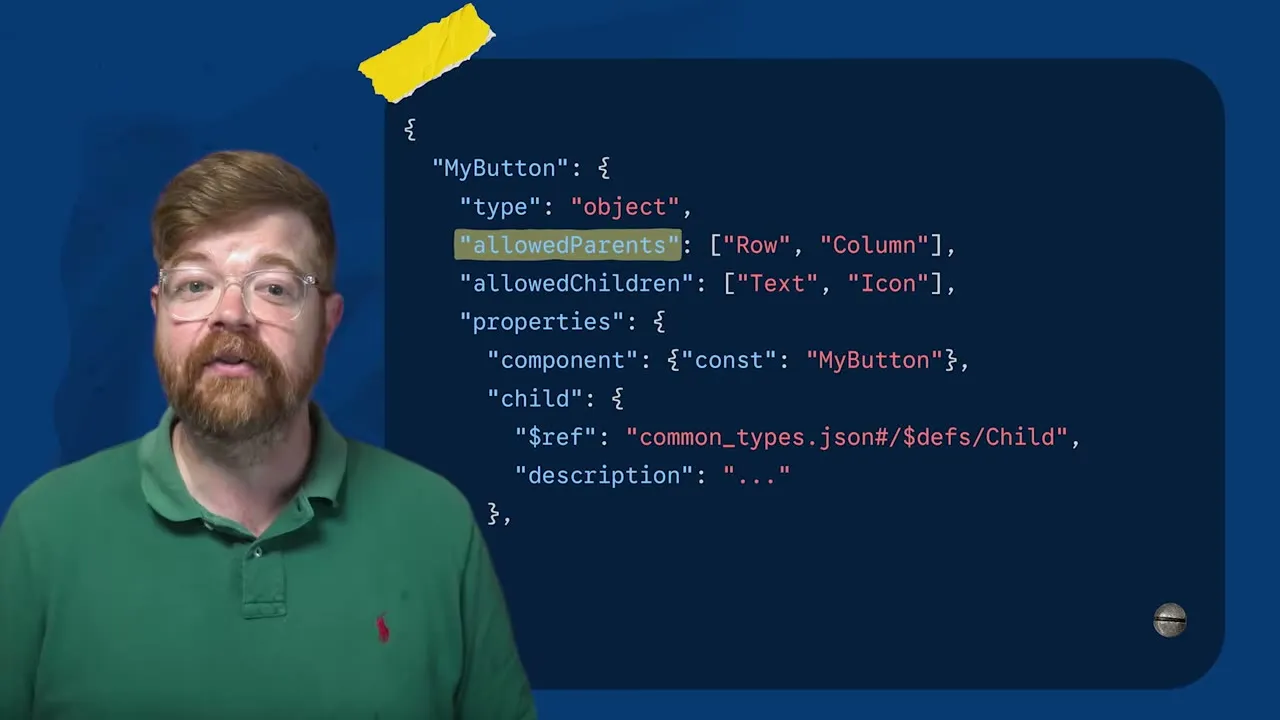
allowedParents / allowedChildren | agent 把整張訂單表塞進按鈕裡 | 編進 prompt,且 processor 會以 UNALLOWED_PARENT / UNALLOWED_CHILD 拒收,回報 agent 自我修正 |
| Express 格式 | 生成太慢、傳輸太大 | a2ui_agent 的預設格式(ExpressFormatFactory);Solid Software 的病歷儀表板約 10 秒 → 5 秒 |
| 多 catalog | catalog 綁死一個 surface | MessageProcessor(catalogs: [...]) 一次註冊多個 |
AgentFunction | 改一個數字也要開新一輪 LLM | 元件呼叫 agent 端函式,結果回寫資料,不經模型 |
| Metadata | 想帶 trace id、樣式旗標 | SurfaceModel.metadata / .extensions、node.metadata |
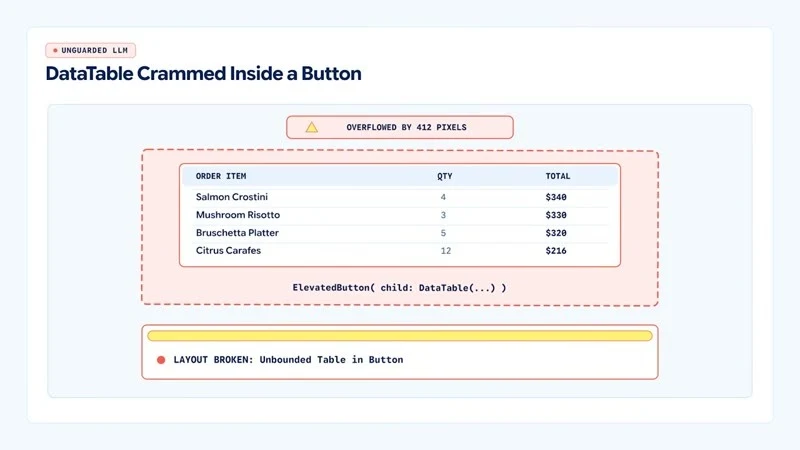
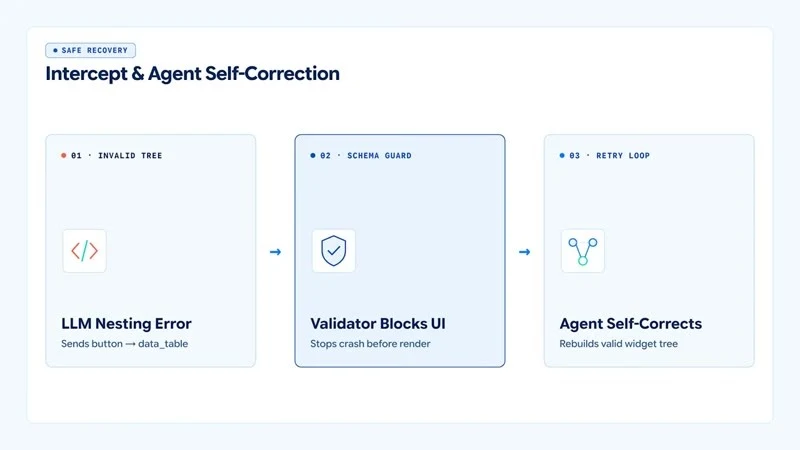
上:0.9 沒有巢狀限制,按鈕裡塞進整張表。下:1.0 在渲染前擋下、讓 agent 自我修正。
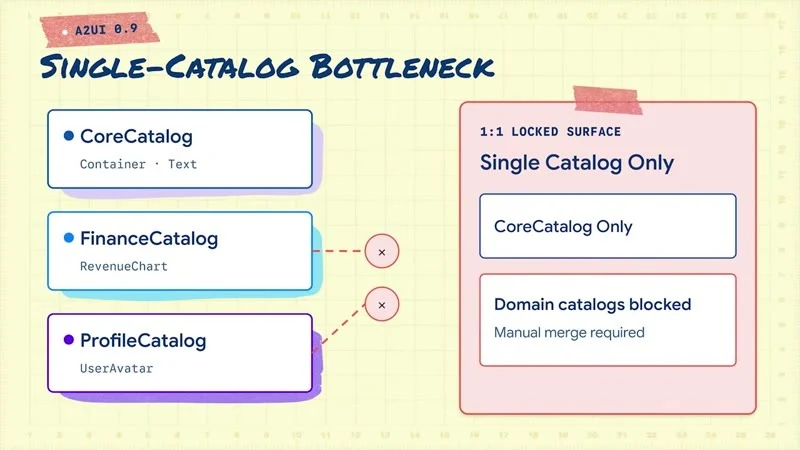
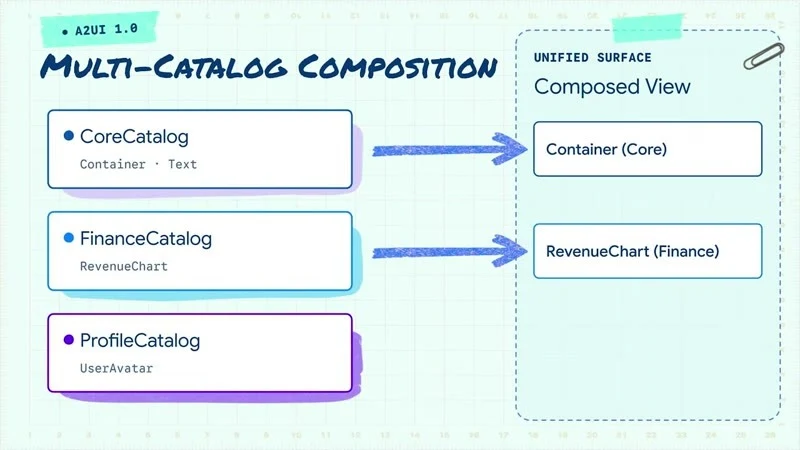
上:0.9 一個 surface 只能用一個 catalog。下:1.0 可同時組合 Core、Finance、Profile catalog。(影片截圖:What A2UI 1.0 means for Flutter devs)
Client-side function(a2ui_core 0.7.0)
dependencies:
  a2ui_flutter: ^0.3.0
  a2ui_core: ^0.7.0
  a2ui_agent: ^0.3.0          # 只有 app 自己組 prompt 時需要
  json_schema_builder: ^0.1.7
import 'package:a2ui_core/a2ui_core.dart';
import 'package:a2ui_flutter/a2ui_flutter.dart';
import 'package:json_schema_builder/json_schema_builder.dart' hide ValidationResult;
class CalculatePayFunction extends FunctionImplementation {
CalculatePayFunction(this.rates)
: super(
name: 'calculatePay',
description: 'Returns the pay for a shift as a TWD string, e.g. NT\$1,830.',
returnType: A2uiReturnType.string,
argumentSchema: S.object(
properties: {
'shift_id': S.string(description: 'The shift ID.'),
'hours': S.number(description: 'Worked hours.'),
},
required: ['shift_id', 'hours'],
),
);
final PayRateService rates;
@override
Object? execute(Map<String, dynamic> args, DataContext context,
[CancellationSignal? cancellationSignal]) {
final hours = num.tryParse(args['hours'].toString())?.toDouble() ?? 0;
final pay = rates.payFor(args['shift_id'].toString(), hours); // 純 Dart、可單元測試
return 'NT\$${pay.toStringAsFixed(0)}';
}
}
final payLabel = ComponentImplementation(
name: 'PayLabel',
schema: S.object(
properties: {'text': CommonSchemasV1.dynamicString}, required: ['text']),
allowedParents: ['ShiftCard'], // 只能放在 ShiftCard 裡
allowedChildren: const [], // 不能再包別的元件
builder: (context, node, props, buildChild) => Text(props.string('text') ?? ''),
);
final shiftCatalog = CatalogImplementation(
id: 'https://example.com/catalogs/shift.json', // 1.0 的 catalog id 用 URI
protocolVersion: A2uiProtocolVersion.v1_0,
components: [payLabel],
functions: [CalculatePayFunction(PayRateService())],
);
// 一個 processor 可同時註冊多個 catalog
final processor = MessageProcessor<ComponentImplementation>(
catalogs: [basicCatalog(), shiftCatalog],
outboundListener: sendToAgent, // actions、errors、callAgentFunction 都從這裡出去
unifiedOutbound: true,
);
// 讀取 agent 帶來的 metadata(例如 trace id)
processor.model.onSurfaceCreated.subscribe((surface) {
final ext = surface.extensions;
});
Agent 端(Dart server 或 app 自己當 agent):A2uiGenerator(catalogs: [...]) 預設就用 Express 格式;AgentFunction 放在 agent 的 CatalogApi(...).copyWith(agentFunctions: [...]),由 RendererToAgentMessageProcessor 回應。注意 CatalogImplementation 不能放 AgentFunction。
舊版對照:影片與 Commis 範例 中的 SynchronousClientFunction、executeSync、Catalog([...], functions:, catalogId:) 都是 genui 的 API,在 a2ui_* 套件中不存在。
決定「哪個動作要叫模型」(Somnio 在金融 demo 的做法):是「問題」就開新一輪;答案已知的操作(改金額重算)走 AgentFunction 或 client function。模型不做算術。他們測了 8 個金融場景,5 個用一般表單就夠,只有 3 個真的值得用 GenUI。(該 repo 的 v1 前端用的是自製 renderer,不是 a2ui_flutter。)
情境延伸
- 薪資 / 時薪試算:「這班做 6 小時可以拿多少?」→ agent 決定畫面,上面的
calculatePay算錢,絕不讓 LLM 寫數字。 - 找工作助理:用 allowedChildren 限制 job card 只能放標題、地點、時薪、按鈕,保住品牌一致性。
- 多團隊分工:核心 UI 維護基礎 catalog,各業務團隊各自發佈 domain catalog。
- 可觀測性:用 metadata 帶 trace id,把後端 agent log 與 app 的 Datadog / Sentry 事件串起來。
- 先問「一般表單能不能解決?」——大多數時候可以。
延伸閱讀
- 官方 blog:Quick, reliable calculations with A2UI’s Client-Side Functions(08-28)、Speeding up generative UI with async A2UI(08-13)、New updates to A2UI and Flutter’s GenUI package(05-14)
- 動手做:Codelab:GenUI 入門、A2UI quickstart、Commis 範例 app、Somnio 金融 demo
- 官方文件:a2ui.org、A2UI Dart 原始碼、Client-Side Functions 部落格、a2ui_core、a2ui_flutter
- ⚠️ 版本提醒:codelab 與 Commis 仍用已 deprecated 的 genui 0.10;新專案用 a2ui_*(0.x)
裝置端 AI:LiteRT-LM + Gemma 4、MediaPipe、Genkit Dart 1.0#
影片:On-device AI with LiteRT-LM and Gemma(選 Gemma 模型 4:19、Flutter 實作 5:31、Tool calling 7:18)、Google AI Edge 10 天做出桌面 AI app
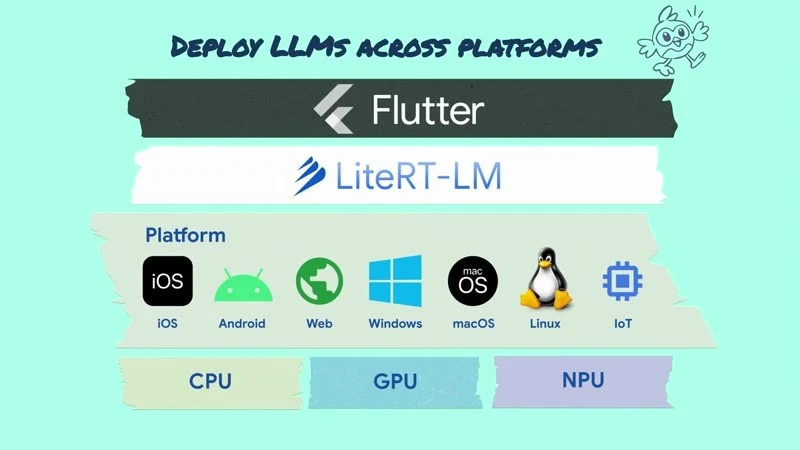
先弄清楚誰是官方:
| 東西 | 來源 | 版本(2026-11-12) |
|---|---|---|
| LiteRT-LM 執行引擎、Gemma 4 模型 | Google 官方 | — |
| flutter_edge_ai + flutter_edge_ai_litertlm | 社群套件(sashadenisov.dev,前身 flutter_gemma),影片示範用它 | 2.6.0 / 1.20.0 |
| MediaPipe for Flutter | Google 官方,5 個 task 套件 + mediapipe_core,22 個 task 類別 | 0.2.1(影片畫面是 0.1.3) |
| Genkit Dart | Google 官方,1.0 發布文 | 1.0.2 |
LiteRT-LM + Gemma 4(flutter_edge_ai 寫法)
dependencies:
  flutter_edge_ai: ^2.6.0
  flutter_edge_ai_litertlm: ^1.20.0
await FlutterEdgeAi.initialize(inferenceEngines: const [LiteRtLmEngine()]);
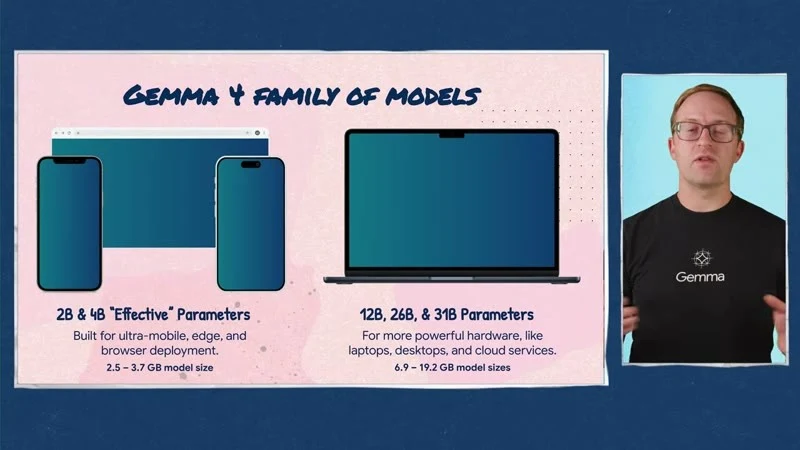
// Gemma 4 E2B 約 2.59 GB、E4B 約 3.66 GB,首次需下載
await FlutterEdgeAi.installModelFromCatalog(LiteRtLmModels.gemma4E2bIt.generic)
.withProgress((p) => debugPrint('downloading $p%'))
.install();
final model = await FlutterEdgeAi.getActiveModel(
maxTokens: 2048,
preferredBackend: PreferredBackend.gpu,
);
const weather = Tool(
name: 'get_weather',
description: 'Current weather for a city',
parameters: {
'type': 'object',
'properties': {'city': {'type': 'string'}},
'required': ['city'],
},
);
final chat = await model.openChat(tools: const [weather]);
await chat.addQueryChunk(Message.text(text: '台北現在天氣?', isUser: true));
await for (final r in chat.generateChatResponseAsync()) {
if (r is TextResponse) debugPrint(r.token);
if (r is FunctionCallResponse) {
final result = await weatherService.lookup(r.args['city']);
await chat.addQuery(Message.toolResponse(
toolName: r.name, response: result, toolCallId: r.id));
}
}平台需求:iOS 15+(static frameworks)、Android minSdk 30 且僅 arm64、macOS 14+。Hugging Face litert-community 另有 12B、26B-A4B、31B 等較大模型。
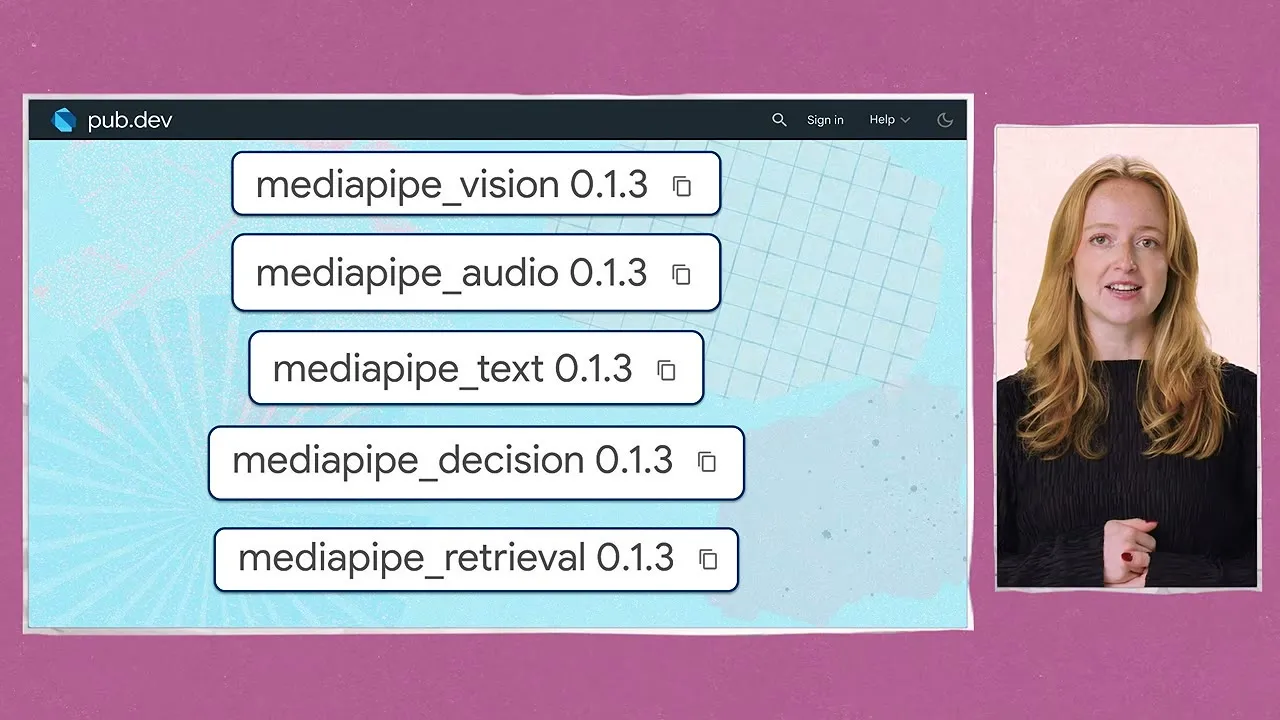
MediaPipe(0.2.1,需 Flutter ≥ 3.47):vision / text / audio / decision / retrieval 五個 task 套件。
final classifier = await TextClassifier.create(
  TextClassifierOptions(model: TextModels.bertClassifier, maxResults: 2),
);
Genkit Dart 1.0(雲端 / server 端的 AI flow)
final ai = Genkit(plugins: []);
final hello = ai.defineFlow(
  name: 'hello',
  inputSchema: .string(defaultValue: 'World'),
  outputSchema: .string(),
  fn: (String subject, _) async => 'hello $subject',
);
情境延伸
- 離線 / 隱私場景:班表摘要、工作說明翻譯、表單內容檢查可以在手機上跑,個資不出裝置。
- 2.59 GB 的下載是主要成本:只在 Wi-Fi、使用者主動開啟時下載,且要有雲端 fallback。
- 低階 Android(minSdk < 30)與 32 位元裝置不支援,上線前先看使用者裝置分佈。
- 小模型(MediaPipe 文字分類、嵌入)先導入,比 LLM 小很多、效果穩定。
延伸閱讀
- 官方 blog:Announcing Genkit Dart 1.0(10-08);LiteRT-LM / Gemma on Flutter 目前只有影片,沒有 blog 專文
- 動手做:flutter-mediapipe(含範例)、LiteRT-LM、Gemma 模型(Hugging Face)、Genkit Dart 入門
- 官方文件:Gemma、MediaPipe for Flutter、Genkit Dart 1.0 發布;社群:flutteredge.ai
- ⚠️ 版本提醒:flutter_edge_ai 是社群套件;Gemma 4 E2B 下載約 2.59 GB;Android 需 minSdk 30、arm64
AI 開發工具:Dart / Flutter MCP、skills、agent plugins#
影片:The Future of Flutter’s Dev Experience(MCP 工具與 skills 在做什麼 15:18、團隊如何做 evals 21:35)
重點:模型會變強,但 analyzer、DevTools、VM service 這類「確定性」工具更重要——MCP 把它們交給 agent,skills 告訴 agent 怎麼寫得道地。
// 任何支援 MCP 的 agent(需 Dart 3.9+)
{ "mcpServers": { "dart": { "command": "dart", "args": ["mcp-server"] } } }
# Claude Code:官方 agent plugin(含 MCP + skills)
claude plugin marketplace add flutter/agent-plugins
claude plugin install dart-flutter@dart-flutter
# 其他 agent:只裝 skills
npx skills add flutter/agent-plugins --skill '*' --agent universal --yes
# 套件作者:取用 / 檢查套件自帶的 skills
dart run skills@ get
dart pub add dev:skills_lint情境延伸
- 團隊的 Claude Code 裝上
dart-flutterplugin,讓 agent 能跑 analyzer、看 widget tree、hot reload,少猜。 - 內部共用套件可以自帶 skills,並用
skills_lint在 CI 檢查。
延伸閱讀
- 官方 blog:Introducing Skills for Dart and Flutter(05-06)、Skills CLI 1.0(09-08)、Building multi-agent development teams(08-20)、Dart MCP server(2025-07)
- 動手做:flutter/agent-plugins、Antigravity
- 官方文件:AI 入門、AI tools、Package skills
- ⚠️ 版本提醒:Dart MCP server 需 Dart 3.9+
LG webOS:Flutter 上電視#
影片:Build a webOS app with Flutter(安裝 SDK 4:47、建立、執行、hot reload 5:52)
- SDK 由 LG 維護,是 Flutter 「pluggable platforms」的第一個外部平台。
- 開發機只支援 Linux(macOS / Windows 用 WSL2 或 DevContainer);目標為 webOS TV 26+,輸出 .ipk,已有 25 個常用 plugin。
flutter-webos doctor -v
flutter-webos precache
flutter-webos config --enable-custom-devices
flutter-webos custom-devices add          # 加入開發者模式的電視
flutter-webos devices
flutter-webos create --platforms webos my_tv_app
flutter-webos run -d <device-id>
flutter-webos build webos --release
情境延伸:店內 / 活動現場的大螢幕(排隊叫號、報到看板)可直接重用既有 Flutter 元件;注意遙控器的 focus 導覽要另外設計。
延伸閱讀
- 官方 blog:目前沒有 webOS 專文,總覽見 What’s new in Flutter 3.50
- 動手做:lg-flutter-webos/flutter-webos
- 官方文件:LG:Flutter for webOS 指南
來源#
- What’s new in Flutter 3.50(2026-11-11)
- Announcing Dart 3.14(2026-11-11)
- Breaking changes 索引、material_ui / cupertino_ui 遷移指南、Docs What’s new
- Quick, reliable calculations with A2UI’s Client-Side Functions(2026-08-28)
- AI makes it easy to migrate. Flutter makes it easy to scale.(2026-10-20)
- 影片:@flutterdev 頻道(各支影片連結見文中各節;截圖與 GIF 皆擷取自這些官方影片)