How Wingman works: Jev judges, an LLM writes, a small helper for replying to messages
Let Jev decide how to reply, let an LLM draft three options, and fill the input box without ever sending
If you switch between Slack, LINE and Discord all day, you know the feeling. Messages keep popping up. Some need an answer right now, some only need a “got it”, and just deciding whether a message needs a reply, and how, already eats a surprising amount of energy.
At the end of September I built a small macOS menu bar tool called Wingman to save myself that step. When someone writes to me, it shows ”✦ 3 suggestions” above the input box. ⌥Space opens three drafts, and the best one is marked ★. Press Enter and it types that draft into the input box and stops. The Enter that actually sends the message is always mine.
In this article I want to share how Wingman is built: what Jev and the LLM are each responsible for, how it reads seven chat apps, how I picked the model that writes the drafts, and whose servers your company’s conversations pass through.
The core idea fits in one sentence: Jev judges, the LLM only writes.
Jev is TypeSafe’s System One decision model. It does not write sentences. It only answers questions that have fixed options, and every answer comes with a probability: what this message wants, whether it needs a reply, how urgent it is. One judgment takes about 0.3 seconds. The LLM starts writing only after it has those judgments, so one suggestion takes 2 to 4 seconds and costs about US$0.0002.
Wingman currently supports Slack, Discord, Messenger, Instagram, Threads, LINE and Telegram. The source is on GitHub under the MIT license.
How one suggestion runs#
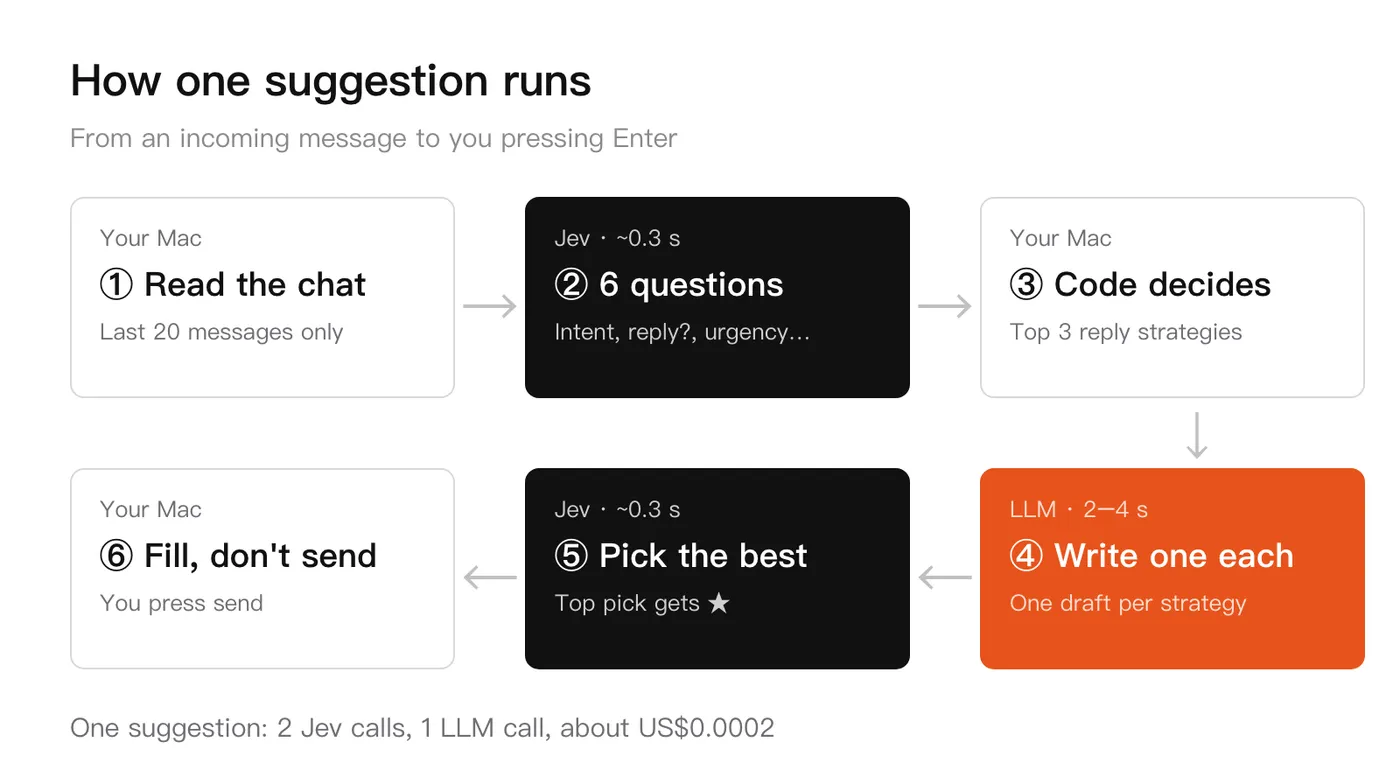
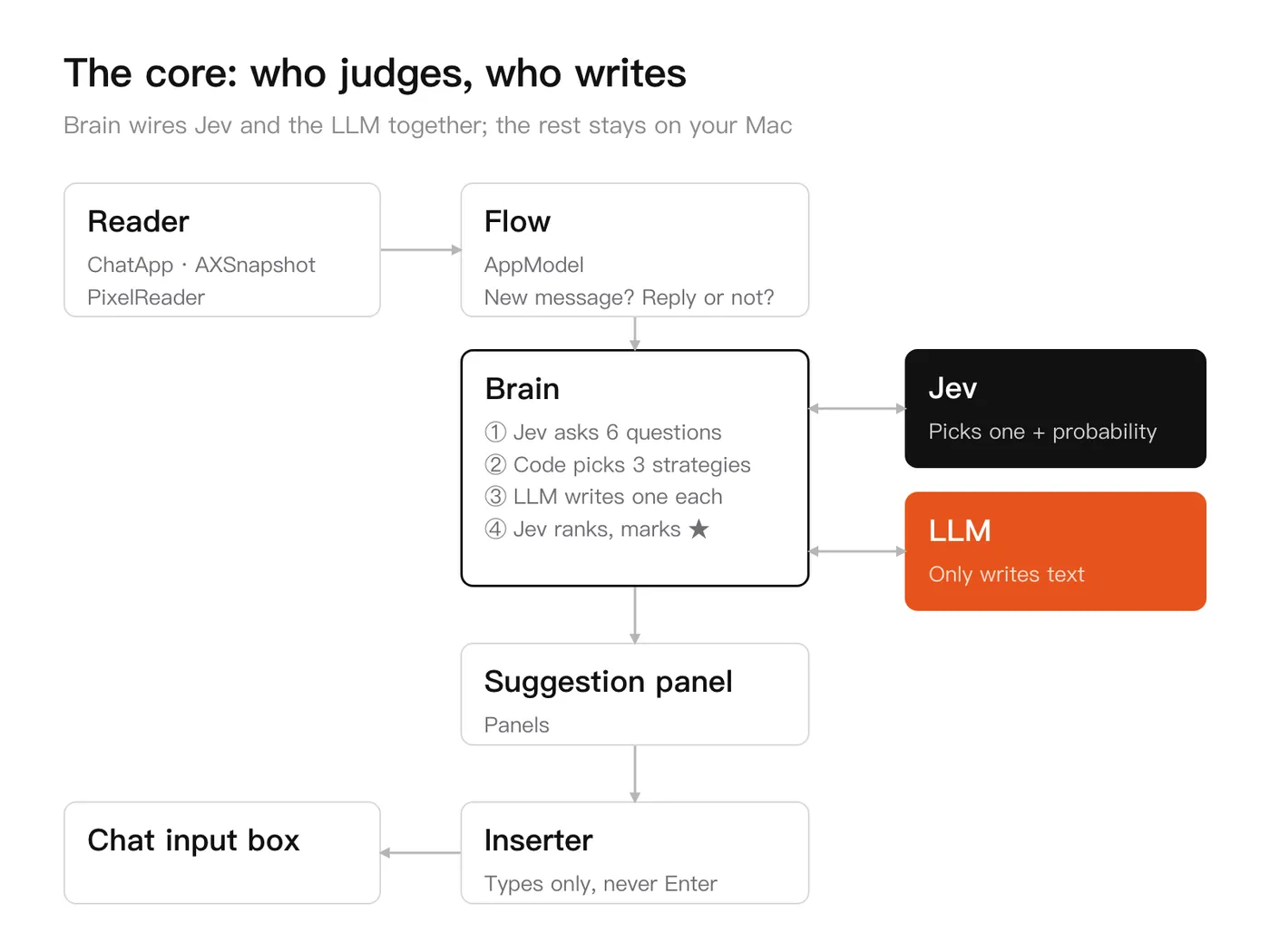
Let’s follow this diagram from an incoming message to the moment you press Enter.
When a new message arrives and the screen has been still for 1 second, Wingman reads the chat, takes only the last 20 messages, and gives them to Jev, which answers six questions at once: intent, whether it needs a reply, urgency, which reply strategies move the conversation forward, how tense the mood is, and whether there is subtext. Every answer comes with a probability.
Then plain code decides. If “needs a reply” is below 0.5, it stops there and never calls the LLM. Otherwise it takes the three most likely strategies and asks the LLM to write one draft for each, showing each draft as soon as it is written. When all three are done, Wingman asks Jev once more, treating the three drafts as options of a single question, and the most likely one gets the ★. Finally, Enter or 1 to 3 puts the text into the input box, and the rest is up to you.
The split exists because of price. One judgment is about 1,000 to 1,800 input tokens and costs under US$0.0001, and writing one draft costs two to three times that. Letting the cheap Jev decide whether a reply is worth writing means small talk and announcements never trigger a wasted LLM call, and no distracting hint appears above the input box.
The six questions Jev answers#
Here is a real example. The diagram below shows Jev judging one message. Someone asks “Can we ship before end of day?”, and it answers that they want progress or an ETA, that a reply is needed, and that the best way to reply is to give progress and a time, each with a probability. After the LLM writes three drafts, Jev is called once more to rank them as three options of one question. When the other person only says “thanks :)”, the three drafts get 99%, 0% and 1%, and it picks “You’re welcome, let me know if you need anything!”. I would have picked that one too.
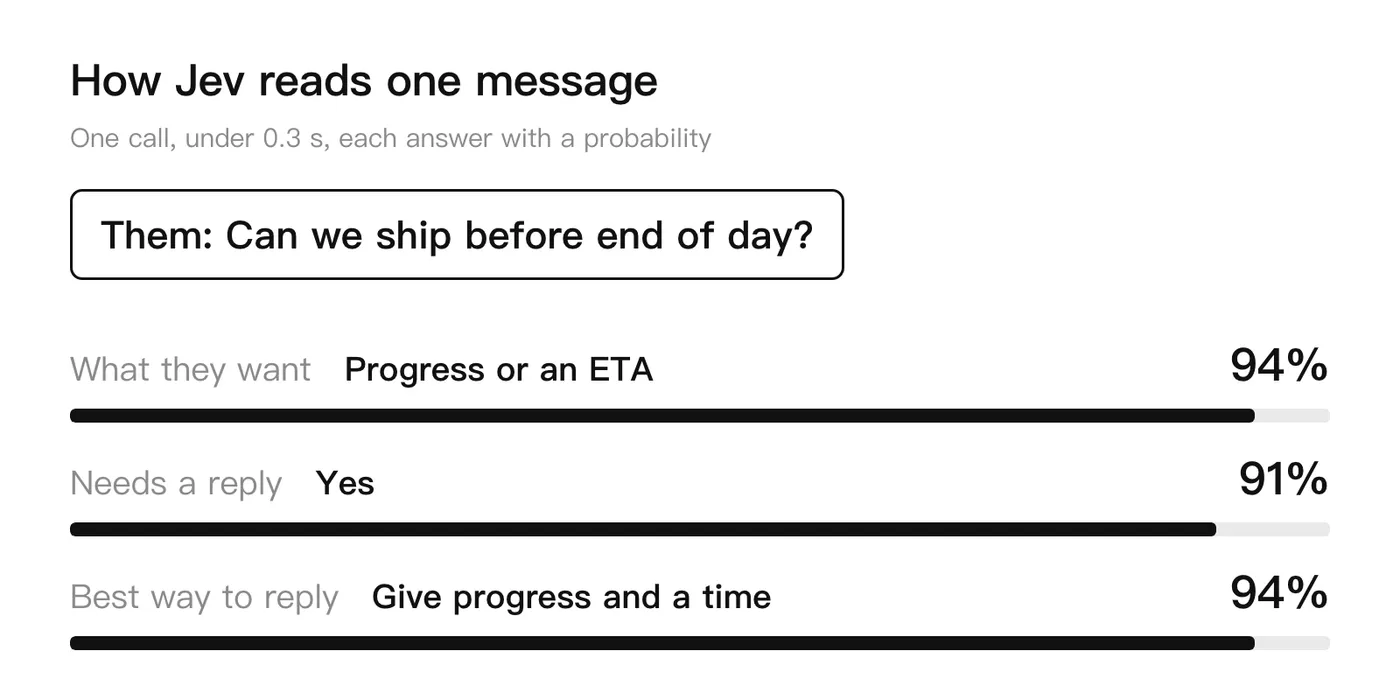
In practice each suggestion asks the six questions below. I wrote the options myself, and Jev only picks from them and tells us how sure it is:
- What they want → ask for information, request or delegate, chase progress or an ETA, confirm or agree, announce, small talk, complain, thank. Eight in total
- Needs a reply → yes or no, with a probability
- How urgent → 0 to 3, from “within a few days” to “right now”
- Best way to move the conversation → agree outright, agree with conditions, give progress and a time, ask for clarification, decline or postpone, thank, short acknowledgment. Seven in total
- How tense the mood is → calm, watch out, tense, about to fight, broken. Five levels
- Any subtext → yes or no, with a probability
The last two questions were added later. When the mood is tense, the three drafts first clear things up instead of agreeing right away. And if the three most likely strategies are all some form of “agree”, the third draft is swapped for “decline or postpone”, because if all three drafts say yes, someone who cannot deliver has nothing to pick.
The overall architecture#
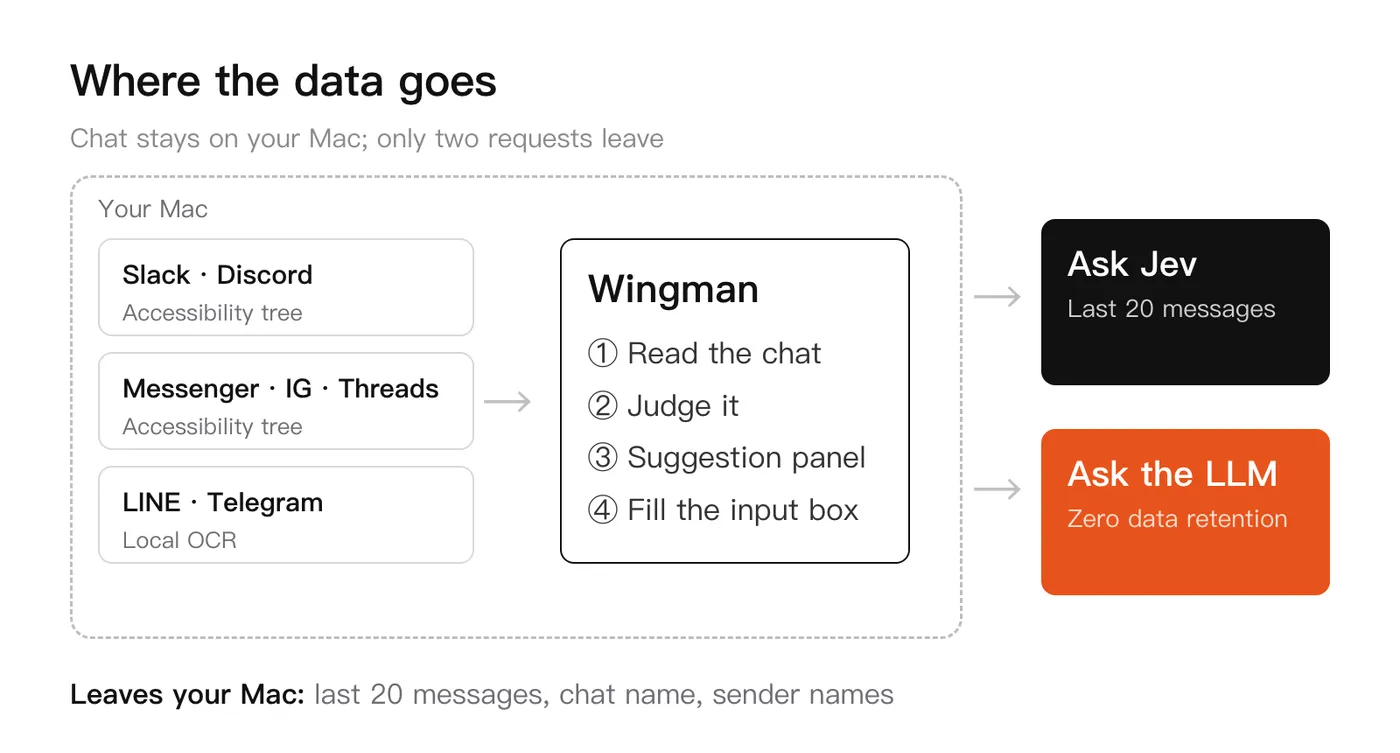
The dashed box in this diagram is your Mac. It holds the chat apps and Wingman itself, and everything outside it is off your machine. Only two kinds of requests leave your computer: one asks Jev, the other asks the LLM to write. Reading messages, deciding whether to continue, showing the panel and typing text into the input box all happen on your Mac.
One level deeper is the core of the program. Brain is the only module that talks to both Jev and the LLM: it asks Jev six questions, the code picks three strategies from the answers, the LLM writes one draft for each, and finally Jev ranks the three and marks the ★. The reader, the flow, the panel and the inserter each do their own job and never touch a model.
How each chat app is read#
The first step of the project was probing every app with the macOS Accessibility API, because they differ a lot.
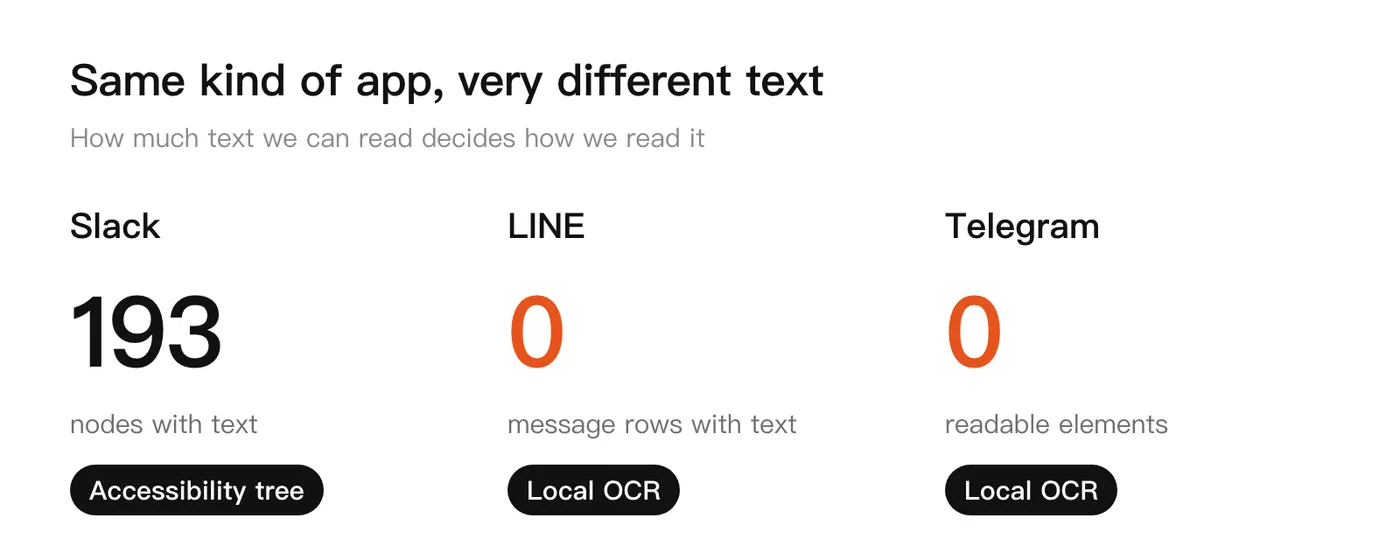
The diagram shows what I found. Slack and Discord are built with Electron, so the whole DOM is readable through the accessibility tree and only the “Accessibility” permission is needed. The web versions of Messenger, Instagram and Threads are also read through the accessibility tree, and only on their exact URLs.
LINE is different. The chat title and the input box are still readable, but the messages themselves are empty. Telegram is even more extreme, with an accessibility tree that is completely empty. For these two apps there is no message text to grab, so Wingman needs the “Screen Recording” permission and runs Apple Vision OCR locally. Screenshots are never uploaded. Chinese recognition is quite accurate, and who said what is decided by the x position of the bubble: the other person’s start at about 12% from the left, mine end at about 93%.
I have used Slack, Discord, Messenger, Instagram and Threads in real chats. LINE and Telegram go through OCR and I have used them less so far.
The web versions have one more limit: the browser is read only on those three sites’ message pages. For comments under an Instagram or Threads post, it reads only the post whose comment box has the cursor, and just scrolling the feed reads nothing. A reply under a post is a public comment, and the panel says so clearly.
The writer model: the cheapest is not always the best deal#
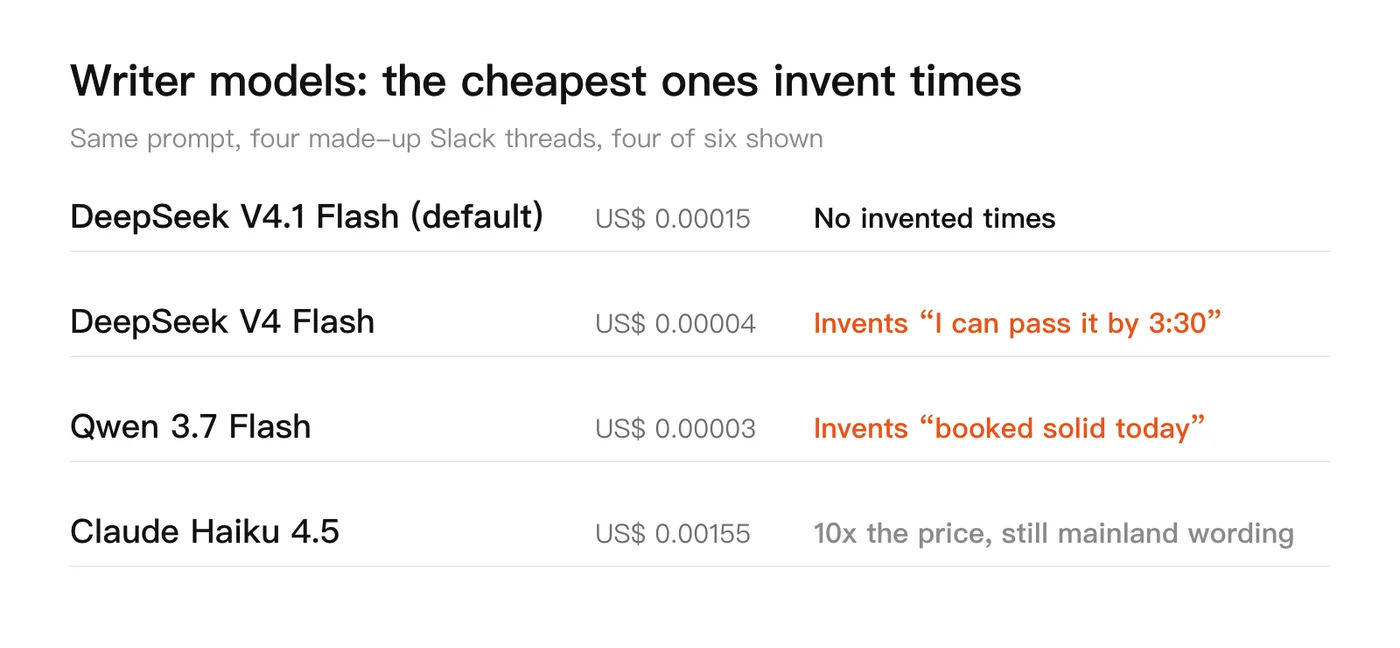
I benchmarked the writer models with scripts/bench-writers.py: four made-up Slack threads, one prompt for everyone, then OpenCC counts how many spots are not Taiwan-style Chinese. These are the results I measured in Taiwan on 9/27. The diagram shows four of the six, and the full list follows below it:
The full results:
- DeepSeek V4.1 Flash → 1.7 seconds on average, US$0.00015 per call, the cleanest Taiwan-style wording (0 spots), and it leaves
[time]when it does not know a time - DeepSeek V4 Flash → 3.5 seconds, US$0.00004, invents times: “I can pass it by 3:30” and “I’ll send you a fix tomorrow morning”
- Qwen 3.7 Flash → 2.4 seconds, US$0.00003, invents schedules: “after 2 pm” and “booked solid today”
- The other three (Qwen 3.8 Flash, Gemini 3.1 Flash-Lite, Claude Haiku 4.5) cost US$0.0001 to US$0.00155 per call and invent nothing, but they mix in simplified characters or mainland wording
What surprised me most is that the two cheapest models write times and plans that were never mentioned in the conversation. Those drafts read the smoothest, so it is easy to press Enter without thinking and promise something on my behalf. DeepSeek V4.1 Flash costs several times more, and still only US$0.00015 per call. What I get in return is not having to check every word for invented promises, so I made it the default.
Two more notes:
- OpenCC’s number is only good for filtering out the clearly unsuitable models. It even rewrites 權限 (permission) into 許可權, so you still have to read the drafts one by one
- The reply language is decided by the program first and then told to the writer, because when the rules only say “reply in the other person’s language”, most models still answer in Chinese when someone thanks me in English
Whose servers your company’s conversations pass through#
Conversations in Slack are company data, so I decided where the data goes before I ran the benchmark:
- There is no Wingman server. Everyone uses their own API key, and I never receive a key or any conversation
- Only the last 20 messages are sent, plus the chat name, the sender names and your display name. Judgments go to TypeSafe and writing goes through OpenRouter
- Only providers with zero data retention that do not collect data are used, and DeepSeek, StreamLake, Alibaba, SiliconFlow and Baidu hosts in China are excluded. After the exclusion, DeepSeek V4.1 Flash’s 1.7 seconds becomes usually 2 to 4 seconds, and sometimes 8 to 10
- Chat content is not stored by default. If you turn on “Remember chats”, the last 300 messages of each chat are kept encrypted, the key lives only in this Mac’s keychain, and anything left untouched for 90 days is deleted
- Logs record only time, counts and cost, never message text, and a button in settings clears them all
A full suggestion costs about US$0.0002, so 20 a day is roughly US$0.1 a month. These are pay-as-you-go API keys. ChatGPT and Claude subscriptions cannot be used by third-party apps.
I also tried the on-device Apple model in macOS 26 (FoundationModels). It supports zh-Hant-TW, it is free, and the data never leaves the computer, so it would be the most reassuring choice for company conversations. But the first reply took 18.6 seconds, and when the conversation was about today it wrote “I’ll ship tomorrow morning”, and it even got who should reply to the customer wrong, so it is not the default.
Why it only fills, and never sends#
The only thing Wingman does to other apps is type the draft you picked into the input box. Below are real screens from a LINE community, with member names blurred: a hint pops up at the bottom right, ⌘Space shows three suggestions, and after you pick one the text appears in the input box. You still press send. Notice that the first suggestion says “I’ll get back to you by [time]”. It does not know the time, so it leaves a blank for me to fill.
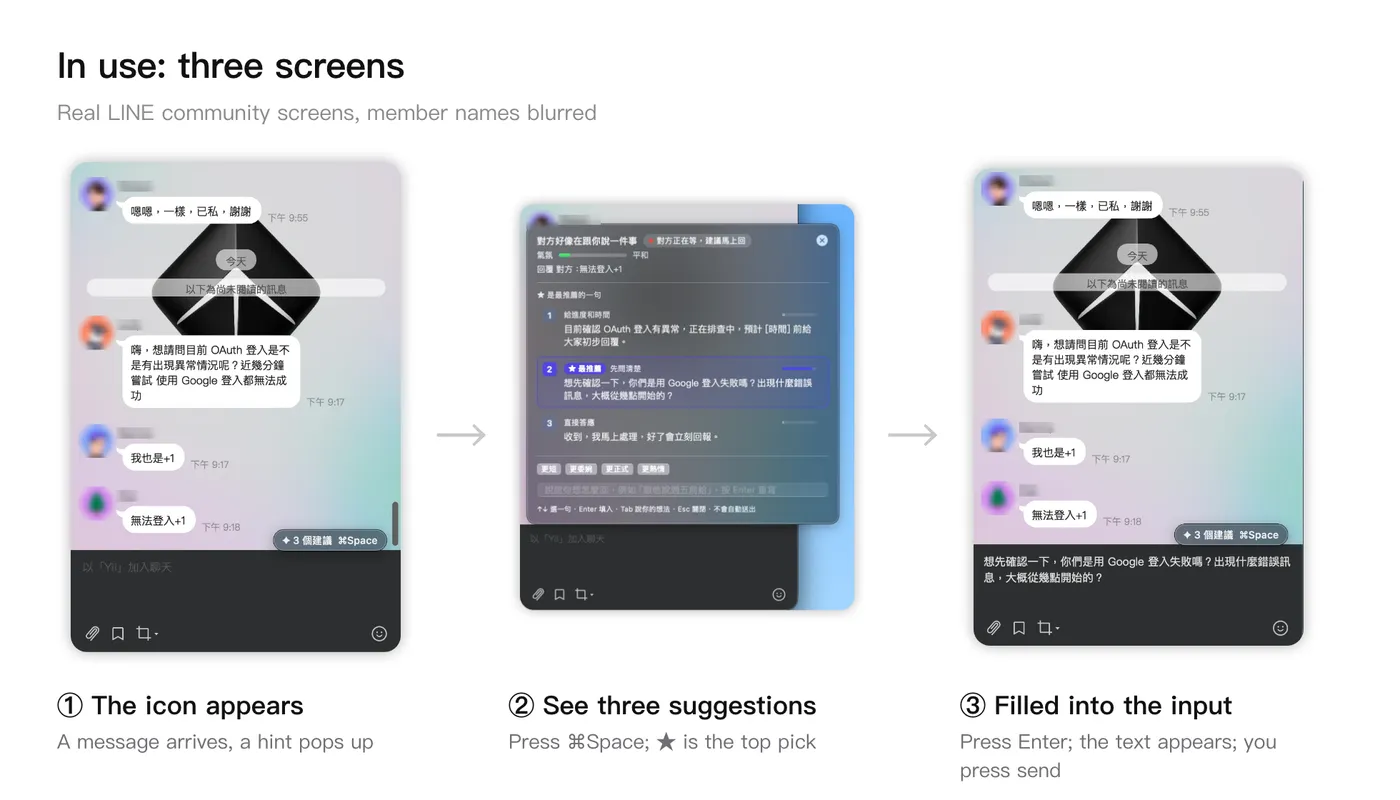
It has a few more safeguards:
- It never presses Enter, and even strips characters in the draft that could be read as Enter, because in Slack a line break means send
- Before typing, it checks that the chat is still the same one and the input box has focus. If either does not match, the draft goes to the clipboard instead
- Messages from others reach the model as plain text. A malicious message can try to steer a draft, so always read it before sending, but the model has no tools and no keys and cannot reach any other chat
I also deliberately do not show percentages on the panel. Jev’s probabilities easily hit the extremes, and a perfectly reasonable draft with 0% next to it reads at first glance as “this one is wrong”. So I use two labels instead, ”★ Top pick” and “Also good”, and tuck the numbers into a tooltip.
Install it yourself#
You need macOS 14 or later, Xcode 16 or later, and brew install opencc. Then run:
git clone https://github.com/chyiiiiiiiiiiii/jev-wingman.git
cd jev-wingman
./scripts/install.sh
The first launch walks us through three steps: permissions, keys, and a display name. For the keys, OpenRouter is required and TypeSafe is optional, but with it the judgments are several seconds faster.
Conclusion#
This article shared how Wingman works: Jev decides whether and how to reply, the LLM writes, and Jev ranks the drafts. If you want to build a similar tool, I have three lessons from my own experience.
- Probe each app’s accessibility tree before choosing an architecture, because Slack and LINE look alike but are read in completely different ways
- Pick the writer model by reading its drafts from your own conversations one by one, and watch mainly whether it promises things on your behalf
- Always leave Enter to the user
Next I want to keep improving the OCR for LINE and Telegram, and use the log to see how often the ★ draft is the one I actually pick. If you try it, I would love to hear what you think.
Further reading#
- Your widget tree is already a list of options: the “let Jev pick, let the LLM write” split first appeared in this article
References#
- Introducing System One models and Jev
- jev-chat-jarvis: Wingman’s skeleton borrows from it: one reader per app, no screenshots when text is readable, fill but never send
- jev-wingman