How to make Flutter E2E tests more complete: Patrol, marionette and e2e, and where AI belongs
One app and the same four flows, measured on three tools: what scripts should gate, and where AI agents help
Contents13
After writing Flutter E2E tests for a while, most of us run into the same few problems. Flutter’s own integration_test cannot tap system permission dialogs. Rename one key in the UI and a whole row of scripts turns red. And this year more and more AI agent testing tools have appeared. They look like they can automate everything, but it is hard to know whether you can trust one to block a merge. So I kept asking myself: to make Flutter tests more complete, which parts should go to scripts, and where does AI actually help?
In the previous article, Your widget tree is already a list of options, I shared what happened when an AI agent ran Flutter E2E tests with Jev, a cheap model that only picks from options. This time I widened the scope. With the same demo app and the same four flows, I measured three tools on the iOS simulator: Patrol, marionette and e2e. The judging works the same way as last time, by reading what the app actually stored. In this article I want to share the results and the split of work I ended up with.
Your widget tree is already a list of options: where Jev fits in a Flutter project — Yii ChenA model that picks from a list and cannot write text. What it can do for Flutter, and when you should not use ityii · writing
Meet the tools#
A few tools come up again and again in this article, so let’s spend a moment on what they are and why I picked them:
- Patrol → a Flutter E2E framework from LeanCode, a team in Poland. Flutter’s own integration_test cannot reach system permission dialogs. Patrol adds UIAutomator / XCUITest on the native side, so tests are still written in Dart but can tap “Allow” on a dialog, and they can check the app’s data directly. That is why it does the gating this time
- marionette → another open-source tool from LeanCode. It lets a coding agent such as Claude Code connect to a running Flutter app, see the widgets on screen, and tap and type by itself. It is great for quick checks during development, and the previous article used it to hand the widget tree to Jev
- e2e → a TypeScript test framework from TesterArmy. A test can mix fixed locators with AI agent steps. Once the agent gets through a step, the step is recorded and later replayed without calling the model, and it only goes back to the agent when the screen has changed. It drives the app from outside, so it can test the real release build
- Jev → a small model from TypeSafe that only picks one of the options it is given and never generates text, so it is fast and cheap. Wherever something needs typing, an LLM is paired with it
Why these three#
There are quite a few E2E options for Flutter. I started with a list of seven, and the table below has the five that get compared most often. You will notice that every tool has something it cannot do, so I did not plan to pick just one. Instead I looked at which tool fills which gap:
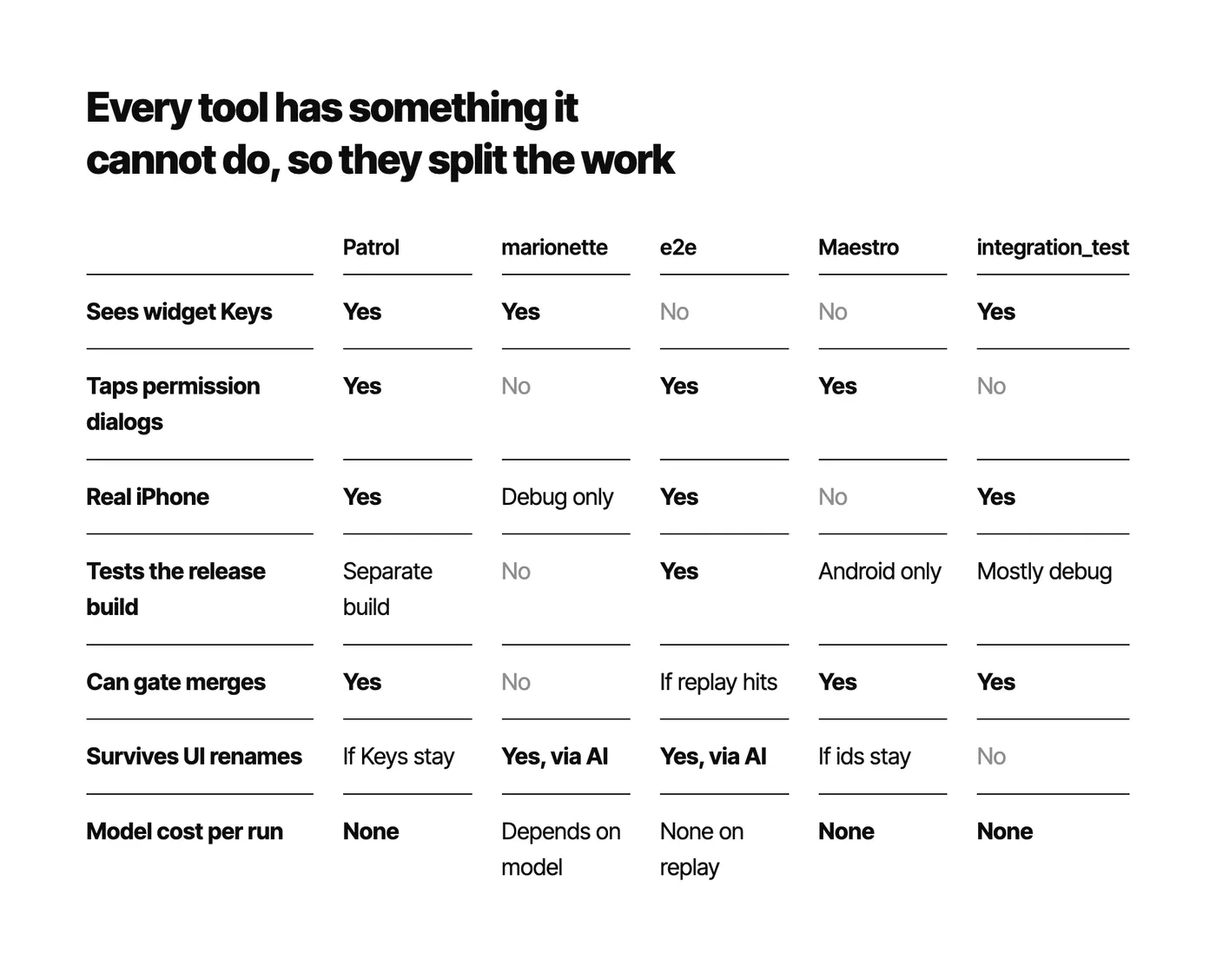
Two tools in the table did not make it in, and here is why:
- Flutter’s integration_test → Patrol is built on top of it. Patrol can do almost everything it can, plus system dialogs, so I went straight to Patrol
- Maestro → I have used it before. Flows are written in YAML, it waits for screens to load by itself, and it reruns a test file as soon as you edit it, without recompiling. It is very pleasant to use. Like e2e it drives the app from outside, its results are stable, and it has no model cost. So why e2e this time? It comes down to real iPhones. Flutter’s release mode does not run on the iOS simulator, so testing the real release build needs a real device, and Maestro does not support real iOS devices yet. If your project only needs to check Android release builds, Maestro may well suit you better than e2e. I did not measure it this time, so none of the numbers below include Maestro
There is also Google’s artemis, and the approach of skipping frameworks and letting an LLM drive the phone directly. artemis only supports Android for now, and neither approach leaves a test file you can rerun and put through PR review, so I left them out.
The results first#
Here is the summary:
- Patrol → 4/4. The test itself takes 5 to 7 seconds, and across the whole run it comes to about 26 seconds per test. The test can check the app’s data directly
- e2e with an LLM → on the return flow, the one the UI change touched, it finished by itself in one of two runs. But each test takes 50 to 70 seconds, and there was one false pass
- e2e with Jev → in the first round all 36 tests stopped at the first step, because Flutter text fields are read as
Otheron iOS, so Jev had no option to type into. In November I reran it with a newer e2e. Text fields were fixed, but Jev still got stuck on order rows that have no name. After I marked tappable list items as buttons in the app, the return flow finished by itself three times in a row - marionette with Jev → the six tasks from the previous article, three runs each on the same simulator: 18/18, about 8 seconds each
- Patrol red after the UI change → I let Jev rerun the flow once through marionette. It found the 3 renamed keys, a person reviewed and applied them, and the test went green in 6 seconds
The split I ended up with is that scripts gate and AI helps on the side. Patrol blocks merges and releases, marionette lets an AI agent check its own work during development and propose fixes when Patrol breaks, and e2e handles exploration and smoke tests on the release build. What surprised me most was this: the same AI model on the same simulator went 18/18 reading from the Dart layer, but could not take a single step from the OS layer in the first round, while an LLM in that same OS layer, which decides by itself where to type, got 10/12. Later the model stayed the same and the app only started reporting button roles, and Jev finished the return flow. So when choosing a tool, first look at which layer of the app it hooks into. For a model like Jev that only picks from options, whether it can help is decided by that layer and by what the app reports to it.
Which layer each tool hooks into#
One big difference between Flutter and native apps is that Flutter draws every pixel on screen itself. iOS and Android cannot see widgets. They only see the Semantics nodes that Flutter reports to them on the side, the information meant for accessibility features. So Flutter E2E tools fall roughly into two groups:
- Inside the Dart process → integration_test, Patrol, marionette. They see widget types and Keys and can read the app’s state directly, but cannot touch anything outside Flutter’s canvas, such as system permission dialogs
- In the OS accessibility layer → Maestro, e2e. They see system dialogs, but they only know Flutter’s screen through Semantics nodes, and they cannot see Keys
Patrol is a special case, with a foot in both. Its test code runs in the app process, and a native runner talks to it over localhost, so one test can tap a Flutter button by Key and then tap “Allow” on a system permission dialog.
In the figure below each row is one layer, with what that layer can see, the tool that reads from it, and how the same AI model did there:
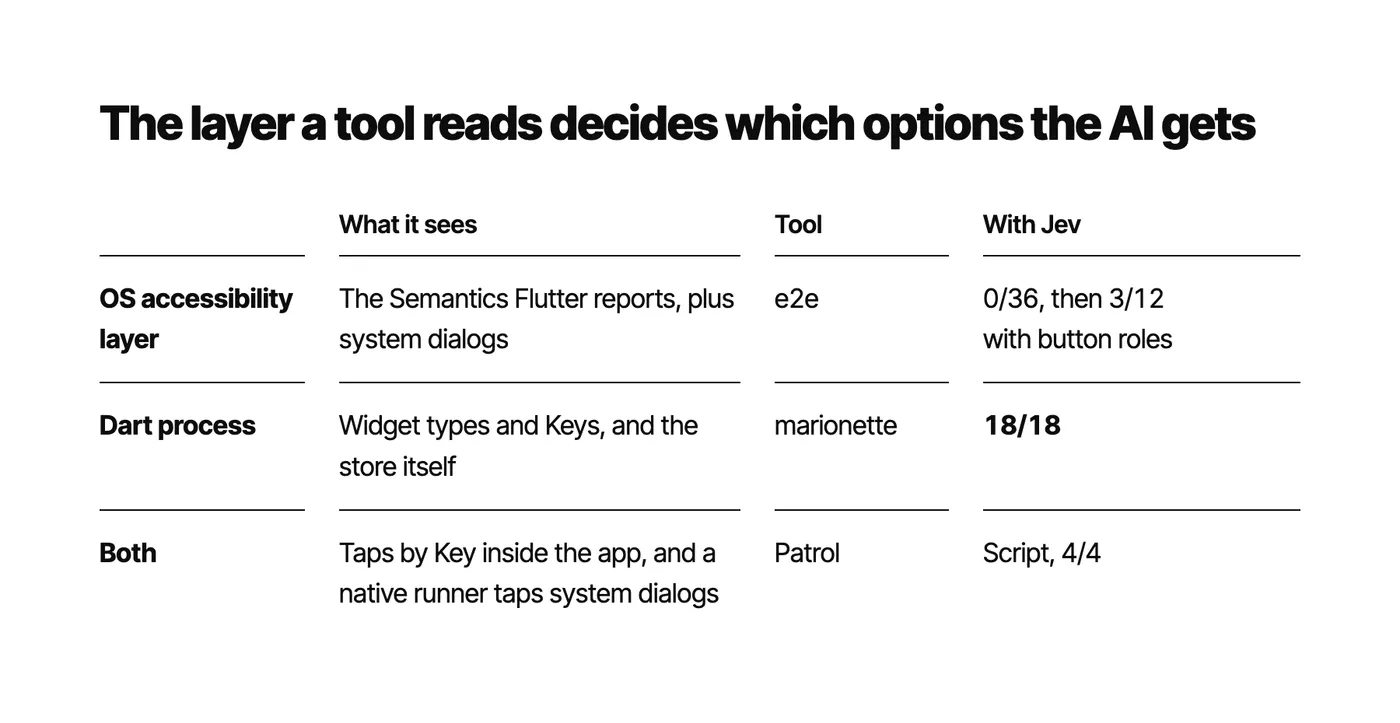
In the previous article Jev was connected through marionette, and the options it got were things like FilledButton key=signin_button, built from the widget tree. This time e2e looks at the same app from the OS layer, and as you will see, the difference turned out much bigger than I expected.
How the experiment works#
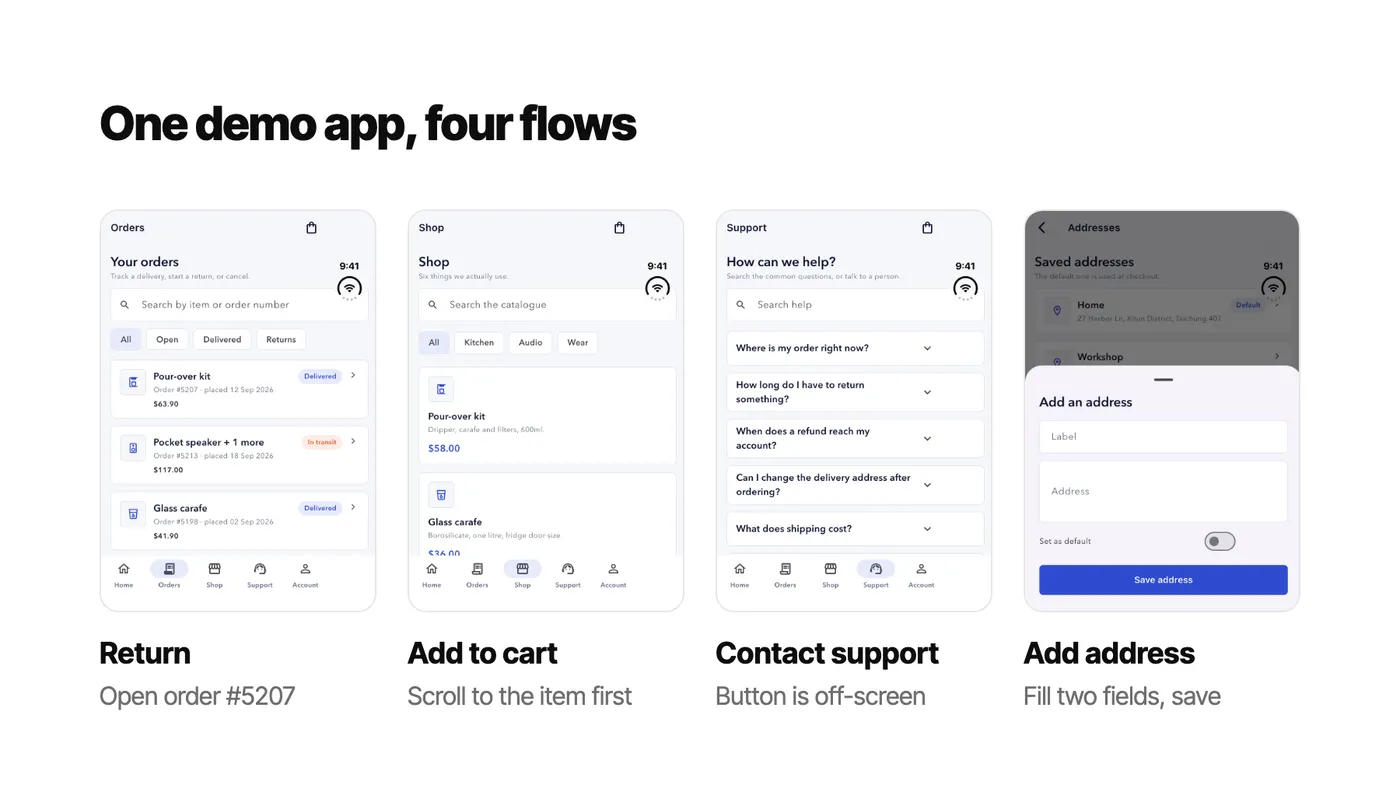
It is the same demo app as last time, Boxtide, with thirteen screens and the same four flows: return, add to cart, contact support and add address. Everything ran on an iPhone 17e simulator (iOS 26.5), with Patrol 4.10 and e2e 0.19.0. The e2e-with-Jev group was rerun in November with e2e 0.23.0 in a different environment, which I will come back to later.
If you have not read the previous article, here is what Boxtide looks like. All four flows start by signing in, and these are the four screens they head to afterwards:
Judging also follows the previous article. I ignore what the test framework or the agent reports and read the app’s store directly. Patrol tests run inside the app, so they can check it directly. e2e drives the app from outside, so at the end of every test I separately read the app’s state through Dart’s VM service, recorded it, and compared it with e2e’s verdict afterwards.
The UI change uses the same switch as last time. Give it a number (a seed) and the app produces a fixed set of changes, renaming some widget keys and swapping a few button labels. The difference is that both frameworks launch the app themselves, so there is no chance to flip the switch after launch. This time the change is compiled in at build time with --dart-define=CHAOS_SEED=4:
// Tools that launch the app themselves (e2e, Patrol) cannot call an extension
// before the first screen, so the changes can also be compiled in at build time
const seed = int.fromEnvironment('CHAOS_SEED');
if (seed != 0) Store.instance.setChaos(seed);
Patrol: the fastest, and the most direct#
Patrol tests read a lot like Flutter widget tests: $(#nav_orders) finds an element by its Key. Here is the return flow. The last line checks the order’s status in the store directly, with no guessing from the screen:
patrolTest('return-flow', ($) async {
  await _signIn($);
  await $(#nav_orders).tap();
  await $(#order_5207).tap();
  await $(#start_return_button).tap();
  await $(#return_next_button).tap();
  await $(#return_next_button).tap();
  await $(#return_confirm).tap();
  await $(#return_next_button).tap();
  // The test runs inside the app, so ask the store whether this order is being returned
  expect(Store.instance.orderById('5207').status, OrderStatus.returning);
});
Next to the screens, each line of the script taps the element boxed below:
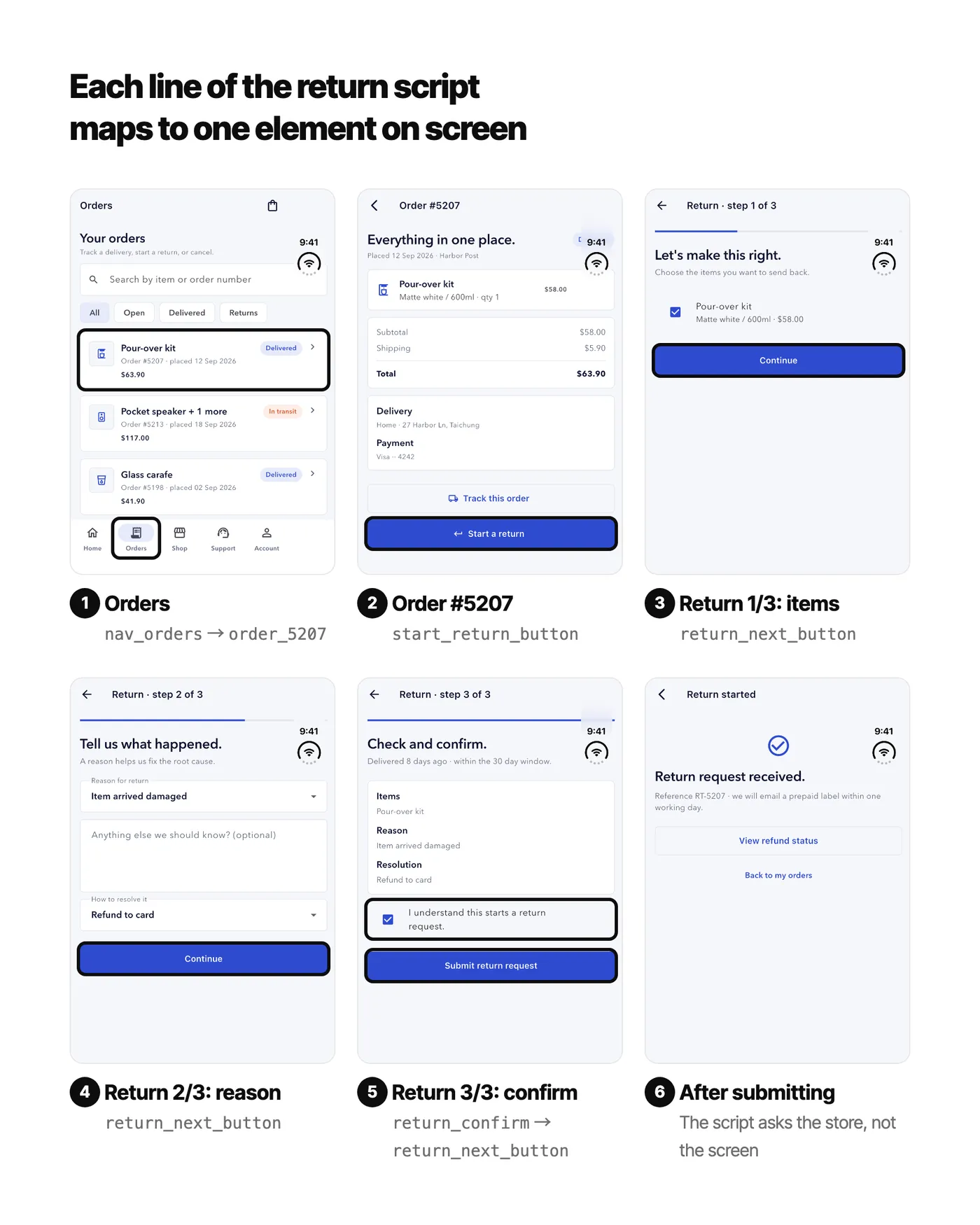
On the normal build all four flows passed, with the test itself taking 5 to 7 seconds. The whole run including the build took 2 minutes 52 seconds. The build was 51 seconds, and of the 103 seconds spent running tests, the tests themselves added up to only 22 seconds. The rest was launching and tearing down, so in practice each test takes about 26 seconds. The very first run was actually 3/4. Add to cart failed because the item was off-screen and had to be scrolled to with scrollTo() before it could be tapped. As in the previous article, scripts are fast only on the condition that the script itself is right.
After the UI change (seed 4) it was 3/4, because the return flow could not find nav_orders right at the start. The other three passed because the demo app only renames keys used by the return flow and leaves the other flows’ keys alone, so this does not mean three scripts survived the change. In the previous article, the hand-written scripts that went 0/12 also failed only on the return flow.
Most of the setup cost is on iOS. Besides adding the dev dependency, you need a new RunnerUITests target, two build phases, a nested target in the Podfile, and parallel execution and the script sandbox turned off. I followed the official example and wrote all of this as an xcodeproj script (demo_app/ios/add_patrol_target.rb), and never opened Xcode. If your project already has many targets or custom build settings, I would set aside some time for this part.
e2e with an LLM: it can get through a UI change, but it is slow and can pass falsely#
e2e tests are written in TypeScript. I gave each flow to the agent as a one-sentence goal, followed by a check the agent cannot talk its way past:
test('support-flow', async ({ app, agent, screen }) => {
  await app.open();
  await agent.act('Sign in with email {email} and password {password}', { params: signIn });
  // On iOS, Flutter's tab is called "Orders\nTab 2 of 5", so match a pattern
  await expect(screen.getByRole('button', /^Orders/)).toBeVisible();
  await agent.act('Contact support about order {order} with the message {message}', {
    params: { order: '5213', message: 'My parcel has not moved in four days.' },
  });
  // From outside, we can only check what is visible on screen
  await expect(screen.getByText('Message sent').first()).toBeVisible();
});
The agent uses gemini-3.1-flash-lite, the same model that did the writing in the previous article. I put Patrol’s two runs in for comparison, with time and cost converted to per test. Each dot is one test: solid means the app really finished, red means a false pass:
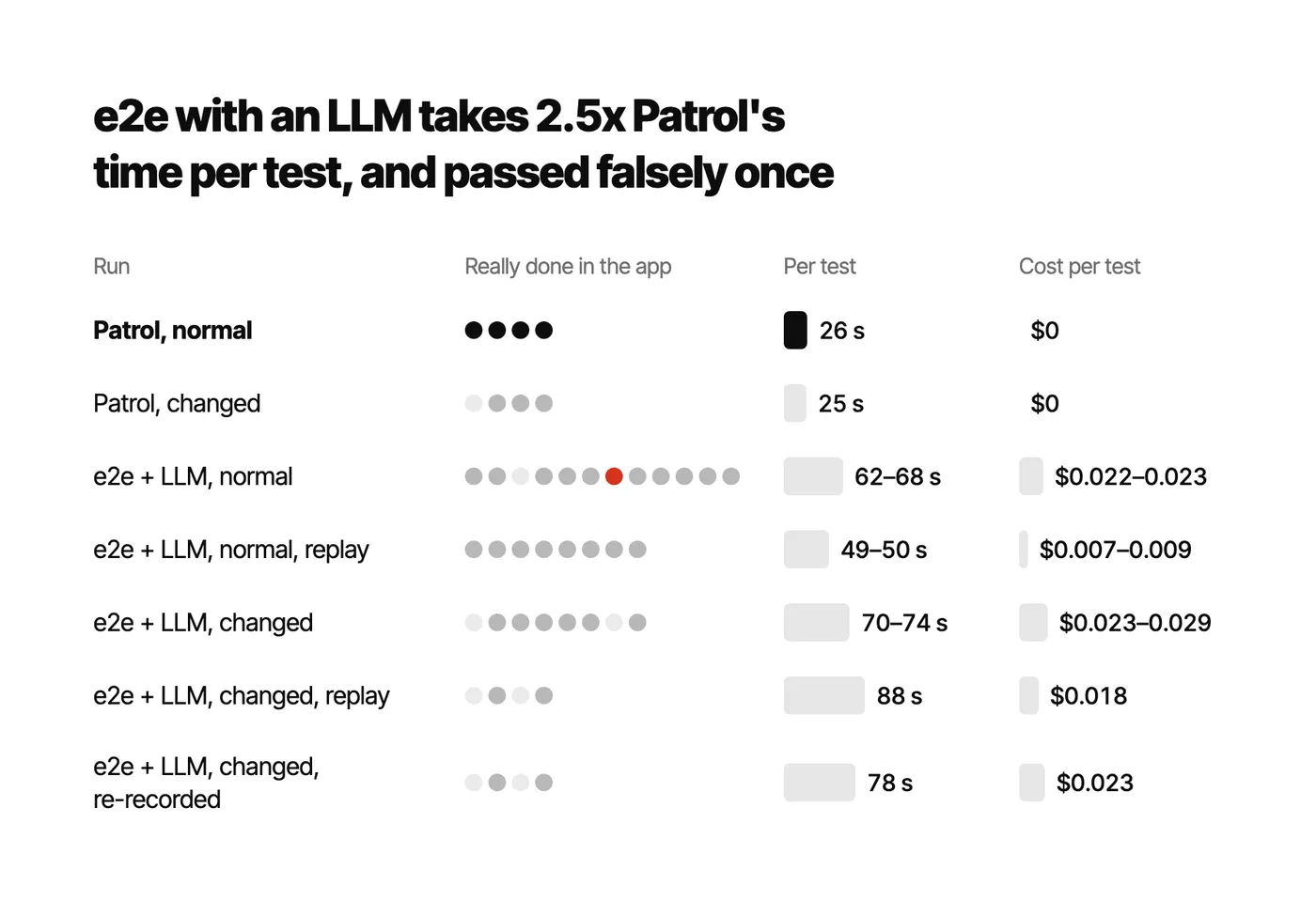
Let’s start with the good part. The agent looks at the current screen, so it still finds things after the UI renames them. Apart from the sign-in button text, this UI change only really touched the return flow. The sign-in button changed from “Sign in” to “Log in”, and all 16 tests after the change still signed in. Of the two uncached runs of the return flow, one finished by itself, while the same flow in Patrol simply went red. That is something hand-written scripts cannot do. But there were only two runs, the other one did not finish, and both replay runs failed too, so I see it as having a chance to survive a UI change, not as something to rely on yet.
Next, the parts to watch out for. I will go through three.
First, speed. Each test took 62 to 68 seconds. With the same whole-run-divided-by-tests calculation, Patrol is about 26 seconds per test, roughly a 2.5x difference, and against Patrol’s 5 to 7 seconds for the test alone the gap grows further. Replay was designed to fix exactly this, and model calls did drop from 48 to 17–23, yet time only went from 62–68 seconds to 49–50. I looked through the log of every step. The task part always replayed successfully, and what failed every time was sign-in. When the replay typed into Flutter’s password field, XCTest reported a failure and the runner’s session became invalid, so it had to go back to the agent and do it again. After the UI change both replay modes were 2/4, worse than letting the agent run directly, and I have not taken that apart yet.
Second, a false pass. Once, a support ticket really was sent, but its order field was empty, and the test still passed because it only checked the “Message sent” heading. e2e looks at the app from outside, so all it can check is text on screen, and it cannot see what was actually stored in a field. If I had not read the store separately, this run would have counted as a success. In Patrol the same flow checks the store for a support ticket on order 5213, so this case goes straight to red.
Third, screen location. When I read e2e’s source earlier, I inferred that it cannot read Flutter’s screen titles, because it only recognizes iOS’s UINavigationBar, and Flutter’s AppBar is not one. The runs confirmed it: the screen location recorded for every step is just the bundle id dev.yii.boxtide. Replay mostly relies on matching controls, though, so the task part still replayed successfully, and the impact was smaller than I expected.
e2e with Jev: the same model only moves once the app reports more#
e2e has a decision executor that can plug Jev in as the deciding model and pair it with an LLM for writing, much like the previous article’s “let Jev pick, let the LLM write”. The setup is only a few lines:
jev: {
  executor: decisionExecutor({
    model: typeSafeAi.decisionModel('jev-latest'),
    textModel: lite, // the same flash-lite, only for writing
  }),
},
First round: all 36 tests stopped at step one#
This was the group I was most looking forward to, and all 9 rounds, 36 tests in total, stopped at the first step with the same error: The decision model cannot make progress.
Digging in, I found the problem was not Jev. The decision executor decides which actions an element allows from its role: text boxes can be typed into, buttons can be tapped. But on iOS, XCTest sees every Flutter text field as type Other. To make sure it was not my code, I wrote a small app comparing six variants: no Semantics, Semantics(identifier:), that plus container, that plus textField: true, and the password field with and without a wrapper. All six were Other, and underneath is Flutter’s TextInputSemanticsObject. Other offers no typing, so Jev could not even sign in.
Then I tried a few workarounds:
- The locator’s
fillcan fill in the email, but filling the password field the first time invalidates XCTest’s runner session, and it only works the second time pressSequentiallyis rejected outright, because it only works on editable fields- Finally I hard-coded sign-in with locators and gave Jev only the return and cart flows, which need no typing. It tapped the Orders tab correctly, then stopped at the order list
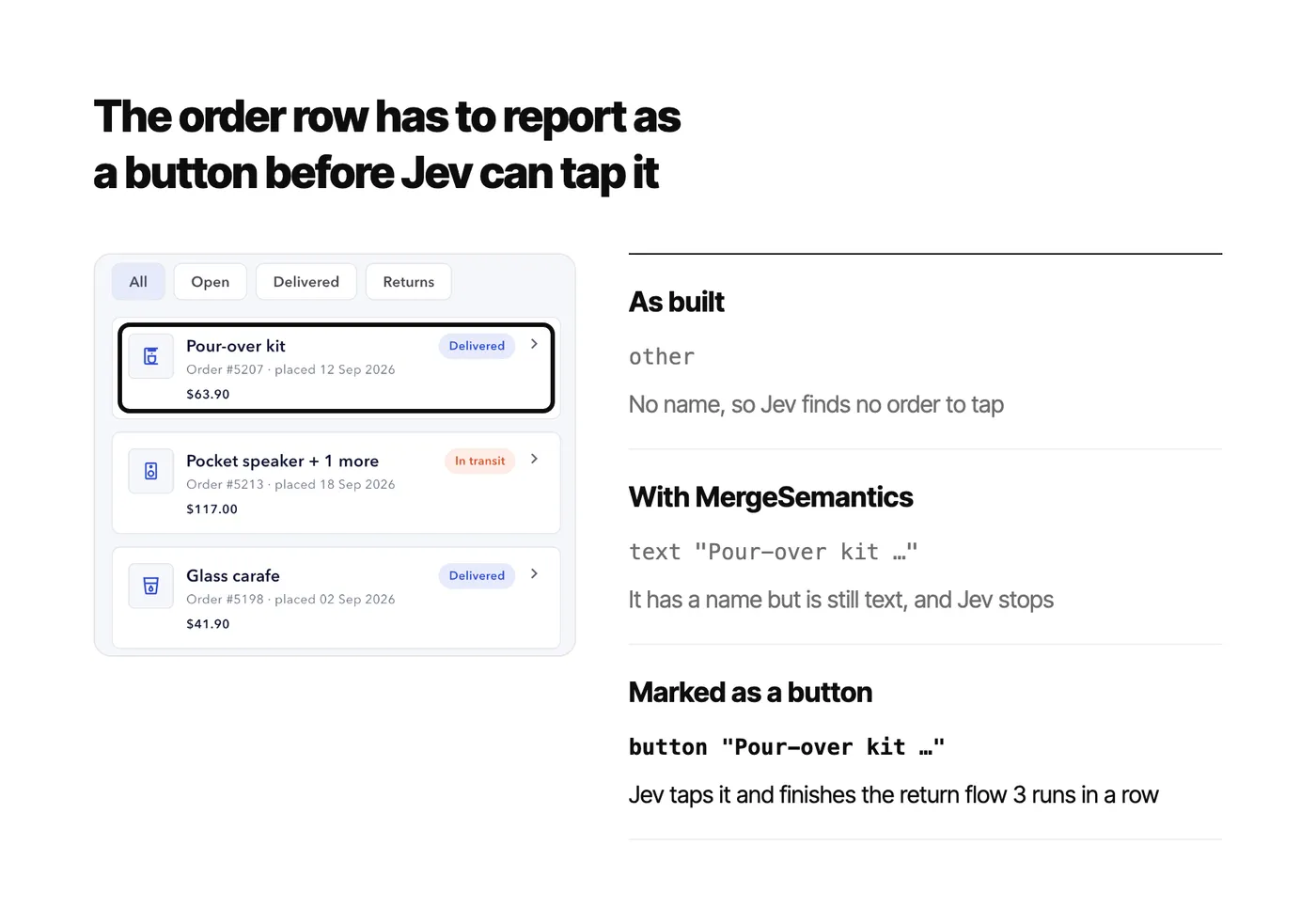
It stopped at the order list for the same reason. In the accessibility tree each order is an other with no name, carrying only testid="order_5213", while the order’s text sits in a separate node next to it. So none of the options Jev got showed which order it would be tapping.
Put the two side by side and it becomes clear. In the previous article the same Jev went 17/18 through marionette, but that was on the macOS desktop build. So on the same iOS simulator I reran the same six tasks three times each through marionette with the previous article’s runner, again with Jev picking and flash-lite writing. The result was 18/18, with options that had types and Keys. Through XCTest in the first round, it got a row of Other. The model was the same, and the difference was the options it was given.
The LLM group went 10/12 in the first round. It got through because it can decide by itself which node to type into, whatever the role, and after the first attempt invalidated the session, it saw that the screen had changed and typed again.
Rerunning with the new e2e#
After I wrote up the first round, e2e moved to 0.23.0, so in November I reran the e2e-with-Jev group. The original iOS 26.5 simulator had been removed by an Xcode update, so this round ran on an iOS 27.2 simulator, and its numbers are only compared with results from the same environment.
The good news first: the text field problem is fixed. On the same simulator, e2e 0.19 still read the email field as other, while 0.23 read it as textbox. So the fix came from e2e, and Jev finally had an option to type into.
The result was still 0/4, and this time it got stuck in two places:
- Password field → the first attempt to type always fails with
No focused text input, and filling it through a locator also only works the second time. The LLM types again when it fails, Jev does not, so it stops at sign-in - Order list → I hard-coded sign-in with a locator and left only the rest of the flow to Jev. It tapped the Orders tab with high confidence (probability 0.97) and then stopped, because in the accessibility tree the orders were still
otherwith no name, and it found nothing to tap
I also tried turning on vision once. With it on, Jev gets extra options to look at a screenshot and tap by coordinates, but it never chose them, and the result was still 0/4.
Changing the app side#
Since what was stuck was the information the app reports to iOS, I went back to the Flutter side. e2e’s docs suggest wrapping Flutter nodes in MergeSemantics so the id, text and role land on one node. I also found that InkWell only provides a tap action and does not report a button role, so on iOS a tappable list item looks like a piece of text. Both changes are only a few lines:
Widget identified(String id, Widget child) {
  // After merging, the id, text and role land on the same node
  return MergeSemantics(
    child: Semantics(identifier: id, container: true, child: child),
  );
}

// InkWell has a tap action but no button role, so tappable list items are marked as buttons
return onTap != null ? Semantics(button: true, child: card) : card;
I tested the two changes separately, with Jev’s setup and the tests untouched:
MergeSemanticsonly → buttons all got names and ids, and the order row became text with an id, but it was still not a button, and Jev stayed at 0/4- Also marking tappable list items as buttons → the return flow finished by itself three times in a row, and the store confirmed that order 5207 was being returned. Jev’s part took 11.6 to 11.8 seconds and 16 model calls each time, the whole test including sign-in took about 30 seconds, and the model cost for a round of four tests was $0.0024 to $0.0027
Looking at the three builds together makes it clearer. The screen is exactly the same, and the only difference is the node iOS gets:
The other three flows have not passed yet, and the reasons are all visible:
- Add to cart → the product card is a different widget that I did not mark as a button this time, so after entering the Shop tab Jev found no product to tap (in one of three runs, the check after sign-in had already failed)
- Contact support → after tapping the Support tab, the “Contact us” button reported empty bounds (
no usable bounds), and two taps in a row missed it - Add address → both fields were filled in and save was tapped, yet the screen stayed on the form, and then three attempts in a row to dismiss the keyboard failed
So in this round e2e with Jev passed one flow out of four, which is not yet good enough to use. But the process happens to show what this article is about. Jev’s setup and the tests never changed from start to finish. I only changed what the app reports to iOS, and Jev went from stopping at the order list to finishing the return flow.
There are two more things to note. First, in the same environment the LLM group was also only 1/4, and 2/4 with sign-in hard-coded, far below the first round’s 10/12. The old simulator is gone, so I cannot tell whether that came from the new e2e, from iOS 27.2 or from the simulator model, so please do not compare the two rounds’ numbers directly. Second, these results only hold on iOS for now. Flutter text fields are EditText on Android, so e2e with Jev may behave differently there. The demo app has no Android platform this time, so I have not tested it.
Where AI goes: checks during development, and repair when Patrol breaks#
So AI agents stay out of the gating tests. A script knows the answer to every step, so as long as it is correct, it will always be faster than an agent and will never pass falsely. I put AI in two places that never block anything. Both drive the app through marionette, with Jev picking every step:
- Checks during development → after a coding agent changes code, it taps through the flow itself, with Jev picking and flash-lite writing. On the iOS simulator that was 18/18, with a median of 8.3 seconds and about $0.001 per run
- Repairing Patrol → when a renamed key turns Patrol red, AI walks the same flow, finds the new key, and proposes a fix for a person to review
The first one was already measured above, and the second one is new this time. Normally when Patrol goes red because of a rename, someone has to open the app, find the new name, and go back to fix the test. I wrote runner/repair.py to turn that into a proposal. It works like this:
- On the changed debug build, let Jev walk the same task through marionette, using a hand-written value table wherever it needs to type
- Collect the keys it actually used
- Match them against the keys in the script to produce an “old key → new key” mapping, and separately list actions the script does not have
- A person reviews it, then applies it to the Patrol test
One thing to watch: marionette and Patrol cannot live in the same build. MarionetteBinding conflicts with Patrol’s binding, since a process can only have one binding, so repair mode runs on a separate debug build that includes MarionetteBinding.
Here is the proposal for the return flow:
"mapping": {
  "nav_orders": "nav_orders_v14",
  "start_return_button": "start_return_button_v14",
  "return_next_button": "return_next_button_v14"
},
"extra": ["scroll", "return_notes_field"]
Jev completed the task, and the store confirmed that order 5207 was being returned: 14 steps, 20 model calls, 12.5 seconds, $0.00097. It actually used all three keys that had been renamed in the script, and every mapping it produced was correct. The matching is done by name prefix, though, and this demo app renames keys by adding a suffix, so anything Jev used is guaranteed to match. In a real project where a name is replaced completely, a person would have to map it back from extra.
Applying the fix was actually where I made more mistakes. The first time I only swapped the keys and ignored scroll in extra, and the test was still red, because order_5207 was off-screen. After adding scrollTo() it went red again. Patrol’s scrollTo() scrolls the first Scrollable on screen by default, and the first one on this page is the row of filter chips at the top. After pointing it at the order list, the test went green in 6 seconds:
// From the proposal's extra: Jev scrolled here. The first Scrollable on this page
// is the filter chips, so point at the order list
await $(#order_5207).scrollTo(view: find.byType(Scrollable).last).tap();
await $(#start_return_button_v14).tap();
The fixed test took three runs to go green, and both failures were details I missed while applying it. Jev’s proposal itself was right. So I treat it as “open a fix PR for a person to review” and do not let it change tests automatically. The extra in the proposal is worth reading too, since it is often exactly the step the script is missing.
What each tool is good for#
Putting the measurements together, the situations each tool suits are actually quite clearly separated:
| Tool | Good for | Not good for | Measured speed and cost |
|---|---|---|---|
| Patrol | Gating every PR and release, flows that tap system permission dialogs or notifications, tests that check app data directly | New flows nobody has scripted yet, and screens where the UI changes a lot and scripts keep needing fixes | 5 to 7 seconds per test for the test itself, about 26 seconds per test across a run, no model cost |
| marionette with Jev | Letting a coding agent tap through after it changes code, and finding the new key when a rename turns Patrol red | CI gates that block (debug / profile builds only, and LeanCode itself advises against it), and flows that need system dialogs | 18/18, about 8.3 seconds and $0.001 per run |
| e2e with an LLM | Apps where you only have the installable build and no source, smoke tests on the release build, and letting an agent explore freely in Nightly | Gates that block merges (slow, and it can pass falsely), and flows that need to check data inside the app | 49 to 68 seconds per test on the normal build, $0.007 to $0.023 |
What the three are good at barely overlaps, so next I put them into one pipeline, each in charge of a different stage.
Putting it into one pipeline#
Tests that can block a merge or a release must be deterministic, for two reasons. The first is probability. Even if each flow is 98% reliable, the chance that 50 flows all go green is only 0.98^50, about 36%. The second is that an agent’s own report cannot be trusted. In the previous article flash-lite reported success on wrong data 6 times out of 18, and this time e2e also passed falsely once. So gating goes to Patrol, judged by what the app actually stored, and agents help on the side.
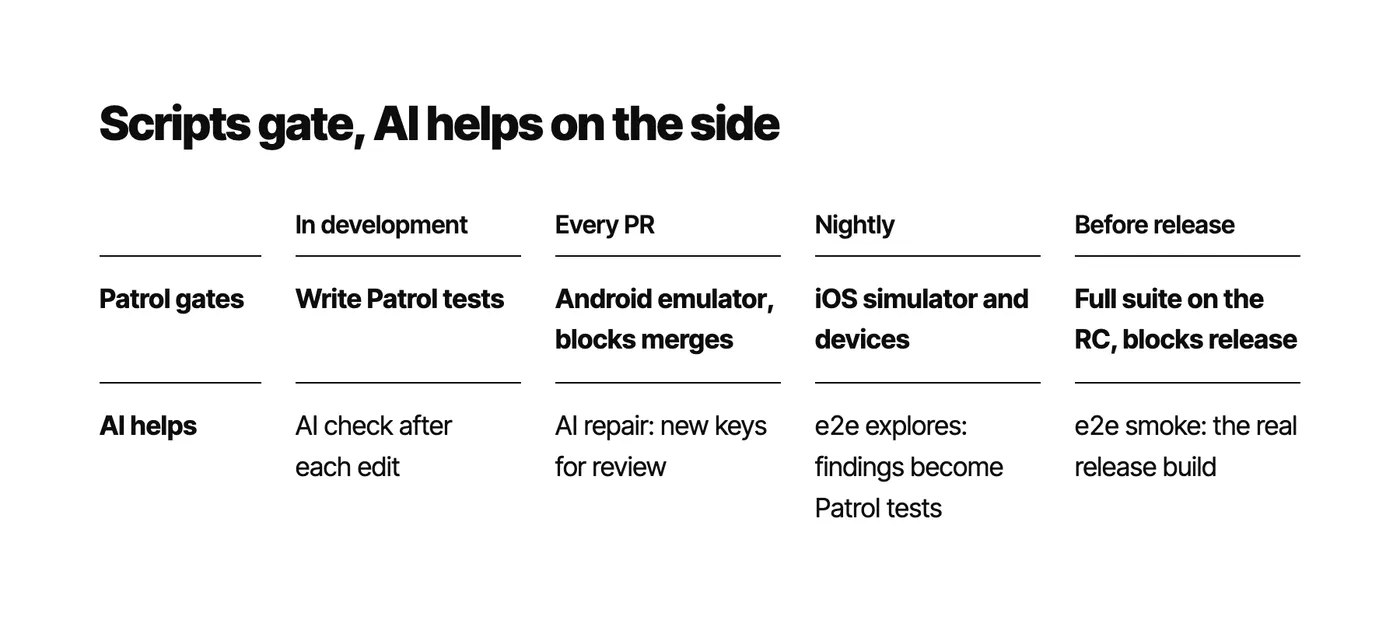
By stage of development, this is how I would arrange it. The top row is Patrol, which blocks, and the bottom row is AI help, which does not:
Two terms are worth a quick explanation:
- Nightly → CI runs once every night on a schedule, separate from the checks on each PR. It suits slower, more expensive tests such as iOS builds and real devices
- RC (Release Candidate) → the version about to ship. Once it is cut, only bugs get fixed, and when the tests pass, that same build goes to the store
Release needs two checks because they look at different things. Patrol reruns on the RC and confirms that the features are right, but it runs a build it packaged itself, with the test code inside. Some problems only show up in the build you actually upload, such as R8 / ProGuard obfuscation, --obfuscate, production --dart-define values, signing and entitlements. e2e drives the real release build from outside, which covers exactly that.
This split also needs a shared foundation. Keep all keys in one file shared by the app and the tests, and give key elements a Semantics(identifier:) with the same value. Patrol and marionette read Keys, e2e reads identifiers, both sides use the same name, and a rename only needs one change. If you plan to connect AI to a tool like e2e that drives the app from the OS layer, add two more things: wrap with MergeSemantics, and add Semantics(button: true) to tappable list items. Flutter’s docs also note that once something is marked as a button, VoiceOver tells the user it is a button, so these two changes help accessibility itself too.
Things to know before adopting#
Finally, here are a few things I ran into this time that are worth knowing up front:
- marionette only runs on debug and profile builds, and
MarionetteBindingconflicts with the bindings of Patrol and integration_test, and with Sentry’s own binding if your project already uses one. I suggest preparing an entry point just for development - Patrol’s iOS setup has quite a few steps. I suggest scripting it, so it is easier to redo when you add a target or upgrade
- e2e with Jev is not ready for Flutter iOS as it is. The new e2e can read text fields, but the first attempt to type into a password field fails and Jev does not retry, and tappable list items need a button role added in the app before Jev can see them. With that added, one of the four flows passed. e2e with an LLM is usable, but you need to check the app’s data separately instead of trusting the screen
- e2e’s docs say that with
visionon, the decision executor can locate and tap controls missing from the tree using a screenshot. I tried it on the rerun, Jev never chose to tap by screenshot, and the result was the same as with it off, so for now it cannot make up for what Flutter fails to report - Repair mode has only run once, on the return flow with seed 4, using Jev plus a hand-written value table. In the previous article the same setup went 0/3 on seeds 7 and 91, which change the email field, because the value table could not find values under the old keys. The combination with flash-lite doing the writing went 3/3 on those two seeds, so I suggest switching to it before using this for real
- e2e only ran debug builds this time, and smoke tests on a release build have not been measured yet. A release build also has no VM service, so you cannot read the store to judge it the way I did here, only the screen, which makes false passes even more of a concern
- The scope this time is one app, the iOS simulator, and two to three runs per setup. The marionette group was added later, after an Xcode update had moved the simulator to iOS 27.0, and the e2e-with-Jev rerun was on iOS 27.2 with one to three runs per change. There is no Android, and none of this has run on a real product yet. If you want to use these numbers to convince your team, I suggest running a round on your own app first
Conclusion#
After giving the same app and the same four flows to three tools, the clearest lesson is that the layer a tool hooks into decides what it can see and whether it can check the app’s data directly, and it also decides which options the AI gets. A model like Jev, which only picks from options, is affected the most. The e2e-with-Jev rerun shows it too: the model did not change, the app reported one more thing, the button role, and Jev went from stopping at the order list to finishing the return flow. To make Flutter tests more complete, my approach is that scripts gate and AI helps on the side. Patrol blocks merges and releases, AI checks its own work through marionette during development and proposes fixes when Patrol breaks, and e2e handles exploration and smoke tests on the release build.
All the code is in flutter-jev. The Patrol tests are in demo_app/patrol_test/, the e2e project is in e2e/, repair mode is runner/repair.py, and the full numbers are under Project H in results/REPORT.md.

My next step is to add button roles to the product cards and the support page as well, and see whether the remaining three flows can finish. Then I will run a round on Android, where Flutter text fields are EditText, so e2e with Jev may well behave differently. After that I want to turn AI checks and repair into two commands that can go straight into CI. If you use Patrol or e2e, I would love to hear how you do it in the comments.
References#
- Your widget tree is already a list of options: where Jev fits in a Flutter project (previous article)yiichenhi.com
- flutter-jev (code for this article)github.com
- Patrolpatrol.leancode.co
- marionette_mcpgithub.com
- e2e (TesterArmy)e2e.com
- e2e docs: Mobile (the MergeSemantics advice for Flutter)e2e.com
Show all sources (2 more)Show fewer
- e2e sourcegithub.com
- TypeSafe: Introducing System One models and Jevtypesafe.ai